Epson TW650 Projector Distance Calculator: Throw Chart
Accurate projection math ensures razor-sharp 1080p images. Learn how to calculate throw distance for your Epson TW650 home setup.
The Epson EH-TW650 features a 1.02 to 1.22 throw ratio with a 1.2x optical zoom lens, requiring precise placement for a crisp 100-inch diagonal screen.
Ready to compare verified models? Start with our Best Throw Projector: Top Home & Outdoor Picks (2026).
Epson TW650 Distance and Screen Size Reference
| Screen Diagonal | Minimum Throw Distance | Maximum Throw Distance | Recommended Aspect Ratio |
|---|---|---|---|
| 80 inches | 2.17 meters | 2.61 meters | 16:9 widescreen |
| 100 inches | 2.72 meters | 3.27 meters | 16:9 widescreen |
| 120 inches | 3.27 meters | 3.93 meters | 16:9 widescreen |
| 150 inches | 4.10 meters | 4.92 meters | 16:9 widescreen |
| 60 inches | 1.62 meters | 1.95 meters | 16:9 widescreen |
| 200 inches | 5.47 meters | 6.57 meters | 16:9 widescreen |
| 90 inches | 2.44 meters | 2.94 meters | 16:9 widescreen |
Decoding the Optical Specifications of the Epson EH-TW650
The Epson EH-TW650 relies on a robust 3LCD projection engine to deliver vibrant color brightness without the distracting rainbow artifacts often found in traditional single-chip digital mirror alternatives.
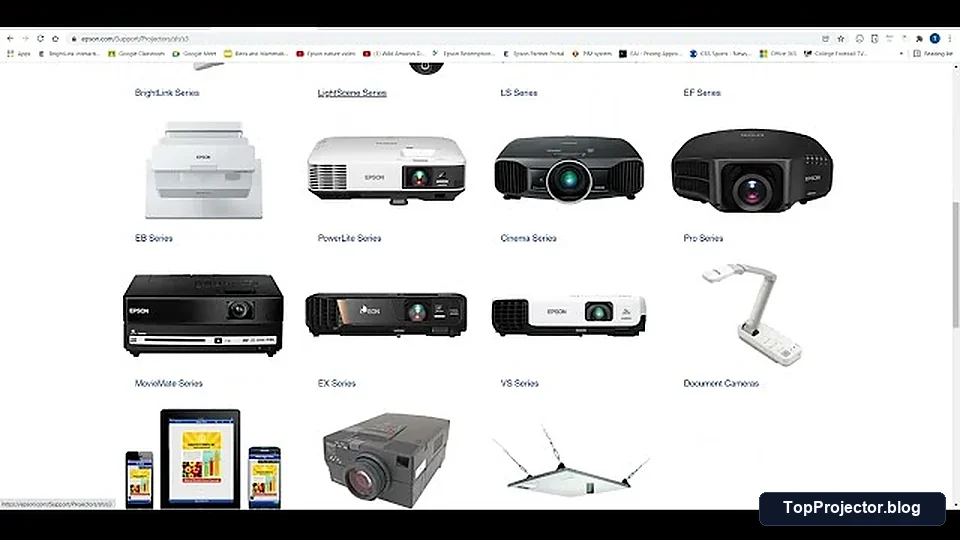
Understanding your hardware optics starts with the native lens assembly. This model incorporates a manual 1.2x zoom lens that provides moderate flexibility when mounting your chassis on ceilings or tabletop stands.
Light output reaches an impressive 3100 ANSI lumens, allowing the device to maintain acceptable contrast levels even when ambient light leaks into standard multipurpose living room environments during daytime hours.
- Native display resolution is 1920x1080 Full HD for crisp media playback.
- Contrast ratio sits at 15,000:1 for respectable dark scene separation.
- Lamp life extends up to 7,500 hours when running in designated Eco mode.
- Throw ratio spans from 1.02 to 1.22 across the manual optical zoom range.
Understanding Lens Shift Limitations
Unlike home theater units tested in our XGIMI Horizon Pro review, this model lacks physical lens shift, forcing you to rely entirely on fixed vertical offset or digital keystone adjustments.
Careful physical alignment is mandatory during initial installation to prevent geometric distortion and maintain pixel-perfect sharpness across your entire projection surface.
- Physical vertical offset is fixed at roughly 6.5 to 1 above optical center.
- Avoid excessive keystone correction to preserve native panel resolution.
Computing EH-TW650 Throw Ratio and Image Scale Geometry
When planning a fixed room setup or choosing our best 4k portable projectors, calculating exact lens-to-screen distance requires applying simple math based on manufacturer throw ratio metrics.
Multiply your desired screen width by the minimum throw ratio of 1.02 to find the closest possible mounting position without cutting off the outer image edges.
Conversely, multiplying that same width by the maximum ratio of 1.22 reveals the furthest distance your optical zoom can stretch before losing focus or brightness intensity.
- Measure from the front glass lens element, not the back chassis wall.
- Account for drywall brackets and cable bend radius during pre-planning phases.
- Always verify diagonal measurements with a physical tape measure before drilling.
- Leave a 5-centimeter safety margin on all sides of your screen border.
Calculating for a Standard 100-Inch Display
A standard 100-inch 16:9 screen measures approximately 221 centimeters wide by 124 centimeters tall in total active display surface area.
Applying the TW650 optics means placing your lens between 2.25 meters and 2.70 meters away for a perfectly filled, distortion-free cinematic canvas.
- Screen width: 221 cm for standard 16:9 widescreen formats.
- Minimum throw: 2.25 meters using maximum wide-angle zoom settings.
- Maximum throw: 2.70 meters using full telephoto optical zoom.
Video Walkthrough: Epson Throw Distance Calculator for Standard Projectors
Leveraging Official Epson Projection Calculator Tools
Epson provides dedicated online distance calculators designed to eliminate guesswork when planning permanent ceiling installations or portable tabletop projection setups in challenging spaces.
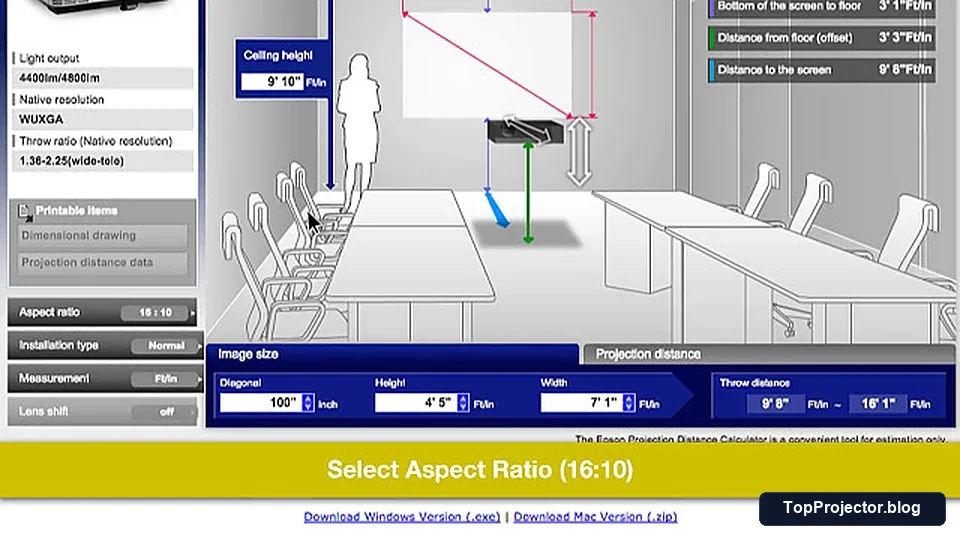
Using our screen size and viewing distance calculator, inputting your model name and desired diagonal instantly generates precise mounting heights, optical offsets, and strict throw boundaries.
These digital utilities account for lens offset percentages automatically, ensuring you never drill holes into your ceiling joists before confirming exact optical placement requirements.
- Select the correct regional model variant such as the EH-TW650.
- Input exact ceiling height to calculate precise vertical drop rod lengths.
- Check interactive room simulation views for furniture clearance warnings.
- Export your configuration summary as a reference guide for installation.
Interpreting Calculator Output Metrics
The calculator output displays a side elevation diagram showing the lens center line relative to the top or bottom edge of your projection screen surface.
Pay close attention to the vertical image offset metric to avoid mounting the projector too high or too low for comfortable eye-level viewing.
- Look for the lens-to-screen clearance dimension in millimeters.
- Verify table mount height versus projected image bottom frame border.
Balancing Ambient Light and Screen Gain in Living Rooms
Living rooms rarely feature blackout curtains, making ambient light management crucial alongside throw distance metrics detailed in our Epson projector distance guide for optimal setup results.
Pairing your 3100-lumen projector with a high-contrast grey screen or an ambient light rejecting material helps preserve black levels during daytime viewing sessions.
Higher screen gain multiplies reflected light back toward the audience but introduces narrow viewing angles that can wash out side-seated viewers in wider rooms.
- Choose 1.0 to 1.3 gain for balanced white and black uniformity.
- Block direct sunlight using heavy thermal drapes or exterior window blinds.
- Paint surrounding walls matte dark colors to minimize disruptive light scatter.
- Turn off nearby recessed ceiling cans during critical movie watching hours.
Optimizing Lamp Power Modes
Switching between Normal and Eco lamp modes alters both acoustic fan noise and light output, directly impacting your perceived image brightness in darkened rooms.
Eco mode drops lumen output by roughly 30 percent while significantly extending lamp longevity and lowering cooling fan decibel levels for quiet scenes.
- Use Normal mode for daytime sports and ambient living room lighting.
- Switch to Eco mode for dedicated nighttime movie viewing sessions.
Video Walkthrough: How to Choose a Projector: Throw Ratio Explained
Avoiding Digital Keystone Distortion Through Proper Placement
Digital keystone correction algorithms reshape your video signal digitally, which introduces visible pixel scaling artifacts and reduces native 1080p resolution clarity.
Always prioritize physical alignment over digital adjustments by aligning the lens center directly with the horizontal and vertical center of your projection screen.
If your mount must be offset due to ceiling obstruction studs, keep digital keystone adjustments below 5 degrees to preserve optimal image sharpness.
- Level your ceiling mount bracket using a bubble spirit tool.
- Center the lens horizontally to eliminate side-angle trapezoid distortion.
- Test grid test patterns before tightening final mechanical mounting bolts.
- Disable auto-keystone features if your physical setup remains permanently fixed.
Managing Input Lag and Refresh Rates for Entertainment
While home theater enthusiasts prioritize color accuracy, gamers must also evaluate input latency and refresh rate capabilities when positioning their display hardware.
The Epson EH-TW650 delivers responsive gaming performance by minimizing internal image processing pipelines when running in dedicated Fast Mode configurations.
Pairing high frame rate consoles or gaming PCs requires verifying your HDMI cable bandwidth to support full 1080p at 60Hz without signal dropout.
- Enable Game Mode in the advanced picture settings menu.
- Keep HDMI cable runs under 15 meters unless using active fiber optics.
- Check audio sync settings to compensate for Bluetooth audio latency.
- Ensure your source device outputs native 1920x1080 resolution.
Frequently Asked Questions
What is the throw ratio of the Epson EH-TW650 projector?
The Epson EH-TW650 features a throw ratio ranging from 1.02 to 1.22. This optical design allows you to project a large widescreen image from relatively short distances.
Can I use digital keystone correction without losing image quality?
Heavy digital keystone correction scales your pixels and reduces native sharpness. You should always prioritize physical lens alignment and keep digital adjustments below 5 degrees.
How far away should I mount the projector for a 100-inch screen?
For a standard 100-inch 16:9 screen, you must place the lens between 2.25 meters and 2.70 meters away depending on your optical zoom setting.
Does the Epson TW650 feature physical lens shift controls?
No, this model lacks mechanical lens shift. You must rely on its fixed vertical offset and precise physical mounting placement to align the picture.
What is the native brightness of this projector model?
The projector delivers a robust 3100 ANSI lumens of color and white brightness, making it suitable for rooms with controlled ambient light.