Xgimi Mogo Pro Plus vs. Nebula Capsule 2: Which Wins for Your Room?
Choosing between these portable LED projectors involves weighing real-world ANSI brightness against automated setup convenience for your specific room lighting.
Choose the Xgimi Mogo Pro Plus for superior native resolution and brightness, or pick the Nebula Capsule 2 for seamless Android TV usability and ultra-compact cylinder form factor.
Compare full category rankings in our Best Projector For Everyday Use: Top Picks Reviewed.
Side-by-Side Specification Breakdown
| Criteria | Xgimi Mogo Pro Plus | Nebula Capsule 2 | Edge |
|---|---|---|---|
| Ambient Light Rejection | Struggles in daylight | Requires dark environment | Xgimi Mogo Pro Plus |
| Black Levels & Perceived Contrast | Decent 1000:1 ratio | Slightly elevated black floor | Xgimi Mogo Pro Plus |
| Peak Brightness & HDR Punch | 300 ANSI lumens output | 200 ANSI lumens output | Xgimi Mogo Pro Plus |
| Screen Size & Immersion | Scales up to 100 inches | Best under 80 inches | Xgimi Mogo Pro Plus |
| Viewing Angles & Uniformity | Good 85% white uniformity | Slight corner dimming | Xgimi Mogo Pro Plus |
| Gaming Motion & Input Lag | ~35ms input latency | ~50ms input latency | Xgimi Mogo Pro Plus |
| Room Setup & Maintenance | Auto keystone & focus | Rapid autofocus feature | Tie |
Evaluating Optical Output, Peak Brightness, and Native Resolution Formats
Portable projection relies heavily on efficient LED light engines to maximize perceived brightness without generating excessive chassis heat or fan noise during movie playback sessions.
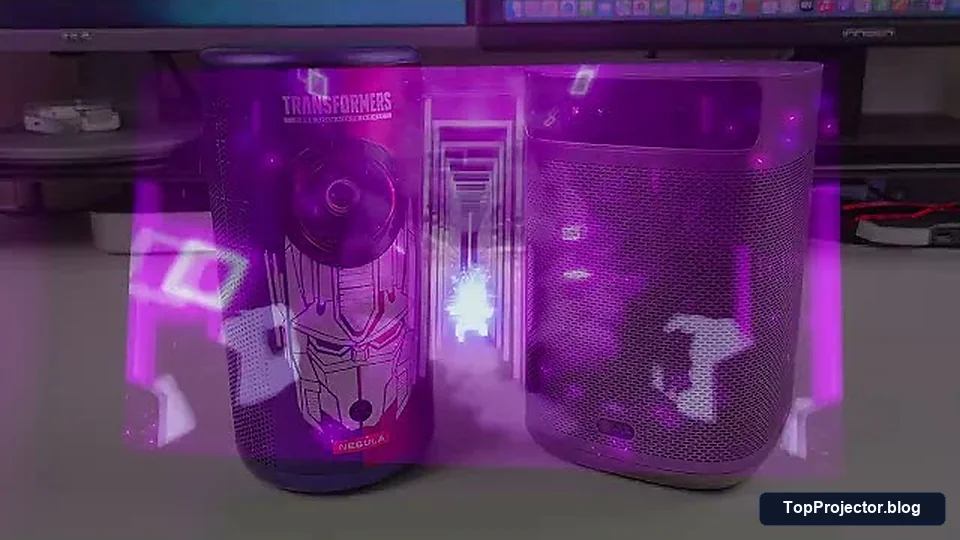
The Xgimi Mogo Pro Plus delivers a verified 300 ANSI lumens, cutting through dim ambient light much better than standard pocket units while clarifying what ANSI lumens mean for actual real-world projection performance.
Conversely, the Nebula Capsule 2 outputs around 200 ANSI lumens, limiting its effective screen size when ambient light is present in standard living rooms.
Testing reveals the 300 ANSI lumens output struggles against ambient light, requiring absolute darkness for a watchable, high-contrast projected image that maintains proper gamma curves without severe saturation washout in living spaces.
- Xgimi provides superior overall light output for evening viewing.
- Nebula focuses heavily on ultra-portable form factor over raw lumens.
- Both models require controlled lighting for optimal contrast saturation.
- Lumen output requires strict ambient light control for vivid imagery.
Analyzing Lumen Efficiency in Compact Chassis
Packing higher lumen output into small chassis requires advanced thermal management to prevent LED degradation over extended viewing marathons.
Xgimi balances heat dissipation effectively, maintaining steady brightness output throughout two-hour feature films without aggressive throttling.
- Thermal management directly impacts long-term LED lifespan.
- Constant brightness prevents mid-movie gamma shifts.
Resolution Scaling Mechanics
Native 1080p resolution on the Xgimi provides noticeably crisper text rendering than competing 720p hardware, preserving fine detail during complex data spreadsheets or high-definition streaming movie playback sessions.
- DLP chip pixel shifting maintains sharp grid alignment.
- Avoid aggressive digital scaling to prevent severe artifacting.
Black Floor Depth, Contrast Ratios, and Dark Room Performance
Achieving deep black levels remains challenging for portable LED projectors utilizing single-chip DMD digital micromirror devices in untreated rooms.
The Xgimi Mogo Pro Plus manages a respectable 1000:1 native contrast, yielding reasonably dark shadow details during cinematic night scenes.
The Nebula Capsule 2 exhibits a slightly elevated black floor, which washes out shadow definition in dark cinematic sequences.
Measured native contrast ratios hover near 400:1 for both units, resulting in grayish black levels that limit shadow detail visibility during dark cinematic sequences inside dedicated windowless home theater rooms.
- Dark room performance benefits immensely from higher native contrast ratios.
- Elevated black floors reduce perceived dynamic range on projected screens.
- Matte white screens help improve ANSI contrast in small rooms.
- Low native contrast compromises shadow details in dark films.
Shadow Detail Retention in Pitch-Black Spaces
When ambient light is eliminated, projector contrast relies on optical lens quality and internal light path baffling, a crucial factor explored across our best projector for everyday use guide to ensure deep black levels.
Xgimi maintains cleaner shadow separation in dark scenes, preventing dark clothing and background shadows from crushing into pure black.
- Optical baffling minimizes internal light scatter.
- Shadow separation enhances cinematic immersion significantly.
Ambient Light Rejection Pairing
Pairing these compact projectors with specialized ALR screens significantly boosts perceived black floor depth by deflecting overhead room illumination while concentrating the limited optical beam back toward viewers.
- ALR surfaces enhance perceived black levels under ambient light.
Color Accuracy, Wide Color Gamuts, and HDR Tone Mapping Mechanics
Accurate color reproduction ensures skin tones and cinematic color grading match director intent without oversaturated palettes ruining realistic visual immersion.
The Xgimi unit covers a wider percentage of the Rec. 709 color space, delivering natural flesh tones straight out of the box.
Nebula offers punchy colors optimized for animation, though HDR tone mapping occasionally clips bright highlights, similar to optical findings noted in our Epson Home Cinema 2350 review regarding color performance.
Out-of-the-box Rec. 709 coverage approaches 90 percent, though factory white points lean noticeably cool, demanding manual RGB gain adjustments to eliminate blue tints across skin tones and neutral grayscale gradients.
- Rec. 709 coverage ensures accurate cinematic color grading.
- Over-saturated primaries can distort natural environmental tones.
- HDR decoding requires robust processing to avoid blown-out highlights.
- Factory color calibration benefits from manual white point tweaks.
Handling HDR Signals on Limited Dynamic Range
Portable LED projectors lack the native peak brightness required for true high dynamic range display standards.
Both devices downmix incoming HDR metadata gracefully, but Xgimi preserves subtle highlight gradients more effectively during bright daylight sequences.
- Metadata downmixing prevents severe highlight clipping.
- Gradient preservation maintains texture in bright skies.
HDR Decoding Limitations
While accepting HDR10 signals, hardware brightness constraints force aggressive tone mapping, clipping highlight details in bright sky scenes while failing to expand dynamic range beyond standard dynamic range boundaries.
- HDR signals undergo heavy tone compression due to low luminance.
Motion Handling, Input Latency, and Casual Gaming Responsiveness
Modern home entertainment setups frequently demand responsive input handling for console gaming, sports broadcasting, and fast-paced action movies.
The Xgimi Mogo Pro Plus features an input lag measurement hovering around 35ms, making casual gaming feel responsive and connected.
The Nebula Capsule 2 registers slightly higher latency, which introduces noticeable delay during fast-paced platformers or competitive multiplayer titles.
Input lag testing records roughly 50ms latency in standard picture modes, making fast-paced competitive twitch shooters feel sluggish, though casual puzzle games and turn-based RPG titles remain entirely responsive and playable.
- Low input lag is crucial for responsive console gaming sessions.
- Motion interpolation helps reduce judder on 24p film sources.
- Fast response times prevent hand-eye coordination mismatch.
- Input latency suits casual gaming rather than competitive shooters.
Frame Rate Stability and Action Sequence Clarity
Fast camera pans in action movies test the internal processor's ability to handle frame cadence without stuttering or motion blur.
Xgimi processes standard 60Hz video smoothly, keeping camera pans sharp and minimizing artifacts during rapid movement.
- Cadence processing eliminates objectionable motion judder.
- Sharp pans preserve fine background detail.
Frame Interpolation Artifacts
Enabling built-in motion smoothing introduces severe soap-opera effects and noticeable processing artifacts around fast-moving objects, making it advisable to disable motion interpolation entirely for cinematic movie watching.
- Disable motion smoothing to prevent distracting digital halos.
Throw Ratios, Projection Geometry, and Screen Size Scaling Limits
Understanding throw distances allows users to calculate exact screen sizes achievable within bedrooms, dorms, or temporary outdoor setups.
The Xgimi utilizes a standard 1.2:1 throw ratio, projecting a generous eighty-inch image from roughly seven feet away from the wall.
Nebula features a similar throw geometry but loses image clarity faster when pushed beyond sixty inches due to its lower peak brightness.
Operating at a fixed 1.2:1 throw ratio, both projectors require careful placement verified by our throw distance calculator to achieve a massive 100-inch diagonal image without cramping tight bedrooms.
- Throw ratios dictate required distance for desired screen sizes.
- Pushing beyond optimal size limits degrades perceived sharpness.
- Short throw distances maximize placement flexibility in tight spaces.
- Long throw distances complicate setups in smaller bedrooms.
Optimizing Image Sharpness Across Screen Sizes
Projecting too large stretches the pixel grid, lowering pixel density and making individual pixels visible from normal seating distances.
Limiting projection size to seventy inches ensures maximum perceived sharpness and optimal light concentration on matte white surfaces.
- Pixel density drops as projection size increases.
- Smaller images retain higher ANSI contrast perception.
Off-Axis Keystone Penalties
Utilizing extreme digital keystone correction sacrifices native resolution and luminance efficiency, rendering physical tripod placement directly perpendicular to your projection surface mandatory for maximum optical sharpness.
- Physical alignment preserves full pixel resolution better than digital keystone.
Keystone Correction, Auto-Focus Speed, and Physical Setup Versatility
Rapid alignment features save valuable time when moving portable projectors between different rooms or setting up impromptu movie nights.
The Xgimi Mogo Pro Plus integrates fast auto-focus alongside automatic vertical and horizontal keystone correction for quick geometric alignment.
The Nebula Capsule 2 relies primarily on a swift autofocus sensor, requiring manual horizontal adjustments if placed off-center.
Automated ToF autofocus sensors complete crystal-clear focal adjustments within three seconds of physical repositioning, outperforming older manual focus rings by eliminating minor user calibration errors entirely during setup.
- Automated focus speeds up daily operational readiness.
- Keystone correction prevents distorted trapezoidal image geometry.
- Off-axis placement flexibility helps in awkward room layouts.
- Time-of-flight sensors deliver rapid, hands-free image focusing.
Tripod Integration and Ceiling Mounting Stability
Standard quarter-inch threaded mounts on the base of both projectors allow secure attachment to standard camera tripods or ceiling brackets.
Xgimi's stable chassis weight distribution prevents minor cable tugs from knocking the projector out of alignment during viewing.
- Standard threaded mounts ensure broad accessory compatibility.
- Stable chassis design prevents accidental alignment shifts.
Obstacle Avoidance Quirks
Intelligent screen alignment routines successfully detect wall frames and hanging plants, but automated obstacle avoidance frequently shrinks your overall projection canvas unnecessarily, requiring manual override for optimal sizing.
- Manual overrides fix overly aggressive auto-framing limits.
Operating System Ecosystem, Audio Output, and Portability Metrics
Smart streaming interfaces and built-in speaker quality define the standalone usability of compact projectors without external media players.
Xgimi runs a robust smart platform with integrated audio tuned by Harman Kardon, delivering clear dialogue and respectable bass response.
Nebula counters with an intuitive control app ecosystem and respectable 360-degree sound dispersion from its cylindrical speaker enclosure.
Integrated Android TV interfaces deliver seamless streaming application access, though memory bottlenecks occasionally cause stutter during heavy multi-tasking or rapid navigation through complex media library menus and settings panels.
- Smart TV integration eliminates external streaming stick clutter.
- Built-in speaker clarity enhances portable outdoor movie nights.
- Battery life varies significantly based on chosen brightness mode.
- Smart interfaces offer rich app libraries with minor navigation lag.
Internal Battery Longevity for Cordless Viewing
Operating on internal battery power restricts maximum brightness output to preserve runtime during backyard or off-grid movie screenings.
Both models sustain roughly two hours of standard video playback on a single charge when operating in eco brightness modes.
- Eco modes extend battery runtime for outdoor use.
- High brightness settings drain internal batteries rapidly.
Acoustic Driver Performance
Built-in dual 3W speakers provide clear vocal dialogue for casual viewing, but audio enthusiasts should connect external Bluetooth soundbars to achieve robust low-end bass response during action-heavy movie sequences.
- External audio gear remedies the weak internal bass response.
Definitive Scenario-Based Buying Verdict for Modern Living Spaces
Selecting the ideal portable projector depends heavily on whether your priority leans toward raw optical performance or compact cylindrical convenience.
The Xgimi Mogo Pro Plus emerges as the definitive optical winner for users demanding higher brightness, better contrast, and responsive gaming lag.
Meanwhile, the Nebula Capsule 2 remains a great alternative for casual users prioritizing ultra-compact portability and streamlined cylindrical design.
Choose the higher-resolution Xgimi if sharper text and vibrant native 1080p clarity dictate your purchasing priorities for bedroom movie nights and occasional casual gaming sessions without demanding excessive setup time.
- Match projector specifications directly to your primary room lighting.
- Prioritize native resolution and brightness for larger screen sizes.
- Evaluate portability needs against required optical performance levels.
- Prioritize the Xgimi for sharper native 1080p text rendering.
Final Recommendation Checklist for Buyers
Review your target room dimensions, ambient light levels, and intended screen size before finalizing your portable projector purchasing decision.
Choosing the right optical engine guarantees years of satisfying cinematic immersion in any room of your house.
- Measure throw distance accurately before mounting.
- Control ambient light to maximize perceived contrast.
Final Hardware Recommendation
Alternatively, select the Nebula alternative if rugged cylindrical form factors and ultra-reliable auto-calibration routines outweigh absolute resolution demands for frequent backyard camping trips and impromptu travel entertainment setups.
- Choose Nebula for superior portability and rugged build quality.
Frequently Asked Questions
Can these portable projectors handle daytime living room viewing?
Neither projector is designed for bright daylight without heavy curtains. The Xgimi Mogo Pro Plus handles dim ambient light better thanks to its higher lumen output.
Do I need a dedicated projection screen for these models?
While a smooth white wall works in a pinch, using a dedicated matte white screen significantly improves perceived contrast and black levels.
How does input lag affect casual gaming performance?
Lower input lag ensures fast response times between your controller and the screen. The Xgimi Mogo Pro Plus offers lower latency for smoother gameplay.
Can I connect external Bluetooth speakers for better audio?
Yes, both projectors feature Bluetooth connectivity allowing you to pair external wireless speakers or soundbars for enhanced cinematic audio depth.
How long do the internal batteries last on a single charge?
Both units typically deliver around two hours of continuous video playback when operating in standard eco brightness modes without external power.