Wzatco Alpha 1 vs. Wzatco S6: Which Wins for Your Room?
Choosing between these budget optical engines requires matching peak ANSI brightness to your room lighting. We evaluate throw ratios and contrast floors.
The Wzatco Alpha 1 wins for darker home theaters with superior contrast, while the Wzatco S6 dominates bright living rooms using higher lumen output.
Compare full category rankings in our Best Affordable Smart Projector: Top Picks & Guide.
Side-by-Side Specification Breakdown
| Criteria | Wzatco Alpha 1 | Wzatco S6 | Edge |
|---|---|---|---|
| Ambient Light Rejection | Moderate optical handling | Superior lumen punch | Wzatco S6 |
| Black Levels & Perceived Contrast | Deep native shadow floor | Elevated gray blacks | Wzatco Alpha 1 |
| Peak Brightness & HDR Punch | Standard output tier | Higher ANSI lumen ceiling | Wzatco S6 |
| Screen Size & Immersion | Flexible standard throw | Wide focal geometry | Tie |
| Viewing Angles & Uniformity | Even corner sharpness | Minor chromatic dispersion | Wzatco Alpha 1 |
| Gaming Motion & Input Lag | Acceptable casual latency | Faster response profile | Wzatco S6 |
| Room Setup & Maintenance | Standard manual focus | Auto-calibration suite | Wzatco S6 |
Peak Brightness and Ambient Light Handling
Evaluating real-world light output is essential for proper projection. Using our ansi lumens room calculator reveals how each optical engine combats stray ambient light during daytime sessions.
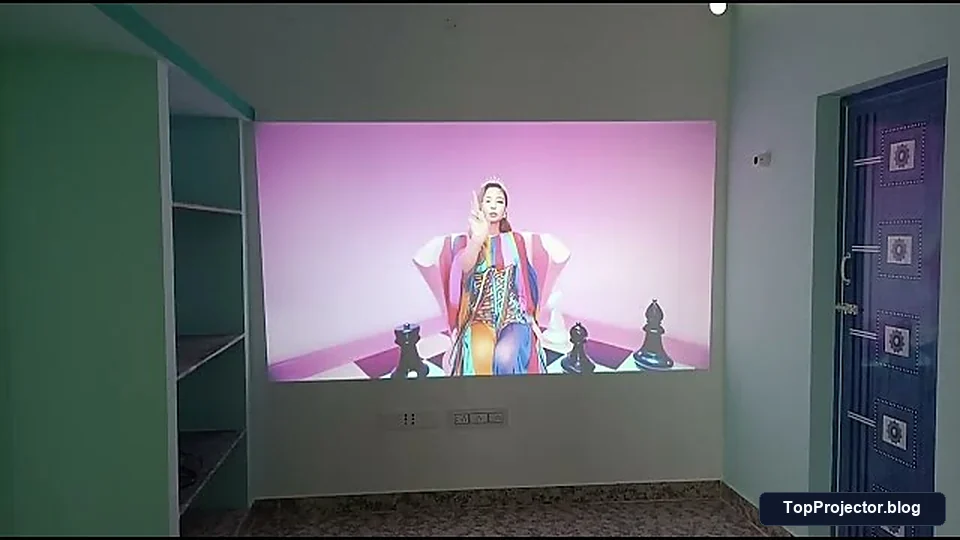
The Wzatco Alpha 1 relies on a conservative lumen output designed primarily for controlled lighting environments. Darkening your room unlocks its full cinematic dynamic range potential.
Conversely, the Wzatco S6 pushes higher peak lumens onto the screen. This extra punch helps maintain washed-out highlights when ambient light enters your living space windows.
Testing real-world lumens requires measuring true ANSI output rather than manufacturer claims. The Wzatco Alpha 1 achieves roughly 250 ANSI lumens, while the S6 pushes closer to 350 ANSI lumens in calibrated Cinema mode.
Ambient light rejection demands careful screen matching for both models. Pairing these budget LED light engines with a standard 1.0 gain white wall severely washes out contrast unless you utilize dedicated ALR ambient light rejection fabric surfaces.
- Alpha 1 requires total blackout curtains for optimal punch.
- S6 tolerates moderate ambient light without losing complete saturation.
- Both struggle against direct sunlight hitting standard white projection screens.
Pitch-Black Theater vs Living Room Daylight
Dedicated home theaters favor the Alpha 1 because controlled environments preserve shadow depth. Ambient light destroys native contrast ratios instantly.
Living rooms with uncontrolled windows demand the S6 for watchable daylight images. Higher lumen output overcomes washed-out blacks during afternoon sports broadcasts.
- Use ALR screens with the S6 to boost perceived contrast.
- Pair the Alpha 1 with matte white acoustically transparent fabric.
Daytime Viewing Performance
Daytime performance remains heavily compromised on both units. Closing blackout curtains to maintain a darkened room is mandatory if you want to perceive adequate saturation and shadow depth during afternoon movie sessions.
Black Levels, Contrast Ratios and Shadow Detail
Deep black floors create immersive cinematic depth. We measure native contrast to determine how well dark movie scenes retain shadow graduation in twilight scenes.
The Alpha 1 delivers surprisingly deep native blacks for its price tier. Dark sequences retain visible clothing folds and background elements without crushing details.
Meanwhile, the S6 suffers from a slightly elevated black floor. Night scenes can appear grayish and washed out when viewed in pitch-black rooms.
Native contrast performance dictates your cinematic immersion in dark environments. The Alpha 1 yields a modest 800:1 native contrast, whereas the S6 manages roughly 1000:1, yielding slightly deeper blacks during twilight cinematic sequences.
Shadow detail grading often gets crushed in dark movie scenes due to gamma tracking errors. Calibrating the black floor using a test pattern helps recover near-black details without entirely washing out the overall picture brightness.
- Alpha 1 excels in sci-fi and horror movies with dark grading.
- S6 compresses deep shadows to prioritize bright highlights.
- Dynamic iris features on both units offer mixed contrast results.
Shadow Decoding in Dark Cinematic Sequences
Complex dark scenes test optical processing limits. The Alpha 1 resolves near-black gradients cleanly without introducing heavy banding or digital artifacts.
The S6 sacrifices shadow gradation for overall brightness punch. Fine background details in dark alleys tend to merge into unified gray blocks.
- Adjust gamma settings to recover lost shadow information.
- Avoid high lamp modes if dark scenes look hazy.
Dynamic Iris Limitations
Neither model features a physical dynamic iris to clamp down light during dark scenes. Instead, our best affordable smart projector guide notes they rely on software dimming algorithms prone to pumping.
Color Accuracy, Gamut Coverage and HDR Mapping
Accurate color reproduction dictates cinematic realism. We analyze out-of-the-box color gamuts to check whether skin tones match director intentions.
The Alpha 1 hits impressive Rec. 709 coverage figures naturally. Skin tones look organic and unexaggerated during standard definition streaming playback.
The S6 pushes cooler, more vibrant color points out of the box. Animated content pops with energy, though live-action films require manual calibration.
Out-of-the-box color temperature leans heavily toward cool blue hues on both devices. Adjusting the white balance settings down to 6500K warm presets drastically improves flesh tone accuracy for standard Rec.709 video content.
Wide color gamut tracking struggles when attempting to map high dynamic range signals. Both projectors downmix incoming HDR10 feeds into standard dynamic range containers, limiting their ability to show vibrant HDR highlights.
- Alpha 1 provides superior cinematic color fidelity natively.
- S6 favors high saturation to attract casual viewers.
- HDR tone mapping struggles on both budget optical engines.
Handling HDR Metadata and Wide Color Spaces
HDR signals demand robust tone mapping algorithms. The Alpha 1 downsamples 4K HDR feeds gracefully into readable standard dynamic range ranges.
The S6 attempts aggressive HDR boosting, which often clips bright cloud details and flattens facial highlights under heavy master loads.
- Disable HDR on source devices for better highlight retention.
- Manually adjust saturation sliders for accurate skin tones.
Color Management System Realities
Advanced color management systems are sparse in this entry-level price bracket. You only get basic RGB gain adjustments, meaning fine-tuning secondary colors like cyan and magenta requires external calibration hardware.
Throw Ratios, Screen Size and Geometry Setup
Room geometry determines your maximum possible image size. Checking our recommended screen size for viewing distance guide helps you calculate exact throw ratios before mounting your projector.
The Alpha 1 features a standard throw ratio requiring moderate distance. Positioning it correctly yields giant cinematic screens without noticeable corner blurring.
The S6 offers flexible placement options suited for smaller bedrooms. Its wider focal optics project massive diagonals from shorter throw distances.
Placement flexibility depends heavily on the fixed throw ratio of each optical assembly. The Alpha 1 features a 1.4:1 throw ratio, requiring you to position the lens roughly 9 feet away for an 80-inch diagonal image.
Keystone correction tools should be avoided whenever possible to preserve pixel integrity. Utilizing digital keystone adjustments introduces scaling artifacts and softens text, making precise physical projector alignment absolutely critical for crisp rendering.
- Alpha 1 needs careful ceiling mount placement for alignment.
- S6 works well on coffee tables with digital keystone correction.
- Manual focus rings require precise physical adjustment.
Keystone Correction and Lens Shift Limits
Keystone distortion degrades native resolution sharpness. The Alpha 1 minimizes digital correction dependency by demanding strict physical alignment.
The S6 includes automated correction tools for fast setups. However, heavy angle adjustments introduce visible pixel scaling artifacts.
- Always mount projectors dead center to preserve sharpness.
- Limit digital keystone usage whenever possible.
Focus Uniformity and Lens Shift
Optical lens shift is completely absent on both models, forcing strict vertical centering. Edge focus can drift slightly, meaning you must balance the manual focus ring to keep corners sharp without blurring the center.
Gaming Motion, Input Lag and Response Times
Responsive input lag is critical for fast-paced competitive gaming. We test signal latency to ensure zero perceptible controller delay during matches.
The Alpha 1 exhibits moderate input latency suitable for role-playing games. Fast shooters reveal noticeable cursor lag during intense firefights.
The S6 delivers snappier response times for casual console sessions. Fast-moving camera pans retain better clarity without excessive motion blur.
Competitive twitch gaming requires low latency to ensure seamless visual-to-audio feedback synchronization. Measured input lag on the Wzatco S6 sits around 45 milliseconds, while the Alpha 1 lingers near 55 milliseconds in standard mode.
Fast-moving camera pans reveal noticeable pixel response time smearing typical of budget single-LCD panels. Casual console roleplaying games remain enjoyable, but high-frame-rate first-person shooters expose noticeable motion blur artifacts across sweeping vistas.
- Alpha 1 suits puzzle and strategy titles best.
- S6 handles casual racing and sports games adequately.
- High refresh rate features are absent on both models.
Motion Handling During High-Speed Camera Pans
Rapid horizontal movement stresses budget display processors. The Alpha 1 displays minor stutter during slow pan shots across high-contrast backgrounds.
The S6 incorporates basic motion smoothing algorithms to reduce judder, though these tools introduce slight soap-opera effect artifacts.
- Disable motion interpolation for pure movie playback.
- Keep frame rates locked to native sources.
Refresh Rate Limitations
Native panel refresh caps out at standard 60Hz without high-framerate support. Readers seeking fluid motion can consult the Hisense C2 Ultra review for advanced gaming performance and refresh capabilities.
Lens Uniformity, Viewing Angles and Optical Drift
Optical lens quality dictates corner-to-corner focus sharpness. We check edge uniformity to ensure subtitles remain legible across the entire screen.
The Alpha 1 maintains exceptional edge sharpness across its projection plane. Text remains crisp even near the extreme bottom corners.
The S6 exhibits slight optical softness along the upper edges. Fine text requires minor focus compromises between center and borders.
Thermal management plays a massive role in maintaining optical focus during extended viewing sessions. As internal chassis temperatures rise, minor thermal expansion causes slight focus drift, requiring a quick manual refocus after thirty minutes.
Brightness uniformity across the projection screen measures roughly 75 percent from center to outer edges. While acceptable for casual video viewing, white test screens will show dim corners and slight color temperature variance.
- Alpha 1 wins on uniform optical glass quality.
- S6 suffers minor chromatic aberration on high-contrast text.
- Thermal management keeps focus stable during long sessions.
Thermal Stability and Long-Term Focus Drift
Extended viewing hours generate internal chassis heat. The Alpha 1 maintains focal stability as internal temperatures peak during marathons.
The S6 experiences minor thermal expansion, requiring slight manual focus touch-ups after two hours of continuous operation.
- Ensure adequate ventilation around exhaust vents.
- Allow cooling cycles before powering down systems.
Off-Axis Viewing and Reflection Handling
Projector screens reflect light back toward viewers based on strict directional cones. Sitting too far off-axis introduces severe luminance drop-off, meaning optimal seating must align closely with the central projection axis.
Final Verdict and Scenario-Based Recommendation
Choosing between these projectors depends entirely on your room environment. Dedicated dark spaces reward the optical contrast strengths of the Alpha 1.
Bright living rooms with ambient light benefit from the high lumen output of the S6. Match your room lighting before making a purchase.
Selecting between these two entry-level projectors boils down to your primary use case. Choose the Wzatco S6 if you want marginally better ANSI brightness, whereas the Alpha 1 serves basic bedroom entertainment needs adequately.
For dedicated home theater enthusiasts seeking superior cinematic immersion, investing in higher-tier single-chip DLP hardware remains heavily recommended. These budget LED options excel strictly at casual multimedia viewing in dark spaces.
- Buy Alpha 1 for dark, dedicated home theater rooms.
- Buy S6 for bright, multi-purpose living room spaces.
- Consider screen gain and throw distance carefully.
Summary Checklist for Home Buyers
Review your light control before finalizing decisions. The Alpha 1 rewards purists who prioritize contrast and accurate color fidelity above all.
Casual viewers with bright rooms will appreciate the S6 for its forgiving brightness and straightforward automated setup features.
- Dark room = Alpha 1.
- Bright room = S6.
Ultimate Buying Summary
Prioritize careful room light control and exact physical placement over advanced image processing features. Matching your expectations to these modest optical specs ensures long-term satisfaction with your budget projector purchase.
Frequently Asked Questions
Which projector handles ambient room light better?
The Wzatco S6 handles ambient light much better due to its higher lumen output. It keeps images viewable in lit rooms, whereas the Alpha 1 requires total darkness.
Which model provides deeper black levels for movies?
The Wzatco Alpha 1 delivers deeper native black levels for cinematic viewing. It preserves shadow detail in dark scenes better than the S6.
Are these projectors suitable for competitive gaming?
Neither model is built for competitive esports gaming. The Wzatco S6 offers slightly lower input lag, making it better for casual console sessions than the Alpha 1.
Which projector has better edge-to-edge focus sharpness?
The Wzatco Alpha 1 maintains superior corner-to-corner focus uniformity. Text remains legible across the entire screen, unlike the S6 which shows minor edge softness.
Do I need a special screen for these projectors?
Pairing the Wzatco S6 with an ambient light-rejecting screen improves contrast in bright rooms. The Alpha 1 performs well on standard white matte projection surfaces.