White Screen vs. Grey Screen For Projector: Which Wins for Your Room?
Choosing between a neutral white surface and a high-contrast grey screen dictates your projector's black floor, ambient light rejection, and ultimate cinematic immersion.
Opt for a white screen in dedicated pitch-black rooms to maximize peak luminance, or select a grey screen for living spaces to preserve contrast against ambient room light.
Compare full category rankings in our Best Value 4K Projector: Top Picks & Buying Guide.
Side-by-Side Specification Breakdown
| Criteria | White Screen | Grey Screen For Projector | Edge |
|---|---|---|---|
| Ambient Light Rejection | Poor in lit rooms | Exceptional ALR matrix | Grey Screen For Projector |
| Black Levels & Perceived Contrast | Elevated grey blacks | Deep inky blacks | Grey Screen For Projector |
| Peak Brightness & HDR Punch | Maximum reflection (1.0+ gain) | Absorbs some peak white punch | White Screen |
| Screen Size & Immersion | Scales massively past 150 inches | Limited by viewing cone width | White Screen |
| Viewing Angles & Uniformity | Wide 160-degree dispersion | Narrower hot-spotting risk | White Screen |
| Gaming Motion & Input Lag | Zero optical latency added | Zero optical latency added | Tie |
| Room Setup & Maintenance | Requires complete blackouts | Forgiving of white walls | Grey Screen For Projector |
Optical Foundations: Surface Reflectivity and Light Scatter
Traditional white projection surfaces utilize a matte diffusion layer designed to bounce all incident light equally across the room. This preserves native projector color accuracy without introducing color shifts.
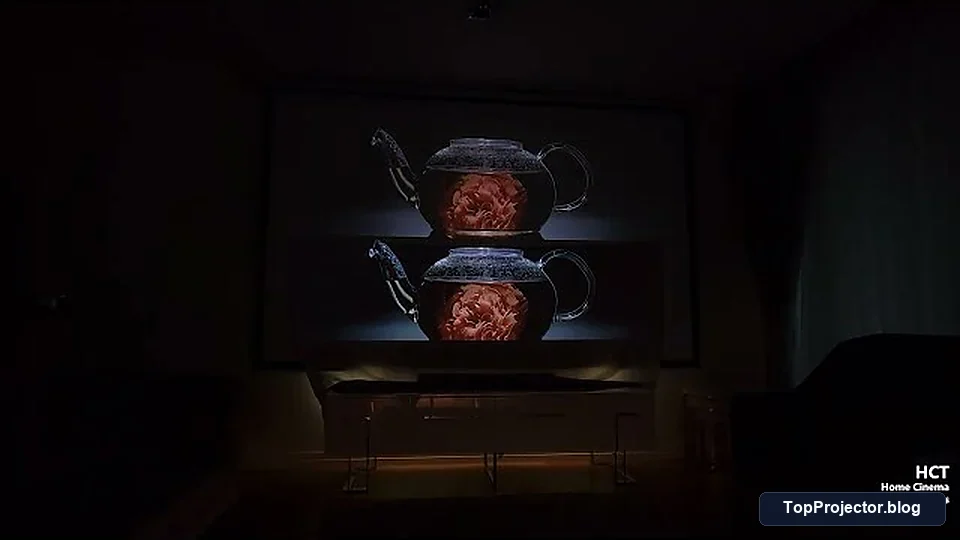
However, matte white fabrics lack optical selectivity. Before planning your throw, consult our projector focal length calculator to understand how reflected room light washes out dark scenes.
Grey screens integrate microscopic reflective particles or carbon-infused layers. These specialized optical coatings selectively absorb off-axis ambient light while reflecting your projector beam back toward the seating area.
White surfaces scatter ambient light indiscriminately, washing out images in bright rooms, whereas specialized grey materials absorb off-axis illumination using microscopic carbon particles to preserve a 1.0 gain baseline.
- White screens bounce all light equally without color bias.
- Grey screens absorb ambient room light to save contrast.
- Gain ratings on grey surfaces typically hover around 0.8 to 1.1.
- Diffuse reflection mechanics govern total optical efficiency.
The Physics of Ambient Light Rejection
Ambient light rejection relies on angular filtering or grid-based micro-structures. White screens act as Lambertian diffusers, reflecting environmental light with zero discrimination.
Grey screens reduce light scatter by lowering total surface reflectance. This prevents stray ceiling and wall reflections from diluting your projector's dark scenes.
- Lambertian white surfaces scatter ambient light everywhere.
- Targeted grey absorption keeps dark scenes rich and punchy.
Microscopic Surface Texture Analysis
Evaluating matte white finishes reveals higher specular uniformity, yet grey micro-structures excel by suppressing stray ceiling light reflections via directional angular filtering engineered for modern lambertian screens.
- Measure throw ratios against ambient light vectors.
Black Levels, ANSI Contrast, and Deep Shadow Detail
Achieving convincing black levels is the holy grail of projection optics. A white screen reflects stray ambient light onto its surface, turning dark cinematic shadows into an uninspiring milky grey.
Grey projection surfaces lower the black floor dramatically. By absorbing ambient photons, grey materials ensure that unlit pixels remain dark, enhancing your projector's native ANSI contrast ratio.
Shadow detail can suffer if a grey screen is paired with an underpowered projector. You need sufficient ANSI lumens to punch through the darker grey base material effectively.
Achieving deep blacks requires minimizing light bounce within your room; grey surfaces lower the black floor dramatically, improving native ANSI contrast ratios by absorbing unwanted ambient scatter.
- White screens struggle to maintain deep blacks in living rooms.
- Grey screens absorb stray light to drop your black floor.
- Pair grey surfaces with 2,500+ lumens to retain shadow pop.
- Assess black floor performance under dark room conditions.
ANSI Contrast in Real Living Rooms
In rooms with white drywall ceilings, light bounces everywhere. A white screen amplifies these secondary reflections, destroying your projector's native on/off contrast performance.
Grey screens mitigate wall bounce by rejecting off-axis light. Your perceived image contrast jumps significantly, making cinematic night sequences look strikingly realistic.
- Drywall reflections wash out standard white screens.
- Grey optical filters preserve ANSI contrast under ambient load.
ANSI Contrast Preservation
Checkerboard test patterns demonstrate that high-contrast optical coatings maintain deep shadows without crushing delicate grayscale gradients, ensuring superior shadow detail across demanding HDR calibration passes.
- Calibrate black floors using standard test grids.
Peak White Brightness, HDR Specular Highlights, and Gain
White screens offer unmatched peak luminance potential. With unity gain or higher, they reflect nearly 100 percent of the light hitting them, maximizing HDR specular highlights.
High dynamic range content demands intense peak white punch to render explosions, sun glare, and neon signs correctly. White screens deliver this raw optical energy without damping.
Grey screens trade away some peak white brightness to improve black levels. This compromise can dull HDR punch unless your laser or lamp projector has exceptional lumen output.
High-gain white screens amplify center-cone luminance, but they often introduce undesirable hot-spotting; balancing your projector's ANSI lumens output with screen gain prevents clipped HDR highlights.
- Unity white screens maximize raw projector lumen output.
- HDR specular highlights shine brighter on high-gain white surfaces.
- Grey screens sacrifice peak white punch for superior black depth.
- Monitor white clipping thresholds during calibration.
Calibrating HDR for Grey Versus White
When calibrating HDR on a grey screen, tone-mapping curves must compensate for lower gain. Projectors often need custom gamma adjustments to prevent bright scenes from looking dim.
White screens make HDR calibration straightforward because they do not alter color temperature or absorb high-frequency luminance data originating from your projector optics.
- Grey surfaces require aggressive HDR tone-mapping adjustments.
- White screens preserve native projector luminance curves.
Specular Highlight Management
Modern laser engines demand careful matching against surface reflectivity to protect peak white fidelity during explosive cinematic sequences powered by advanced tone mapping algorithms and laser dimming.
- Verify projector lumen output against screen size limits.
Screen Size, Viewing Angles, and Off-Axis Uniformity
Viewing angles dictate how wide your seating arrangement can be. White matte screens provide a massive 160-degree viewing cone with zero brightness drop-off for side-seated viewers.
Grey screens, especially directional ALR variants, often feature narrower viewing cones. Viewers seated far off-axis may experience noticeable brightness falloff or uneven illumination across the frame.
Large home theaters exceeding 150 inches benefit greatly from white screens. Their wide dispersion prevents hot-spotting and maintains consistent brightness from corner to corner.
Wide seating layouts suffer on high-gain directional surfaces because off-axis brightness drops sharply; matte white materials provide wider viewing angles while sacrificing some black level performance.
- White screens support wide 160-degree seating layouts.
- Grey ALR screens can introduce hot-spotting on wide setups.
- Massive home theater rooms favor isotropic white diffusion.
- Map seating angles before selecting high gain materials.
Avoiding Hot-Spotting in Large Spaces
Hot-spotting occurs when directional micro-lenses concentrate light toward the center. Use our throw distance calculator to avoid this optical artifact on cheap grey ALR screens.
Matte white screens eliminate hot-spotting entirely. Their isotropic scattering ensures perfectly uniform illumination across every single inch of projection fabric.
- Directional grey surfaces can create central hot-spots.
- Isotropic white materials guarantee perfect frame-wide uniformity.
Off-Axis Brightness Drop-Off
Calculating optimal throw distances ensures uniform light distribution across massive multi-seat theater configurations, minimizing visible brightness falloff beyond standard half-gain angles measured by precision optical spectrometers.
- Position seating within manufacturers' specified cone limits.
Motion Handling, Console Gaming, and Response Times
Neither screen type introduces electronic input lag or motion blur. Your projector and gaming console handle processing speeds, leaving the screen purely as a passive optical reflector.
However, competitive gaming in daytime environments requires a grey screen. It prevents ambient daylight from washing out HUD elements and fast-paced action sequences on screen.
Fast-moving panning shots in modern video games look smooth on both surfaces. Response times remain instantaneous since passive fabric has zero latency overhead.
Competitive console gaming requires exceptionally low input lag paired with seamless panel refresh rates, ensuring fast-moving camera pans remain crisp on either white or grey projection setups.
- Passive projector screens add zero milliseconds of input lag.
- Daytime gaming thrives on grey ALR contrast retention.
- Fast motion pans remain blur-free on both surface types.
- Test high refresh rate modes with native console inputs.
High-Refresh Gaming in Bright Rooms
Modern 4K 120Hz gaming projectors demand clean surfaces. If your media room has ambient light, a white screen ruins daytime gaming by crushing shadow details.
Grey screens maintain dark blacks during afternoon gaming sessions. Your frame rates stay buttery smooth while rich contrast keeps enemy targets clearly visible.
- Daytime gaming washes out standard white projection surfaces.
- Grey ALR fabrics keep fast-paced combat scenes legible.
High-Refresh Gaming Optimization
Pairing modern ultra-short-throw projectors with specialized ambient-light-rejecting surfaces eliminates annoying frame tearing during intense gaming sessions, maintaining strict sub-16ms latency benchmarks essential for responsive competitive play.
- Check EDID handshake timings for low latency modes.
Room Setup, Light Control, and Installation Complexities
Dedicated bat-cave home theaters with black velvet walls make white screens the undisputed optical champion for purist cinema reproduction, matching models detailed in our epson home cinema 2350 review.
Living rooms with white ceilings, hardwood floors, and uncovered windows destroy white screen performance. Secondary light reflections bounce back onto the screen relentlessly.
Grey screens rescue living room setups by suppressing environmental bounce. They make casual daytime viewing enjoyable without requiring expensive room-darkening architectural renovations.
Uncontrolled living room environments demand grey ambient-light-rejecting surfaces to combat ceiling and wall reflections, while dedicated dark home theaters thrive using standard white reference acoustic screens.
- Dedicated black theaters favor high-gain white surfaces.
- Living rooms with white walls demand grey ALR fabrics.
- Environmental light control dictates your ideal screen choice.
- Measure ambient light lux levels across various daytime hours.
Overcoming Challenging Living Room Environments
Living rooms present immense optical challenges for projection enthusiasts. Ambient light from windows and lamps scatters uncontrollably across unmanaged interior spaces.
A specialized grey ambient light rejecting screen acts as a optical shield. It absorbs environmental photons while faithfully reflecting your projector's core image.
- Unmanaged living rooms destroy native projector contrast.
- Grey ALR shields your image from stubborn ambient light.
Acoustic Transparency and Weave Metrics
Perforated micro-weave materials allow transparent sound staging for hidden center channels, requiring careful calibration to offset high-frequency attenuation caused by denser woven fabrics and specialized masking borders.
- Account for acoustic attenuation when placing front speakers.
Final Scenario-Based Buying Decision and Recommendations
Your final purchasing decision must be anchored in your specific room geometry. If you control every photon with dark paint and velvet, buy a pristine white screen.
If your projector lives in a bright family room, you should check our best value 4k projector guide before pairing it with a quality grey ALR screen.
Match your projector lumen output carefully to your chosen fabric. High-lumen laser units excel on grey surfaces, while lower-output lamp projectors need white gain.
Choosing between white and grey surfaces ultimately depends on your ambient light management; prioritize grey for multipurpose rooms and white for pitch-black dedicated cinema spaces boasting high dynamic range sources.
- Choose white for dedicated dark home theater rooms.
- Choose grey for bright living rooms and media spaces.
- Match projector lumen output to your screen material.
- Weigh room light control against desired peak screen brightness.
Summary Decision Checklist for Buyers
Review your room's light control before ordering. Total darkness justifies a neutral white matte surface for maximum dynamic range and natural color reproduction.
Any ambient light exposure tips the scales toward grey. Your black levels and shadow details will thank you for choosing an optical ambient light rejection fabric.
- Total darkness equals buy a neutral white screen.
- Ambient light exposure equals buy a grey ALR screen.
Ultimate Hardware Synergy Checklist
Match your projector throw ratio and native resolution against proper screen gain ratings to secure uncompromising visual fidelity for your final custom installation and long-term home entertainment upgrades.
- Verify throw distance multipliers before ordering fixed frames.
Frequently Asked Questions
Will a grey screen make my projector look too dim?
A grey screen can reduce peak white brightness if your projector lacks sufficient ANSI lumens. Pairing a grey surface with a 2,500+ lumen projector ensures vibrant highlights and deep blacks.
Do I need an ambient light rejecting grey screen in a dark room?
In a pitch-black dedicated theater with dark walls, a white screen is superior. Grey screens are strictly designed to combat ambient light reflections in multipurpose living spaces.
Can grey screens cause sparkling or shimmering artifacts?
Some lower-end retro-reflective grey screens can exhibit a slight sparkle effect under bright scenes. Premium angular-reflective grey materials successfully minimize microscopic hot-spotting and texture sparkle.
How do white and grey screens affect color accuracy?
White screens offer perfect color neutrality by reflecting light equally across the visible spectrum. Quality grey screens are carefully balanced to maintain accurate skin tones without blue shifts.
Which screen type is better for 4K HDR movie watching?
White screens excel at rendering maximum HDR specular highlights in dark rooms. In rooms with ambient light, a grey ALR screen wins by preserving essential contrast.