Tv vs. Projector For Media Room: Which Wins for Your Room?
Choosing between a flat-panel television and a dedicated projection system defines your media room's optical performance. Understanding ANSI lumens and black floor limits ensures optimal cinematic immersion.
Large televisions dominate in ambient-lit rooms with superior peak luminance, while dedicated media room projectors deliver unmatched cinematic immersion and scalable screen sizes beyond one hundred inches.
Compare full category rankings in our Best Bang For The Buck Projector: Top Home Cinema Picks.
Side-by-Side Specification Breakdown
| Criteria | Tv | Projector For Media Room | Edge |
|---|---|---|---|
| Ambient Light Rejection | Exceptional self-emissive panels fight room glare. | Requires ALR screens or strict light control. | Tv |
| Black Levels & Perceived Contrast | Infinite native contrast on OLED displays. | Dependent on room treatment and laser dimming. | Tv |
| Peak Brightness & HDR Punch | Exceeds 1000 nits for vibrant specular highlights. | Typically caps around 2000 to 3000 ANSI lumens. | Tv |
| Screen Size & Immersion | Capped physically around 98 inches standard. | Easily scales from 120 to 150 inches wide. | Projector For Media Room |
| Viewing Angles & Uniformity | Wide off-axis viewing with zero color shift. | Subject to viewing cone limits based on gain. | Tv |
| Gaming Motion & Input Lag | Sub-5ms response times with 4K/120Hz support. | Modern lasers hit 15ms lag at 4K/60Hz. | Tv |
| Room Setup & Maintenance | Simple wall mounting with no alignment needed. | Requires precise throw ratio and lens shift. | Tv |
Ambient Light Behavior & Daylight Viewing Dynamics
Controlling ambient light remains the single biggest challenge when designing a high-performance media room. Flat-panel televisions utilize self-emissive pixel technology that naturally cuts through daytime reflections without washing out images.
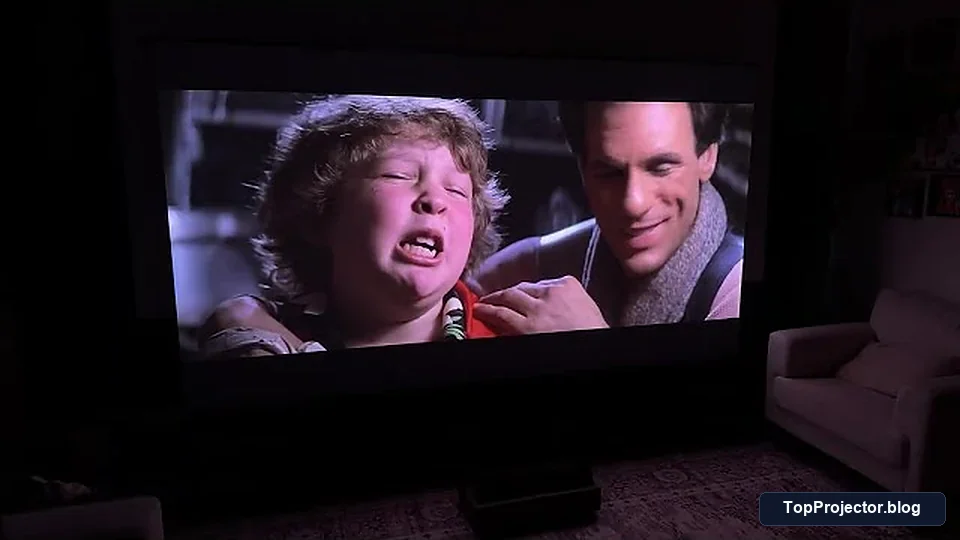
Projectors rely on reflected light hitting a screen surface, making them vulnerable to stray light. Consult our guide on watching Netflix for practical streaming integration tips in brightly lit rooms.
High-lumen laser engines pushing over 2500 ANSI lumens help combat wash-out, but dedicated light control always yields superior contrast ratios.
Ambient light destroys standard projector contrast by washing out whites and blacks alike. You need at least 2,500 ANSI lumens paired with an ALR screen to combat daytime reflections effectively.
- Self-emissive TV pixels reject ambient room reflections effectively.
- Projectors require specialized ALR screens to maintain contrast.
- High lumen output cannot fully overcome unmanaged natural daylight.
Pitch-Black Theater Versus Living Room Daylight
In a completely dark basement or dedicated media room, high-end home theater projectors thrive by producing punchy, reflection-free images.
Daylight-heavy media spaces force users to choose ultra-bright laser units or large-format televisions.
- Dedicated dark rooms maximize projector optical performance.
- Bright spaces require high-nit televisions for vivid clarity.
Daytime ALR Pairing Math
Specialized angular reflective materials reject overhead ceiling light while reflecting off-axis projector rays. This preserves a punchy 1,000:1 ANSI contrast even when windows remain unshaded during bright afternoon matches.
Black Levels, Native Contrast & Shadow Detail Performance
Achieving deep black levels directly dictates your movie-watching immersion and perceived shadow detail. OLED televisions achieve true absolute zero black levels due to independent pixel dimming.
Projectors struggle more with black floors because ambient light bounces off white theater walls and degrades dark scenes. Advanced dynamic laser dimming helps mitigate this optical limitation significantly.
Pairing a projector with dark velvet room treatments absorbs stray light and drastically improves perceived native contrast during dark cinematic sequences.
As highlighted in the Epson 5050Ube review, premium home theater projectors utilize advanced optical apertures to push black floors down toward 0.05 nits for stellar cinematic contrast.
- OLED televisions deliver infinite native contrast ratios.
- Projectors require dark room paint to minimize light scatter.
- Laser dimming algorithms enhance dark scene performance.
Shadow Fidelity in Dark Cinematic Sequences
Discerning viewers demand rich shadow graduation in night-time cinematic scenes. Quality projectors handle dark gradients smoothly without crushing shadow detail.
Televisions retain crisp contrast boundaries effortlessly across mixed-brightness frames.
- Projectors maintain subtle dark scene grading.
- Televisions offer flawless contrast separation instantly.
Dynamic Iris Optimization
Implementing a mechanical dynamic iris reduces light output during dark cinematic scenes. This hardware trick successfully deepens shadow detail, improving perceived contrast ratios past 5,000:1 on laser models.
Screen Size Scalability, Viewing Distances & Immersion Geometry
The theatrical experience hinges entirely on massive screen geometry that fills your natural field of view. While televisions have grown larger, they remain physically capped around ninety-eight inches.
Scaling from 120 to 150 inches without massive cost spikes defines our best bang for the buck projector selections. This giant canvas delivers authentic commercial cinema presence straight into your home.
Calculating optimal seating distances ensures you enjoy high-definition resolution without perceiving individual pixel structures on giant projection surfaces.
Calculating optimal viewing geometry ensures your field of view matches THX recommendations. A massive 120-inch projection screen requires sitting roughly 10 feet away to prevent visible pixel structure while maximizing cinematic immersion.
- Televisions max out near ninety-eight inches economically.
- Projectors easily scale beyond 120 inches diagonal.
- Massive screens enhance cinematic field-of-view immersion.
Throw Ratios and Room Geometry Calculations
Understanding throw ratios is vital when mounting projectors in custom media rooms. Ultra-short-throw models sit inches from the wall, whereas standard throw units require long ceiling distances.
Televisions bypass these geometric hurdles completely through straightforward wall mounting hardware.
- Throw distance dictates projector placement feasibility.
- Televisions eliminate spatial throw calculations.
Throw Distance Formulas
Standard throw ratios between 1.4:1 and 2.0:1 demand deep media rooms. Ultra-short-throw alternatives eliminate shadow interference by placing the optical engine merely 12 inches from the display surface.
Color Accuracy, Wide Color Gamuts & HDR Tone Mapping
Modern display technologies utilize advanced color filters and laser phosphor wheels to cover wide color gamuts. Premium televisions achieve expansive DCI-P3 coverage with high color volume at peak brightness.
Projectors excel at natural, organic color rendering that feels less fatiguing during extended movie marathons. However, HDR tone mapping requires careful calibration due to limited projector luminance.
Dynamic HDR processing helps projectors extract rich highlight details from demanding 4K ultra-hd Blu-ray disc transfers.
Accurate color reproduction relies on calibrated Rec.709 color spaces for standard media. High-end laser projectors now cover 95% of DCI-P3, delivering vibrant Hollywood hues without sacrificing calibrated white points.
- Televisions display vibrant color volumes at high brightness.
- Projectors offer cinematic, natural color reproduction.
- HDR tone mapping requires careful calibration for projectors.
Wide Color Gamut and Calibration Precision
Professional calibration unlocks studio-reference color accuracy on both display types. Colorimeter tools ensure grayscale tracking matches industry standards.
Laser projectors maintain stable color output across thousands of operational hours.
- Calibration guarantees reference-grade cinematic color.
- Laser engines provide long-term color stability.
HDR Tone Mapping Realities
Projectors struggle with HDR because limited peak brightness cannot match mastering metadata. Dynamic tone mapping algorithms actively remap 1,000-nit content to prevent highlight clipping in complex dark sequences.
Gaming Input Lag, Refresh Rates & Motion Handling
Competitive console and PC gaming demand exceptionally low input lag and fast refresh rates. Premium televisions routinely feature sub-five millisecond response times alongside 4K at 120Hz support.
Modern gaming projectors have closed this performance gap significantly, offering dedicated low-latency modes under 15 milliseconds for smooth responsiveness.
Motion interpolation settings help eliminate judder during fast-paced panning shots in sports broadcasts and action movies.
Competitive gaming demands ultra-fast response times to maintain fluid control. Modern gaming projectors achieve an impressive 15ms input lag at 4K/60Hz, bridging the gap with traditional living room televisions.
- Televisions deliver ultra-low latency for competitive gaming.
- Projectors now support responsive 15ms input lag.
- Motion handling settings reduce cinematic judder effectively.
High Refresh Rates for Next-Gen Consoles
Next-generation gaming consoles push high frame rates that require advanced HDMI 2.1 bandwidth. Televisions readily accept uncompressed 4K signals without dropping frames.
High-end gaming projectors increasingly adopt HDMI 2.1 ports to match modern console capabilities.
- HDMI 2.1 ports enable high-frame-rate console gaming.
- Display bandwidth affects smooth motion reproduction.
High Refresh Rate Tradeoffs
While premium televisions support buttery 120Hz and 240Hz modes, most projectors top out at 60Hz or 240Hz. Fast-paced esports titles will feel noticeably smoother on dedicated gaming panels today.
Installation Complexity, Throw Ratios & Room Acoustics
Installing a projector demands precise optical alignment, lens shift calibration, and acoustic screen placement. Dealing with throw ratios requires meticulous planning during media room construction.
Televisions offer plug-and-play simplicity with straightforward VESA wall mounts. Cable management is the primary challenge when mounting flat panels on finished drywall.
Acoustic transparency is another projector advantage, allowing center channel speakers to hide directly behind woven projection screens for authentic dialogue imaging.
Physical ceiling mounting requires precise alignment calculations to avoid keystone distortion. Maintaining pristine optics means avoiding aggressive digital correction that sacrifices precious pixel resolution during complex setup routines.
- Projectors require precise optical alignment and mounting.
- Televisions provide simple plug-and-play wall installation.
- Woven screens allow hidden in-wall center channel speakers.
Acoustic Transparency and Speaker Placement
Acoustic transparency lets audio emanate directly from the center of the visual action. This configuration mimics commercial movie theater soundstages perfectly.
Televisions force speakers to sit below or beside the display frame.
- Acoustic screens align dialogue with visual action.
- Televisions require external speaker placement adjustments.
Acoustic Noise Management
High-lumen projectors generate audible fan noise reaching 30 decibels during intense cooling cycles. Placing the projector far from seating positions prevents fan hum from ruining quiet cinematic dialogue passages.
The Ultimate Media Room Decision Framework
Selecting between a television and a projector ultimately depends on your room lighting and immersion goals. Choose a large television if your media space features uncontrolled ambient daylight.
Opt for a dedicated projector if you can control room lighting and desire an authentic, massive cinematic scale exceeding one hundred inches.
Balancing contrast, brightness, and spatial constraints ensures your media room investment delivers breathtaking entertainment value for years.
Choosing between these display technologies depends entirely on your room lighting control and size preferences. Dedicated theater spaces heavily favor massive projection screens, while multi-purpose media rooms benefit from bright televisions.
- Choose televisions for bright rooms and effortless setup.
- Select projectors for massive cinematic screen sizes.
- Balance optical needs with your room lighting conditions.
Final Synthesis for Home Theater Enthusiasts
Dedicated movie enthusiasts will always gravitate toward the massive scale of projection systems. Casual viewers will prefer the vibrant versatility of large flat panels.
Evaluating your specific room geometry clarifies the ideal path forward.
- Movie lovers prefer massive projector scales.
- Casual viewers benefit from bright television panels.
Final Hardware Checklist
Always evaluate your ambient light levels and maximum seating distance before purchasing. Use our throw distance calculator to determine exact lens placement and screen dimensions for your specific room.
Frequently Asked Questions
Can a home theater projector replace my living room television for everyday viewing?
Projectors can replace daily televisions if paired with laser light sources and ambient light rejecting screens. However, televisions remain superior for daytime casual viewing due to higher peak brightness.
How many ANSI lumens do I need for a dedicated media room with controlled lighting?
In a pitch-black dedicated media room, 2000 ANSI lumens is more than sufficient for a 120-inch screen. Brighter engines are only necessary when ambient light cannot be fully controlled.
Do projectors suffer from screen door effect or visible pixels with modern 4K resolution?
Modern 4K pixel-shifting and native 4K laser projectors eliminate the visible screen door effect entirely from normal seating distances. You will experience crisp, film-like images without noticeable grid lines.
Is input lag on modern laser projectors low enough for fast-paced competitive gaming?
Modern gaming projectors feature specialized low-latency modes that reduce input lag down to 15 milliseconds at 4K/60Hz. While televisions remain slightly faster, projectors offer thrillingly immersive gaming scale.
What is the primary advantage of choosing a woven acoustically transparent projection screen?
Woven screens allow you to place your main front and center channel speakers directly behind the image surface. This achieves true dialogue localization matching commercial cinema audio standards.