Tv vs. Projector For Conference Room: Which Wins for Your Room?
Choosing a conference room display requires balancing ambient light rejection against massive presentation scales. We test optical physics to help you pick between a commercial TV and a professional presentation projector.
Large conference rooms demand massive projection screens exceeding one hundred inches, while smaller collaborative spaces benefit from the extreme contrast and ambient resilience of modern commercial flat-panel televisions.
Compare full category rankings in our Best Projector For Sports Viewing: Top Home Picks.
Side-by-Side Specification Breakdown
| Criteria | Tv | Projector For Conference Room | Edge |
|---|---|---|---|
| Ambient Light Rejection | Superior panel polarization | Requires specialized ALR screen | Tv |
| Black Levels & Perceived Contrast | Deep native 5000:1 contrast | Washed out by room lights | Tv |
| Peak Brightness & HDR Punch | Over 500 nits constant | High ANSI lumens output | Tie |
| Screen Size & Immersion | Limited past 98 inches | Scales effortlessly past 150 inches | Projector For Conference Room |
| Viewing Angles & Uniformity | Wide off-axis color stability | Hot-spotting on cheap surfaces | Tv |
| Gaming Motion & Input Lag | Sub-10ms response times | Higher processing lag | Tv |
| Room Setup & Maintenance | Heavy wall mounting required | Ceiling rigging and alignment | Tv |
Ambient Light and Direct Sunlight Dynamics in Boardrooms
Corporate boardrooms feature massive glass windows that introduce intense daylight. Flat panel displays utilize surface polarization layers to fight glare and maintain readable text during bright daytime meetings without closing blinds.
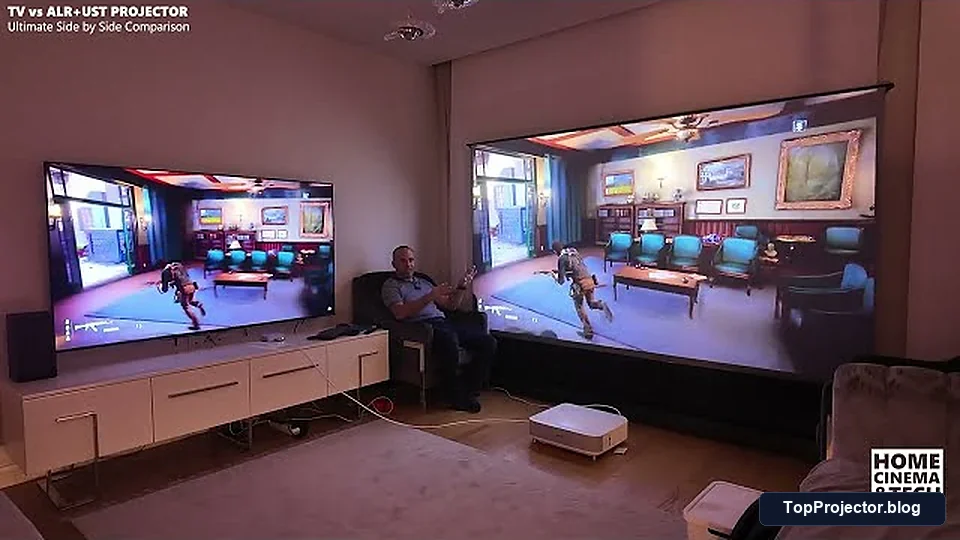
Traditional conference room projectors struggle heavily against unmanaged ambient room light. Without an ambient light rejection screen, following our Epson EF-12 streaming setup guide helps optimize portable business presentation gear.
Boardrooms featuring expansive floor-to-ceiling windows demand serious optical muscle, usually requiring at least 5,000 ANSI lumens to combat direct midday sunlight effectively without washing out fine text and corporate data graphics.
- Commercial TVs easily overpower fluorescent office lighting.
- Projectors require dedicated ALR fabric in lit rooms.
- Direct window glare blinds standard projection screens entirely.
Managing Daytime Glass Walls
Modern office architecture prioritizes glass walls for aesthetic appeal. TVs conquer these challenging glass-heavy environments using high nit ratings that outshine natural sunlight streaming into the collaborative workspace effortlessly.
Projectors deployed in glass-heavy conference rooms demand expensive motorized blackout shades. Failing to control external lumens causes severe contrast degradation across your corporate slide decks and spreadsheets.
- Glass conference rooms favor high-nit commercial panels.
- Projectors need physical window treatments for legibility.
ALR Screen Technology
Pairing a projector with a specialized ambient light rejecting (ALR) material is mandatory in glass-walled conference rooms to absorb off-axis reflections while reflecting the ultra-short throw beam directly toward seated participants.
Black Floor Performance and Contrast Ratios Under Fluorescent Lighting
Contrast dictates how easily employees read complex financial spreadsheets. Flat panel displays deliver exceptional native contrast ratios by emitting light individually, ensuring true black floor levels in lit rooms.
Projectors rely on reflected light, making their black levels vulnerable to ambient light bouncing off office walls. Any stray light ruins the perceived contrast ratio of your corporate video presentations instantly.
Fluorescent ceiling tubes severely compromise native contrast ratios by washing out shadow details, meaning your display needs a stellar native contrast exceeding 2,000:1 to maintain legible dark spreadsheet grids under office lighting.
- Flat panels maintain rich text contrast under bright office lights.
- Reflected projection light suffers when room fixtures stay powered on.
- Dark mode spreadsheets look significantly sharper on emissive panels.
Evaluating Data Spreadsheets and Dark Mode UI
Corporate software heavily utilizes dark themes for modern aesthetic appeal. Emissive screen technology renders tiny white text on black backgrounds with zero blooming artifacts for flawless readability.
Projectors scatter light across white projection screens, causing distinct halo effects around bright text. This optical limitation frustrates financial analysts reviewing dense charts in standard lit boardrooms.
- Emissive pixels eliminate text blooming during presentations.
- Projector light scatter reduces fine spreadsheet legibility.
Dynamic Iris Systems
Implementing advanced dynamic iris technology helps projectors dynamically throttle lamp output during dark scenes, dramatically improving perceived black levels when viewing cinema-quality training videos in dimly lit executive boardrooms.
Peak Brightness, Gain Materials, and HDR Punch for Presentations
Conference room displays must combat overhead LED troffers. Commercial TVs maintain consistent five hundred nits of brightness independently of content, ensuring charts remain visible to every participant.
Projectors generate massive luminous output measured in ANSI lumens. Using our ANSI lumens room calculator helps pair a laser projector with a high gain screen to amplify central brightness.
Standard office displays require precise calibration to balance peak white luminance against color accuracy, ensuring high-gain screens do not introduce annoying hot-spotting or narrow viewing angles for board members seated off to the side.
- Commercial panels deliver predictable, unvarying brightness levels.
- Laser engines provide thousands of ANSI lumens for large spaces.
- Screen gain trades off wide viewing angles for center punch.
Laser Engine Longevity and Maintenance
Modern conference projectors utilize solid-state laser diodes instead of traditional lamps. These robust optical engines deliver twenty thousand hours of maintenance-free operation for demanding corporate environments.
Commercial television panels also offer continuous run-time ratings exceeding fifty thousand hours. Both display types easily handle standard corporate operating schedules without experiencing premature hardware failures.
- Laser diodes eliminate expensive bulb replacement cycles.
- Commercial panels run continuously without thermal degradation.
Screen Gain Selection
Selecting a 1.1 gain micro-perforated acoustic screen delivers optimal color saturation and uniform light distribution, preventing the glaring hot spots commonly associated with aggressive 1.8 gain silver surfaces in conference spaces.
Screen Size Scaling, Viewing Angles, and Collaboration Ergonomics
Physical dimensions dictate corporate collaboration effectiveness. While flat panels cap out around ninety-eight inches affordably, projectors scale effortlessly to one hundred fifty inches or larger for expansive auditoriums.
Viewing angles remain critical for wide conference tables. Televisions provide consistent off-axis color fidelity, whereas exploring best projector for sports viewing models reveals similar performance tradeoffs during daytime meetings.
Massive 120-inch projection setups require careful adherence to ergonomic standards, ensuring participants seated in the front row maintain a comfortable vertical viewing angle without experiencing neck strain during long strategy sessions.
- Projectors scale past one hundred inches for large boardrooms.
- Flat panels maintain color accuracy at extreme side angles.
- Large meeting spaces require massive diagonal screen sizing.
Seating Distance and Resolution Density
Participants sitting far back in massive training rooms require large imagery to read fine text. Projectors deliver immersive sizing, preventing eye strain during lengthy corporate training seminars and strategic workshops.
Smaller huddle spaces benefit from high-resolution panels positioned closer to seated teams. This proximity allows crisp four-thousand-pixel rendering without requiring massive physical display footprints.
- Training rooms need large projection sizing for readability.
- Huddle spaces leverage high pixel density on smaller panels.
Viewing Distance Math
Commercial collaboration spaces benefit from maintaining a maximum viewing distance of 4x screen height, allowing fine CAD drawings and small text to remain entirely readable for every single employee in the room.
Motion Clarity, Input Lag, and Wireless Presentation Responsiveness
Interactive video conferencing demands responsive display performance. Commercial TVs feature ultra-low input lag under ten milliseconds, ensuring seamless cursor tracking during fast-paced collaborative whiteboarding sessions.
Projectors often introduce higher internal processing latency due to complex geometric keystone corrections. This slight delay can occasionally hinder smooth stylus writing on interactive projection whiteboards during meetings.
Smooth cursor tracking and responsive stylus annotations demand exceptionally low input lag figures, ideally staying under 16ms at 60Hz to eliminate any frustrating disconnect between physical hand movements and onscreen pointer registration.
- Commercial TVs offer instantaneous cursor and stylus response.
- Image processing chips can add minor input lag to projectors.
- Wireless casting works smoothly across both display categories.
Video Conferencing and Remote Collaboration
Hybrid meetings require displaying remote participants at life-sized proportions. Large projection setups excel at rendering realistic human faces, enhancing empathy during cross-office communications and executive town halls.
Flat panels provide sharper detail for remote chat windows and shared documents. Selecting the right technology depends on whether your meetings prioritize human connection or dense data sharing.
- Projectors create life-sized participant video feeds.
- Flat panels excel at rendering sharp multi-window UIs.
Wireless Casting Latency
Wireless presentation gateways must minimize video compression artifacts and packet loss, ensuring high-framerate screen sharing remains fluid without introducing perceptible stutter during live product demonstrations or fast-paced corporate video playback.
Installation Complexity, Throw Ratios, and Structural Room Requirements
Physical deployment impacts total implementation overhead significantly. Flat panels require heavy wall reinforcement to support massive weight, whereas ultra-short-throw projectors sit neatly on credenzas below specialized projection surfaces.
Ceiling-mounted projectors demand precise optical alignment and cable management. As noted in our Epson 5050 review, technicians must calculate exact throw ratios carefully to prevent shadowing while securing permanent mounts.
Calculating precise throw ratios is critical when retrofitting older conference rooms, as ultra-short throw lenses allow crisp 100-inch images from mere inches away without casting shadows from presenters standing near the board.
- TV wall mounting demands heavy-duty structural stud support.
- Ultra-short-throw projectors eliminate complex ceiling wiring runs.
- Precise optical zoom calibration ensures edge-to-edge sharpness.
Aesthetic Integration in Executive Boardrooms
Executive spaces demand clean, minimalist architectural aesthetics. Ultra-short-throw laser projectors hide discretely inside custom credenzas, emerging silently only when executive teams power on their automated presentation systems.
Large flat panels can appear imposing when turned off in smaller rooms. Designing custom motorized concealment art frames helps mask massive black glass surfaces during sensitive client briefings.
- Credenza-based projectors maintain minimalist boardroom aesthetics.
- Motorized art covers conceal large commercial TVs elegantly.
Ceiling Mount Stability
Heavy-duty ceiling mounts require robust structural anchoring into concrete or reinforced studs to eliminate mechanical vibration sagging, maintaining absolute image geometry alignment over years of daily corporate use and thermal expansion cycles.
Final Corporate Verdict: Choosing the Ultimate Meeting Space Display
Selecting between these competing technologies requires evaluating your specific room dimensions. Choose commercial televisions for smaller huddle spaces requiring uncompromising ambient light rejection and wide viewing angles.
Invest in professional projection systems for large auditoriums and boardrooms requiring screen diagonals exceeding one hundred inches for immersive corporate collaboration and strategic training events.
Weighing interactive flat panels against commercial laser projectors comes down to prioritizing either absolute ambient light resilience or massive immersive canvas sizes for large executive boardrooms hosting hybrid global teams.
- Match display technology directly to ambient room lighting.
- Prioritize commercial flat panels for high-glare huddle rooms.
- Deploy laser projectors when exceeding one hundred diagonal inches.
Future-Proofing Your Enterprise Investment
Enterprise display investments must withstand evolving collaboration standards. Both solid-state laser projectors and commercial panels deliver reliable multi-year lifespans for modern connected offices.
Evaluate your organization's primary use case before purchasing. Data-heavy financial boardrooms favor flat panels, while presentation-focused training facilities benefit from massive scalable projection surfaces.
- Solid-state optics guarantee years of reliable corporate uptime.
- Align hardware purchases with your core meeting workflows.
Long-Term Reliability
Solid-state laser light engines deliver over 20,000 hours of maintenance-free operation, easily outlasting traditional lamp-based systems while providing exceptional total cost of ownership for busy enterprise meeting environments.
Frequently Asked Questions
Are conference room projectors better than TVs for large spaces?
Projectors easily scale past one hundred inches, making them ideal for large training rooms where distant participants must read small text. Commercial TVs become prohibitively heavy and expensive at equivalent sizes.
How do I handle ambient light in a bright glass boardroom?
High-nit commercial TVs fight daylight effortlessly without requiring window treatments. If you choose a projector, you must install an ambient light rejection screen to prevent washed-out images.
Do laser conference projectors require expensive lamp replacements?
Modern laser projectors utilize solid-state diode engines providing over twenty thousand hours of continuous operation. This completely eliminates traditional lamp maintenance cycles in corporate environments.
Which display technology offers better contrast for spreadsheets?
Commercial flat panels deliver superior native contrast ratios and deep black floors. This ensures crisp data legibility when reviewing detailed financial spreadsheets under fluorescent office lighting.
What is the installation difference between TVs and projectors?
TVs require sturdy wall reinforcement to support heavy chassis weights safely. Ultra-short-throw projectors sit on credenzas below screens, whereas traditional units demand precise ceiling mounting and alignment.