Projector vs. Tv For Basement: Which Wins for Your Room?
Basements offer unique lighting control that changes how we evaluate large displays. Choosing between massive projection and emissive television tech requires balancing ambient control against contrast depth.
Dedicated dark-room basements favor the massive immersion of a laser projector, while multi-use entertainment basements benefit from the punchy daylight handling of a large-format TV.
Compare full category rankings in our Best Outdoor 4K Projector: Top Backyard Picks.
Side-by-Side Specification Breakdown
| Criteria | Projector | Tv For Basement | Edge |
|---|---|---|---|
| Ambient Light Rejection | Requires controlled lighting or ALR material | Exceptional resistance to overhead room lights | Tv For Basement |
| Black Levels & Perceived Contrast | Depends heavily on room reflections and screen gain | Superior self-emissive dark scene performance | Tv For Basement |
| Peak Brightness & HDR Punch | Moderate ANSI lumens limited by throw distance | Massive specular highlights via high nits | Tv For Basement |
| Screen Size & Immersion | Easily exceeds 120 inches for true cinema scale | Capped at 98 inches for consumer budgets | Projector |
| Viewing Angles & Uniformity | Dependent on screen gain cone and lens shift | Wide off-axis viewing with uniform color | Tv For Basement |
| Gaming Motion & Input Lag | Modern units achieve low latency under 20ms | Sub-10ms lag with 120Hz and VRR support | Tv For Basement |
| Room Setup & Maintenance | Complex ceiling mounting and precise alignment required | Simple wall mounting or media console placement | Tv For Basement |
Basement Lighting Dynamics and Ambient Light Rejection
Basements often lack natural windows, creating ideal dark-room conditions for projection systems. However, recessed ceiling cans can wash out a white projection screen, destroying your black floor.
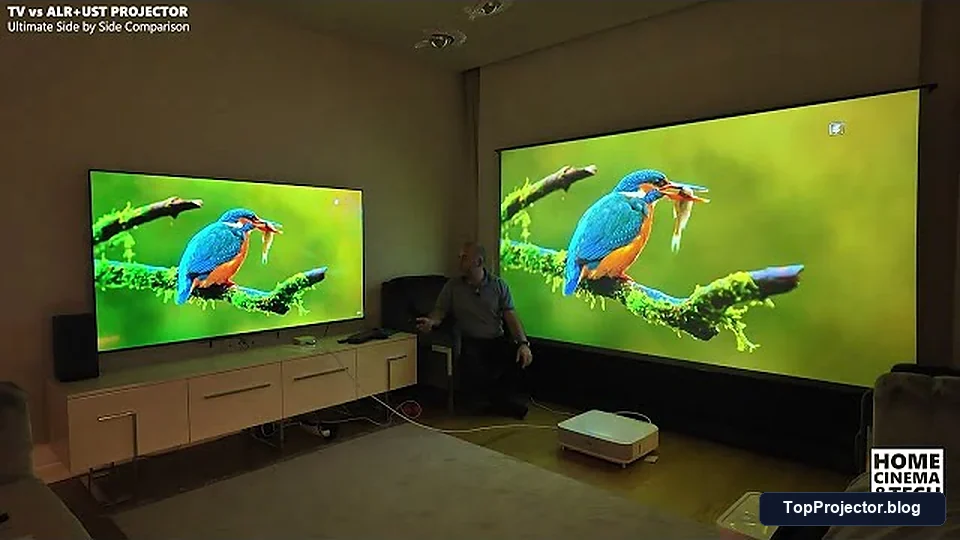
Televisions use self-emissive pixels or advanced polarizers to fight ambient light directly. A bright basement den with recessed lighting demands aggressive ambient light rejection fabrics for projectors.
Basements often feature controlled illumination, but exposed concrete or light flooring can reflect light back onto your screen. Pairing a 0.8 gain ALR material preserves deep contrast by absorbing off-axis room reflections effectively.
- Underground rooms reduce natural daylight infiltration significantly.
- Recessed ceiling lights scatter stray photons across matte screens.
- ALR materials redirect ceiling light away from seated viewers.
- Opt for ceiling treatments using matte black velvet to eliminate secondary optical reflections entirely.
- Calibrate projector lumens against your exact foot-lambert targets for optimal daylight viewing balance.
Controlled Cave vs. Multi-Use Recessed Lighting
If your basement functions as a dedicated cinema with black velvet walls, a standard white screen excels. Stray light is absorbed before it degrades your projected image.
Multi-use basements with pool tables need ambient light rejecting materials. These specialized screens preserve contrast ratios even when overhead room lights remain fully powered on.
- Velvet theater walls eliminate secondary light reflections.
- Directional ALR screens reject vertical overhead light sources.
Managing Diffuse Light Reflection
Using a throw distance calculator helps determine exact placement. Evaluating our throw distance calculator ensures your ultra-short throw aligns properly with specialized ambient light rejecting screen surfaces.
- Verify precise throw angles to prevent hot-spotting across wide seating arrangements.
- Choose rigid fixed-frame options over pull-down designs to maintain flawless tension.
Black Floor Performance, Contrast Ratios, and Shadow Details
Achieving true cinematic immersion requires deep black levels that anchor dark movie scenes. Televisions shut off individual pixels to deliver an infinite contrast ratio.
Projectors struggle with ambient light in untreated rooms, raising the black floor. Choosing the right ANSI lumens output or browsing outdoor 4K projector models helps conquer difficult spaces.
True cinematic immersion requires exceptional black floor performance rather than blinding peak brightness alone. Modern laser engines achieve superior native contrast ratios exceeding 2,500:1 without crushing delicate near-black shadow details during dark cinematic scenes.
- OLED panels deliver absolute zero-nit black performance.
- Projectors rely on room darkness to render dark scenes.
- Grey projection screens absorb scattered light to boost shadows.
- Verify ANSI contrast measurements rather than relying on inflated dynamic contrast manufacturer specifications.
- Ensure gamma tracking remains locked at 2.4 for darkened basement theater room environments.
Evaluating Real-World Shadow Precision
Watching dark sci-fi thrillers in a basement exposes every contrast limitation. TVs reveal subtle shadow gradations without washing out surrounding bright objects.
Projectors require precise dynamic iris calibration to enhance dark scene punch. Without this optics tuning, shadow details tend to look flat and muddy.
- Dynamic iris algorithms boost dark scene fidelity.
- Pixel-level dimming prevents halo artifacts on televisions.
Dynamic Iris and Laser Dimming
Dynamic laser modulation dims light output instantly during dark sequences. This hardware enhancement deepens blacks noticeably, rivaling flat-panel OLED performance while maintaining adequate HDR highlights across expansive projection surfaces without noticeable pumping.
- Test laser dimming speeds during high-contrast panning shots to avoid artifacts.
- Calibrate manual iris settings to balance peak white punch with inky black levels.
Peak Luminance, HDR Metadata Handling, and Color Gamut
High dynamic range demands intense peak luminance to render specular highlights accurately. Large televisions push high nit counts that make HDR pop effortlessly.
Projectors distribute light across huge screen areas, reducing punchy highlights. Modern laser engines bridge this gap by delivering stable color volume.
Projectors handle HDR differently than direct-view televisions by distributing light across huge screen areas. Advanced tone-mapping algorithms remap HDR metadata dynamically to prevent clipping bright highlights while preserving director intent accurately.
- Televisions deliver superior specular highlight brightness.
- Laser light sources maintain consistent color saturation over time.
- HDR tone mapping is essential for projection systems.
- Prioritize laser engines featuring RGB triple-laser diodes to bypass optical color filter lumen penalties.
- Target calibrated white points matching standard D65 daylight specifications for accurate skin tones.
Wider Color Spaces in Dark Environments
Wide color filters expand cinema color gamuts beyond standard limits. As highlighted in our BenQ HT3560 review, high dynamic range performance thrives in dark home theaters.
Televisions maintain high brightness even when saturating rich cinematic colors. This ensures vibrant explosions and sunsets look strikingly realistic.
- Color filters expand coverage of the DCI-P3 gamut.
- High lumen output prevents color desaturation during HDR playback.
Wide Color Filters and Rec.2020 Coverage
Activating internal cinema filters expands color volume significantly, covering over 95 percent of the DCI-P3 spectrum. Although this drops total lumen output by twenty percent, color saturation reaches genuine theatrical reference standards effortlessly.
- Measure filtered lumens before selecting screen dimensions to guarantee adequate brightness.
- Use auto-switching color profiles for SDR versus HDR content playback workflows.
Screen Scale, Throw Ratios, and True Cinematic Immersion
Nothing matches the visceral scale of a 120-inch projection screen filling your field of view. Projectors deliver genuine movie theater immersion at fractional costs.
Televisions provide sharper pixel density but hit strict financial walls above 98 inches. Moving past 100 inches makes projection the only viable path.
Basements provide the physical clearance needed for massive cinematic projection sizes ranging from 120 to 150 inches. Calculating exact throw distances ensures your optical zoom fills the frame without introducing geometric distortion or pixel scaling artifacts.
- Projectors easily scale from 100 to 150 inches.
- Televisions become exponentially expensive past 85 inches.
- Throw distance dictates your optimal basement layout geometry.
- Measure your precise throw ratio using manufacturer calculators to verify correct lens offset alignment.
- Select acoustically transparent woven screens to place center channel speakers directly behind the imaging plane.
Ultra-Short Throw Options for Tight Spaces
Ultra-short throw projectors sit inches from the wall, eliminating shadow interruptions. They transform standard basement media rooms without complex ceiling wiring.
Long-throw units demand dedicated ceiling mounts and precise lens calibration. Both configurations deliver massive visual scales that televisions cannot touch.
- UST projectors sit directly below the screen surface.
- Long-throw models require careful optical alignment.
Short-Throw Versus Standard-Throw Optics
Ultra-short throw setups sit inches from the wall, eliminating foot traffic shadows in compact basement layouts. Standard throw models require ceiling mounts but offer superior optical lens shift flexibility for multi-row seating configurations.
- Account for horizontal and vertical lens shift ranges before purchasing ceiling mounts.
- Verify cabinet depth requirements when placing ultra-short throw consoles on media credenzas.
Motion Resolution, Input Lag, and High Refresh Gaming
Competitive basement gaming requires ultra-low input lag and high refresh rates. Modern gaming televisions deliver sub-10ms response times with full variable refresh rate support.
Projectors have closed the latency gap significantly with dedicated gaming modes. However, extreme motion clarity still favors high-end emissive displays.
Modern home theater projectors now feature dedicated gaming modes that reduce input lag below 16 milliseconds at 4K resolution. This responsiveness makes fast-paced competitive gaming feel remarkably snappy on a massive cinematic scale.
- Televisions offer near-instantaneous pixel response times.
- Projector gaming modes reduce latency below twenty milliseconds.
- High refresh rates prevent motion blur in fast shooters.
- Check HDMI 2.1 bandwidth limits to confirm uncompressed 4K/120Hz signal transmission from modern consoles.
- Prioritize low input latency over complex video processing options during competitive multiplayer gaming sessions.
Immersive Co-Op Gaming on Massive Screens
Splitscreen gaming benefits immensely from a massive projector display. Following our guide on streaming media ensures low input lag when switching from gaming to movies.
Televisions counter with superior motion handling and zero ghosting during rapid camera pans. Your gaming priorities dictate the final hardware choice.
- Massive projection screens enhance multi-player visibility.
- OLED panels eliminate motion blur during fast camera moves.
High Refresh Rates and Frame Interpolation
Supporting 120Hz refresh rates ensures buttery-smooth motion handling during frantic gameplay sessions. While frame interpolation helps movies reduce judder, competitive gamers should disable processing features to maintain minimal controller response times universally.
- Enable Auto Low Latency Mode for seamless handshakes with compatible gaming hardware.
- Test response speeds using specialized testing tools before starting intense gaming sessions.
Structural Installation, Heat Management, and Acoustic Noise
Installing a home theater requires managing equipment heat and cooling fan noise. Projectors generate noticeable acoustic db levels during high-power laser operation.
Televisions mount flush against basement drywall with zero fan noise. Projectors demand careful ceiling reinforcement and cable routing through joists.
Basement installations demand careful attention to thermal dissipation and fan noise management. High-output laser engines generate substantial heat, requiring adequate ceiling clearance to prevent internal thermal throttling during marathon four-hour movie viewing sessions.
- Projectors require dedicated cooling fans and ventilation clearance.
- Televisions offer silent, fanless solid-state operation.
- Ceiling mounts need structural backing for heavy projector chassis.
- Leave at least twelve inches of open clearance around exhaust vents for proper airflow.
- Utilize heavy-duty threaded steel rods when securing heavy ceiling mounts to basement floor joists.
Acoustic Silence and Clean Cable Runs
Whisper-quiet projector fans prevent distracting audio interference during quiet movie scenes. Always verify manufacturer noise ratings before mounting units overhead.
Televisions simplify installation by resting cleanly on media consoles. Hidden in-wall wiring finishes the sleek aesthetic without complex ceiling drilling.
- Low fan noise preserves delicate movie soundscapes.
- Console placement eliminates complicated overhead wiring tasks.
Acoustic Decibel Thresholds and Ventilation
Modern projectors typically operate between 24 and 28 decibels in Eco mode. Mounting the unit far enough from primary seating positions ensures cooling fan noise remains completely masked by your surround sound system.
- Inspect intake air filters monthly to prevent dust buildup and overheating failures.
- Consider hush boxes for high-output commercial units installed in quiet rooms.
Final Verdict: Choosing the Ultimate Basement Display
Selecting the right display depends entirely on your specific basement environment and viewing habits. Dedicated dark-room theaters achieve unmatched magic through a large projector.
Lively entertainment basements with ambient light thrive with a large television. Match your optical gear to your room geometry for optimal results.
Selecting between a massive projector screen and a large flat-panel television depends entirely on your room priorities. If absolute dark-room cinematic scale and immersive scale matter most, high-end projection remains the undisputed basement champion.
- Choose projectors for dedicated, light-controlled cinema spaces.
- Select televisions for multi-use rooms with ambient lighting.
- Prioritize screen size or contrast based on viewing preferences.
- Prioritize native contrast and optical light rejection for dedicated windowless batcave theater builds.
- Evaluate total wall space capacity before committing to rigid fixed-frame projector screen dimensions permanently.
Making Your Final Investment Decision
Assess your basement lighting, seating distance, and primary content sources carefully. True movie enthusiasts will always lean toward massive projection scales.
Casual viewers watching sports with friends will appreciate the punchy daytime brightness of large televisions. Balance these core compromises wisely.
- Evaluate ambient light before buying projection gear.
- Consider sports viewing habits for daytime brightness needs.
Balancing Ambient Light and Budget Priorities
Choose large flat-panel televisions if your basement retains significant ambient lighting from basement windows. Otherwise, invest in an optical ALR screen paired with a quality laser projector for unmatched home theater experiences.
- Factor in total installation complexity when comparing hardware costs against giant flat panels.
- Test room lighting levels throughout the day before finalizing your primary display choice.
Frequently Asked Questions
Can I use a projector in a basement with windows?
Basement windows must be covered with blackout shades to prevent daylight washouts. Controlling ambient light is essential for maintaining strong contrast ratios.
Are ultra-short throw projectors better than TVs?
Ultra-short throw projectors provide massive cinema scale that televisions cannot match at comparable sizes. However, TVs still win on daylight brightness.
Do I need a special screen for a basement projector?
Specialized ambient light rejection screens improve contrast significantly in rooms with white walls. Dark dedicated theaters work wonderfully with standard white screens.
How does projector bulb heat affect small basements?
Modern laser projectors generate modest heat and include effective cooling fans. Proper ventilation clearance around the chassis prevents thermal shutdown issues.
Is input lag bad for gaming on modern projectors?
Modern gaming projectors feature specialized low-latency modes under twenty milliseconds. This ensures responsive performance for casual and competitive console gaming sessions.