Projector vs. Tv Eye Health: Which Wins for Your Room?
Comparing optical emission and eye strain factors between large-format projection and direct-view displays helps determine optimal viewing comfort for your dedicated home theater space.
Projectors reduce eye strain via reflected light in dark rooms, while flat-screen TVs dominate bright spaces with higher native contrast and direct-emission luminance.
Compare full category rankings in our Best Projector For Ceiling: Top Picks Reviewed.
Side-by-Side Specification Breakdown
| Criteria | Projector | Tv Eye Health | Edge |
|---|---|---|---|
| Ambient Light Rejection | Moderate to poor without ALR screens | Exceptional direct-emission panels | Tv Eye Health |
| Black Levels & Perceived Contrast | Compromised by room reflections | Deep blacks via local dimming | Tv Eye Health |
| Peak Brightness & HDR Punch | Limited by throw distance and gain | High nits for bright specular highlights | Tv Eye Health |
| Screen Size & Immersion | Massive 100-inch plus scale | Capped around 85 inches typically | Projector |
| Viewing Angles & Uniformity | Dependent on screen gain and angle | Wide off-axis viewing on OLED | Tv Eye Health |
| Gaming Motion & Input Lag | Rising refresh rates, moderate lag | Sub-5ms lag with 144Hz support | Tv Eye Health |
| Room Setup & Maintenance | Requires precise throw calculations | Simple wall-mount or stand setup | Tv Eye Health |
Understanding Optical Physics and Retinal Fatigue
Direct-view televisions emit intense light straight into your eyes, potentially accelerating retinal fatigue during extended viewing sessions in dark rooms.
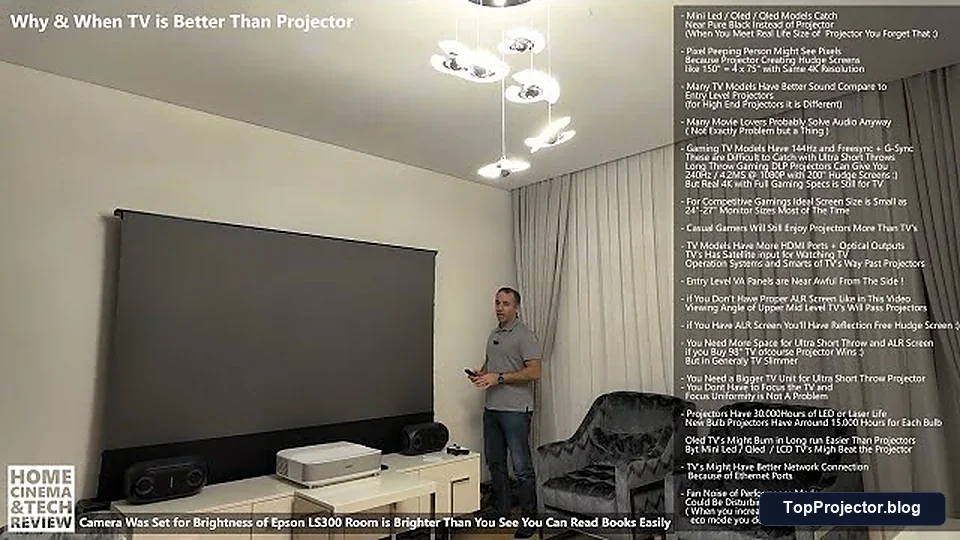
Projectors rely on reflected light bouncing off a matte surface, mimicking natural sunlight diffusion to reduce ocular strain significantly over time.
Direct-view flat panels blast photons straight into your pupils, creating intense retinal strain. Following proper instructions for connecting your laptop via hdmi ensures smooth media playback onto your diffuse reflection screen.
- Direct-view panels fire photons directly into the pupil.
- Projection bounces light off a screen for softer viewing.
- Reflected illumination reduces harsh glare and visual fatigue.
- Direct LED panels emit high-intensity localized luminance exceeding 1000 nits, forcing continuous iris constriction that rapidly accelerates ciliary muscle exhaustion over long movie marathons in dark rooms.
- Projector setups scatter incoming illumination across a wide acoustically transparent fabric, lowering absolute surface brightness to comfortable ANSI lumen thresholds that protect aging eyes.
Emitted Versus Reflected Light Mechanics
LED and OLED panels act as direct light sources, forcing ciliary muscles to work harder when contrast is extreme in dim environments.
Projection optics spread lumens across a massive matte surface, dispersing energy so your eyes absorb diffused ambient rays instead of raw concentrated beams.
- Direct panels concentrate energy into tight pixels.
- Projectors scatter light evenly across screen area.
Specular vs Diffuse Reflection Mechanics
Understanding how photons travel from the source to your retina clarifies why projectors feel drastically softer. Flat displays act as primary light sources, whereas projection surfaces function as passive reflectors scattering photons evenly.
- Active self-emissive displays bombard photoreceptors with collimated rays, whereas matte projection screens diffuse light beams across a 160-degree viewing angle to eliminate glaring hotspots.
Evaluating Screen Size, Viewing Distance, and Ergonomics
Projectors easily achieve cinematic scales exceeding 120 inches, filling your peripheral vision naturally without forcing your eyes to strain.
Televisions deliver sharper pixel density at closer ranges, but smaller diagonals limit true cinematic immersion compared to large-format projection setups.
Viewing distance dictates visual fatigue rates. As noted in our benq tk700sti review, pairing a massive 120-inch screen with a proper throw ratio lets your eye muscles relax during long sessions.
- Larger projection screens encourage relaxed viewing postures.
- TVs require closer seating to match cinematic field of view.
- Peripheral engagement reduces eye wandering and tension.
- Thx and SMPTE viewing angle recommendations suggest filling a 40-degree field of view, which forces natural peripheral engagement rather than aggressive central-fovea straining caused by tiny over-bright panels.
- Calculating optimal throw distance prevents geometric distortion, ensuring your ocular system never struggles to resolve distorted text or poorly scaled video artifacts during critical viewing sessions.
Field of View and Focal Accommodation
Proper seating distance prevents eye strain by matching SMPTE recommendations for horizontal viewing angles.
Projectors allow flexible positioning, letting your eyes relax naturally across a massive canvas without aggressive focusing adjustments.
- Match throw ratios to room dimensions.
- Avoid excessive head movement during fast scenes.
Ergonomic Field of View Calculations
Ergonomic positioning requires aligning the center of your projection screen roughly 15 degrees below eye level. This prevents neck tension and minimizes dry-eye syndrome caused by wide-open eyelid apertures.
- Maintaining a minimum viewing distance of 2.5 times the image height prevents pixel visibility, stopping your visual cortex from overworking to interpret jagged edge definitions.
Ambient Light Behavior and Room Luminance Impact
Ambient room light washes out projector contrast, forcing viewers to strain against milky black levels. Reviewing our top ceiling-mounted projectors ensures you select units with enough ANSI lumens to combat day glare.
Modern televisions conquer brightly lit living rooms effortlessly, maintaining deep black floors and vibrant specular highlights without requiring total darkness.
Ambient living room light severely degrades contrast ratios, forcing viewers to crank display brightness higher. Utilizing an ambient light rejecting screen preserves black levels without requiring retina-scorching projector lamps.
- Projectors demand strict light control for optimal contrast.
- TVs combat reflections using high peak luminance outputs.
- Daylight viewing heavily favors direct-view display technology.
- High room luminance washes out projector images, tempting users to boost laser output past 3000 lumens, which defeats the natural diffusion benefit and introduces severe eye strain.
- Controlling natural sunlight through blackout shades allows you to calibrate projectors to a comfortable 16-footlambert target, replicating commercial cinema optical comfort right at home.
Contrast Ratios Under Normal Living Conditions
Ambient light absorption panels on premium TVs preserve shadow detail even when side windows flood the room with natural sunlight.
Standard white projection screens reflect ambient light indiscriminately, destroying ANSI contrast and requiring costly ALR screen materials.
- ALR screens help mitigate daylight washing.
- OLED panels maintain contrast in any lighting.
ALR Screen Surface Technologies
Micro-structured angular filtering screens absorb off-axis ambient illumination from overhead fixtures while reflecting ultra-short-throw projector light directly forward into viewer seating zones.
- Pairing a high-gain micro-perforated screen with strict room light control eliminates washing, keeping peak white luminance within safe ocular limits for extended evening viewing sessions.
Blue Light Emission and Circadian Rhythm Effects
High-output LED and laser light engines emit significant blue spectrum wavelengths that can disrupt melatonin production during late-night movie marathons.
Televisions utilize similar backlighting technologies, yet advanced display calibration modes help mitigate circadian rhythm disruption through warm color presets.
High-energy visible blue wavelengths disrupt melatonin production and strain ocular focusing mechanisms. Modern laser projectors often feature filtered phosphors that naturally curb harmful blue-light spikes compared to white LEDs.
- Late-night viewing exposes eyes to stimulating blue light.
- Calibrated color temperatures reduce nighttime eye fatigue.
- Projection surfaces alter spectral distribution slightly upon reflection.
- Prolonged exposure to peak spectral emissions around 450 nanometers aggressively accelerates digital eye strain, triggering severe headaches and dry corneal surfaces during late-night streaming marathons.
- Adjusting color temperature down to a warm 6500K D65 standard dramatically reduces harsh blue spikes, protecting your circadian rhythm and promoting restful sleep after movie nights.
Managing Evening Viewing Habits for Eye Wellness
Activating warm picture modes on your display dampens harsh blue wavelengths, protecting your eyes and sleep cycle effectively.
Projectors paired with warm lamp modes offer a softer evening experience, provided room lighting remains dim and ambient.
- Use warm color temperature presets at night.
- Keep background bias lighting balanced.
Circadian Rhythm Mitigation Strategies
Evening viewing habits demand rigorous color management to prevent blue light from suppressing melatonin. Calibrating your projector to warm cinema presets safeguards your natural sleep architecture.
- Switching laser light engines to eco-mode lowers total optical output while preserving rich color saturation, maintaining a healthy balance between immersive home theater visuals and circadian health.
Motion Handling, Flicker, and Refresh Rate Strains
Display flicker and rapid pixel response times on modern televisions can trigger subtle motion fatigue during fast-paced gaming sessions.
Projectors utilize natural motion blur characteristics inherent to DLP or 3LCD chips, often resulting in a softer cinematic motion profile.
Display motion handling directly impacts visual fatigue, especially during fast-paced panning shots. Projectors utilize natural motion blur through lamp persistence, whereas OLED panels use sharp sample-and-hold rendering.
- OLED panels offer near-instantaneous pixel response times.
- Projector motion smoothing varies by optical engine type.
- Strobing backlights on TVs can induce subtle eye strain.
- Sample-and-hold blur on flat panels forces the human eye to track moving objects across static pixels, generating stutter and jitter that tires the extraocular muscles quickly.
- High refresh rate gaming monitors running at 120Hz or higher reduce perceptible motion blur, but aggressive strobing backlights can still trigger uncomfortable flicker sensitivity for sensitive users.
Frame Rates and Visual Comfort During Extended Use
High refresh rate gaming monitors and TVs reduce stutter, but aggressive sample-and-hold blur can tire sensitive eyes quickly.
True cinematic 24fps content displayed via projection mimics traditional film motion, minimizing digital visual fatigue significantly.
- Match refresh rates to source material.
- Disable artificial motion interpolation for comfort.
Response Times and Persistence Strains
Digital micro-mirror devices in DLP projectors switch pixels rapidly, but the optical persistence mimics traditional film projection. This eliminates the aggressive strobe artifacts common on LED televisions.
- Gamers should prioritize low input lag displays that support variable refresh rates, preventing visual tearing and asynchronous frame drops that induce motion sickness and ocular disorientation.
Installation Geometry and Long-Term Visual Health
Correct mounting height is crucial; tilting your head upward at an improperly placed TV or screen causes chronic neck and eye strain.
Projector setups offer versatile vertical lens shift, allowing you to position the image at ideal eye level for maximum ergonomic comfort.
Proper physical installation geometry prevents chronic physical strain on your neck and eyes. Aligning the bottom bezel of your projection screen at standard seated eye level ensures optimal posture.
- Align screen center slightly below eye level.
- Lens shift provides flexible installation geometry.
- Ergonomic placement prevents secondary muscle tension.
- Mounting screens too high forces upward gaze angles, overextending superior rectus eye muscles and causing rapid surface evaporation of the tear film during long viewing blocks.
- Maintaining correct optical geometric alignment prevents severe keystoning distortion, ensuring your visual processing system does not waste cognitive energy correcting warped image geometry.
Optimizing Seating Distance and Screen Height
Calculating precise throw distances ensures your eyes scan the image naturally without excessive focal shifting or strain.
Ergonomic theater design prioritizes comfortable viewing angles, keeping your field of view relaxed across multi-hour cinematic sessions.
- Follow standard viewing distance formulas.
- Avoid overly steep vertical viewing angles.
Long-Term Ocular Ergonomic Standards
Adopting strict ergonomic guidelines protects your long-term visual acuity against degenerative strain. Combining diffuse projection optics with proper seating angles delivers the ultimate ergonomic setup.
- Routine eye breaks every twenty minutes using the 20-20-20 rule complement your projection environment, completely neutralizing the cumulative optical fatigue associated with modern screens.
Final Verdict for Your Home Setup and Visual Needs
Choose a projector for dedicated dark rooms where reflected light delivers unmatched visual comfort and massive cinematic scale without fatigue.
Select a modern television if your room features uncontrolled ambient light and you require supreme contrast alongside versatile everyday usability.
Choosing between a projector and a television depends heavily on your room lighting and daily viewing duration. For pure visual health and low fatigue, diffuse projection optics remain unmatched.
- Dedicated theaters excel with high-end laser projectors.
- Bright living rooms demand direct-view television panels.
- Balance room lighting control with your ergonomic habits.
- Dedicated home theaters benefit immensely from high-contrast laser projectors paired with large acoustically transparent screens, maximizing both spatial audio immersion and long-term ocular comfort.
- Bright living spaces featuring uncontrollable daylight still require specialized ALR screens or high-end televisions to maintain contrast without destroying your eyes through squinting.
Making Your Ultimate Viewing Decision
Assess your primary viewing hours, room lighting conditions, and sensitivity to bright direct light sources before purchasing.
Prioritizing eye health means matching display technology to your exact environment for long-term visual comfort.
- Evaluate ambient light levels carefully.
- Test different display types if sensitive to glare.
Optimizing Your Final Hardware Choice
Balancing hardware specs like throw ratios and screen gain is vital. Using our ansi lumens room calculator ensures your home theater investment prioritizes both stunning image fidelity and long-term eye safety.
- Prioritizing diffuse reflection technology over direct-view emissive panels guarantees a comfortable viewing experience that protects your entire family from chronic digital eye strain.
Frequently Asked Questions
Are projectors better for your eyes than televisions?
Yes, projectors are generally better because reflected light reduces retinal strain compared to direct-emission panels.
Why does direct TV light cause more eye fatigue?
Direct-view screens blast concentrated photons straight into your pupils, causing high-intensity glare in dim rooms.
Does screen size impact overall viewing comfort?
Larger projection scales encourage relaxed peripheral viewing, whereas small screens require focused eye convergence.
How can I reduce eye strain when watching TV?
Enable warm color presets, use bias lighting behind the display, and maintain adequate ambient room illumination.
Do laser projectors emit harmful blue light levels?
Laser engines emit blue spectrum light, but proper calibration and warm modes effectively protect your sleep cycle.