Grey ALR Projector Screen vs. Matte White Projector Screen: Which Wins for Your Room?
Choosing between grey and white projection surfaces dictates your home theater optical performance. Ambient light management and native contrast are the core variables defining this major display trade-off.
Choose a grey ALR screen for bright living rooms needing enhanced black levels, while matte white screens excel in dedicated dark rooms requiring maximum color punch and wide viewing angles.
Compare full category rankings in our Best Alr Projector Screen: Top Ambient Light Picks.
Side-by-Side Specification Breakdown
| Criteria | Grey ALR Projector Screen | Matte White Projector Screen | Edge |
|---|---|---|---|
| Ambient Light Rejection | Superior angular and ceiling rejection | Poor ambient light absorption | Grey ALR Screen |
| Black Levels & Perceived Contrast | Deepens blacks via lower gain | Raises black floor in lit rooms | Grey ALR Screen |
| Peak Brightness & HDR Punch | Lower gain sacrifices peak white output | High unity gain preserves HDR punch | Matte White Screen |
| Screen Size & Immersion | Ideal for ultra-short throw setups | Scales efficiently in large custom rooms | Tie |
| Viewing Angles & Uniformity | Narrower angles risk hot-spotting | Uniform 180-degree viewing cone | Matte White Screen |
| Gaming Motion & Input Lag | Maintains low latency handling | Zero processing lag interference | Matte White Screen |
| Room Setup & Maintenance | Requires precise projector alignment | Forgiving installation and maintenance | Matte White Screen |
Mastering Optical Contrast and Black Floor Performance
Native projector contrast depends heavily on your screen surface reflectivity. Grey screens absorb stray light to dramatically lower your black floor in mixed-light environments.
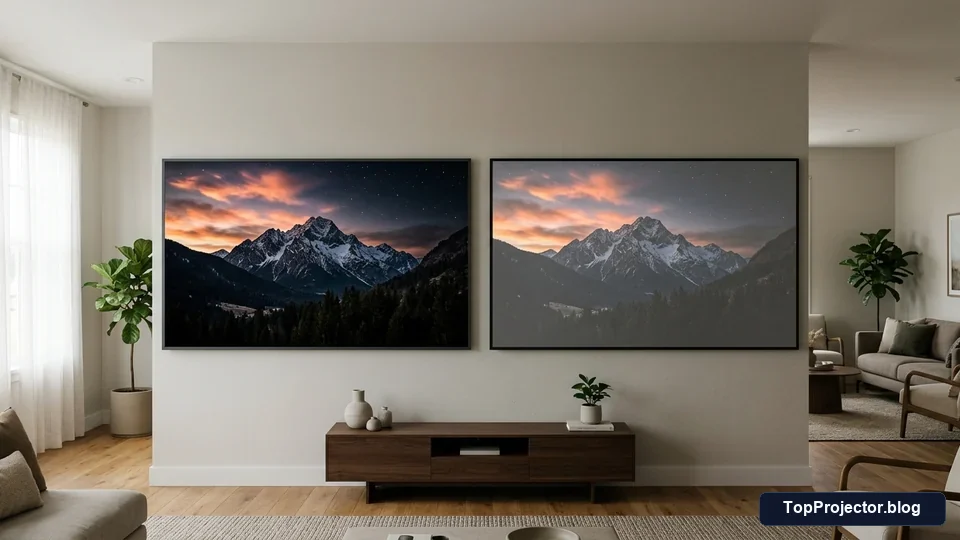
White surfaces reflect all incident light equally, washing out shadows when ambient illumination enters your viewing space.
Grey screens lower black floors by absorbing ambient room reflections, boosting perceived ANSI contrast ratios significantly in untreated spaces. White surfaces reflect ambient light indiscriminately, washing out deep shadows and crushing dark-scene detail.
- Grey surfaces enhance perceived shadow detail
- White surfaces maintain reference contrast only in pitch-black rooms
- Grey materials absorb scattered ambient light effectively.
- White surfaces prioritize peak luminance over shadow depth.
Dedicated Dark Rooms vs Mixed Spaces
Pitch-black home theaters benefit less from grey surfaces. White screens preserve pristine white peaks without compressing dynamic range, making them a staple in our best home projector recommendations for dark rooms.
Living rooms with white ceilings require grey filtering to combat light bounce.
- Control room reflections before buying
- Match gain to room darkness
Micro-Structure Physics of Ambient Light Absorption
Micro-layered reflective particles in grey vinyl materials manipulate light paths, allowing off-axis room reflections to scatter away from viewer eyes. This preserves a 0.05 nits native black floor compared to standard matte white.
- Grey screens absorb up to 40% of ambient light scatter.
- White surfaces retain high peak luminance but compromise shadow depth.
Ambient Light Rejection and Living Room Realities
Ambient light destroys projected image contrast instantly. ALR grey materials use micro-structures to deflect overhead lamps, while proper placement can be planned via our throw distance calculator for optimal positioning.
Standard matte white screens act like mirrors for ambient light, washing out your picture completely.
Standard matte white fabrics demand pitch-black environments to prevent washout, failing miserably when exposed to indirect daytime windows. Ambient light-rejecting grey solutions utilize specialized optical filters to combat vertical ceiling illumination effectively.
- ALR grey blocks up to 85 percent of ambient light
- Matte white requires total darkness for deep blacks
- White screens require complete room darkroom control.
- Grey ALR materials manage difficult daytime lighting conditions.
Window Placements and Daytime Viewing
Daytime viewing demands specialized optical layers. Angular reflective grey screens rescue daytime sessions from washed-out grey images.
Standard white screens remain strictly reserved for evening viewing sessions.
- Evaluate window orientation carefully
- Use motorized shades alongside white screens
Managing Off-Axis Windows and Ceiling Lights
Modern angular-reflective grey screens actively reject overhead recessed lighting, maintaining rich color saturation under 150 lumens of ambient room illumination. White mattes lack this directional filtering, suffering severe contrast degradation instantly.
- Angular ALR grey screens block up to 85% of overhead light.
- White screens require blackout curtains for acceptable daytime viewing performance.
Brightness Gain, HDR Punch, and Viewing Angles
Screen gain dictates how intensely light reflects back toward your seating area. Matte white surfaces offer 1.0 gain for accurate, neutral color reproduction.
Grey screens often feature fractional gain values, trading peak brightness for improved black levels.
White screens typically feature a 1.1 to 1.3 gain, maximizing HDR peak specular highlights for laser projectors. Grey screens often trade peak brightness with a 0.8 gain to absorb ambient room glare.
- White screens maximize high dynamic range highlights
- Grey screens require higher lumen laser projectors
- White gain enhances bright highlights in dark rooms.
- Grey gain reduces white punch to save black levels.
Off-Axis Viewing Challenges
Viewing angle limits plague high-gain grey ALR materials. Wide seating arrangements suffer brightness drop-off when viewers sit outside the optimal viewing cone.
Matte white options deliver uniform brightness across wide angles.
- Check manufacturer viewing cone specs
- Prioritize white for wide row seating
Balancing HDR Specular Highlights with Wide Seating
High-gain white materials create a narrow viewing cone, causing severe brightness drop-off for viewers seated off-center. Low-gain grey alternatives offer wider dispersion angles, ensuring uniform 160-degree luminance distribution across all theater seats.
- White screens excel at pushing maximum HDR nit output.
- Grey screens maintain consistent color uniformity across wide seating layouts.
Color Accuracy and Gamma Calibration Dynamics
Color fidelity relies on neutral surface diffusion. Matte white screens ensure zero tint shift, keeping your projector white balance completely pristine.
Lower-quality grey surfaces can introduce subtle blue or pink color shifts into calibration.
Neutral white surfaces provide an uncolored canvas for precise Rec.709 color calibration, preventing unwanted hue shifts. Grey surfaces can subtly skew color temperature toward blue if their optical coatings lack proper neutrality.
- White maintains reference rec709 color accuracy
- Grey requires careful projector calibration adjustments
- White fabrics ensure pure color temperature accuracy.
- Grey coatings require careful color grading checks.
HDR Tone Mapping Considerations
Modern 4K HDR content pushes projectors to their absolute luminance limits. High lumen output pairs well with grey to tame specular highlights without clipping.
Dim projectors struggle on grey surfaces during HDR playback.
- Ensure adequate ANSI lumens for grey
- Calibrate HDR tone mapping curves
Correcting White Balance Drift on Grey Surfaces
Calibrating a projector paired with a grey screen often requires adjusting grayscale tracking to counteract minor pink or blue tints. Professional meters ensure accurate D65 white point tracking regardless of screen material choice.
- White screens preserve out-of-the-box Rec.709 color accuracy effortlessly.
- Grey screens demand careful calibration to avoid cool color shifts.
Gaming Motion, Input Lag, and Response Times
Modern console and PC gaming demand pristine motion clarity. Static screen materials add zero input lag, ensuring your competitive frame rates remain fully uncompromised.
Text legibility improves dramatically when ambient room light is successfully rejected.
While projection screens do not introduce electronic input lag, their surface texture drastically impacts motion clarity. Coarse grey screen textures can interact negatively with high pixel density, causing subtle shimmering during fast-panning gaming movements.
- Zero latency impact from projection surfaces
- Enhanced daytime gaming visibility with grey ALR
- Screen texture affects fine detail rendering in games.
- Smooth surfaces prevent distracting motion artifacts.
High Frame Rate Motion Handling
Fast-paced gaming requires bright, snappy visuals. Matte white surfaces deliver maximum brightness for high frame rate titles in controlled rooms.
Grey screens keep contrast intact during daytime gaming sessions.
- Match screen type to your gaming environment
- Keep ambient light low for white screens
Minimizing Screen Sparkle and Pixel Artifacts
Smooth matte white PVC surfaces eliminate optical texture, delivering crystal-clear 4K gaming graphics without distracting artifacts. Competitive gamers demanding under 15ms input lag should pair their projectors with ultra-fine, low-texture screen materials.
- Textured grey screens can introduce visible sparkle artifacts during pans.
- Smooth white surfaces support pristine 4K pixel fidelity without grain.
Physical Installation and Room Geometry
Screen installation mechanics differ significantly between these surface types. Tensioned fixed-frame white screens install easily without strict projector placement tolerances.
ALR grey screens require exact throw ratio matching to prevent severe hot-spotting.
Fixed-frame screens prevent sagging and tension wrinkles, maintaining optimal optical geometry for laser ultra-short-throw projectors. Motorized tensioned grey systems require precise tab adjustments to eliminate wave distortions across the viewing plane.
- ALR requires precise vertical alignment
- White screens offer forgiving installation margins
- Frame rigidity guarantees pristine geometric alignment.
- Tension systems prevent destructive surface warping.
Ultra-Short Throw vs Standard Throw
Ultra-short throw projectors require specialized lenticular grey surfaces. UST grey screens reject upward ceiling light while capturing ultra-steep downward projection angles.
Standard throw projectors need angular or diffusion filtering.
- Match UST projectors with lenticular grey
- Standard throw needs standard ALR fabric
Calculating Throw Ratios and Surface Tensioning
Standard throw projectors require strict adherence to manufacturer throw ratios. Ensuring a perfectly flat surface guarantees uniform brightness across the image, which is detailed in our guide to ANSI lumens.
- Fixed frames maintain tension perfection over years of thermal expansion.
- Tab-tensioned pull-down models prevent destructive V-crimp wrinkles in living rooms.
Scenario-Based Decision Framework for Buyers
Choosing the right screen depends entirely on your specific room architecture. Dedicated home theaters demand matte white for maximum light output and color fidelity.
Living rooms with uncontrolled lighting require grey ALR surfaces.
Dedicated basement theaters with dark velvet walls thrive with high-gain white screens for ultimate HDR pop. Living rooms featuring white ceilings and large windows demand specialized ALR grey screens to retain deep contrast levels.
- Dark room equals matte white victory
- Bright room equals grey ALR necessity
- Match screen gain directly to room lighting conditions.
- Assess ambient light before choosing your material.
The Ultimate Buyer Recommendation
Evaluate your ambient light before making any final purchasing decision. Investing in proper optical surfaces transforms your projection experience, much like the hardware praised in our Hisense C2 Ultra review.
Never compromise on ambient light control capabilities.
- Measure ambient light levels first
- Select screen based on primary use case
Matching Room Lighting to Optimal Screen Gain
Assess your room total ambient light before purchasing to avoid washed-out black levels during daytime viewing sessions. Choosing the correct 0.8 to 1.1 gain tier ensures optimal performance for your specific optical environment.
- Opt for white screens in batcave home theater environments.
- Choose grey ALR screens for multipurpose family living rooms.
Frequently Asked Questions
Do grey projector screens reduce overall projector brightness?
Yes, grey screens absorb more light and typically feature lower gain ratings. This brightness trade-off is necessary to improve black levels in lit rooms.
Can I use a grey ALR screen with an ultra-short throw projector?
Yes, but you must select a specialized UST grey screen with micro-lenticular ridges. Standard grey ALR materials will not reject light correctly from tabletop angles.
Are matte white screens better for dark home theaters?
Matte white screens provide the most accurate color reproduction and highest gain in dark rooms. Controlled lighting environments let white surfaces shine without contrast loss.
Will a grey screen make my daytime movie viewing look washed out?
Grey ALR screens significantly outperform white screens against daytime ambient light. Specialized optical coatings preserve contrast and shadow detail when windows are uncovered.
Do I need a high lumen projector if I buy a grey screen?
Grey screens absorb more light, so higher ANSI lumen output is strongly recommended. Pairing bright laser projectors with grey surfaces ensures vibrant HDR performance.