Cnet Projector vs. Tv: Which Wins for Your Room?
Choosing between a large-format display and a projection system requires balancing ambient illumination, throw geometry, and contrast floors to maximize your home theater experience.
Choose a flat-panel display for bright living rooms with intense ambient light, but select a dedicated projection setup if massive 120-inch cinematic scale is your primary viewing priority.
Compare full category rankings in our Best Christmas Laser Lights: Top Holiday Picks.
Side-by-Side Specification Breakdown
| Criteria | Cnet Projector | Tv | Edge |
|---|---|---|---|
| Ambient Light Rejection | Relies on specialized ALR screens to combat overhead glare. | Uses high panel nits and anti-reflective coatings natively. | Tv |
| Black Levels & Perceived Contrast | Struggles with ambient bounce in untreated rooms, lowering contrast. | Delivers inking blacks via local dimming zones or self-emissive pixels. | Tv |
| Peak Brightness & HDR Punch | Typically outputs 1500 to 3000 ANSI lumens for large spreads. | Easily exceeds 1000 to 3000 nits on smaller physical areas. | Tv |
| Screen Size & Immersion | Easily scales from 100 to 150 inches without massive cost spikes. | Stops practical affordability around 85 to 98 inches maximum. | Cnet Projector |
| Viewing Angles & Uniformity | Depends heavily on screen gain and off-axis viewing drop-off. | Maintains vivid colors and contrast across extremely wide angles. | Tv |
| Gaming Motion & Input Lag | Modern lasers achieve low input lag around 15ms to 20ms. | Offers ultra-fast 120Hz/240Hz refresh rates with sub-10ms response. | Tv |
| Room Setup & Maintenance | Requires precise throw calculations, ceiling mounts, and alignment. | Simple tabletop placement or standard VESA wall mounting. | Tv |
Ambient Light Behavior and Optical Rejection
Projectors project light outward onto a passive surface, making them inherently vulnerable to ambient room illumination. Stray light washing out the projection area destroys perceived shadow detail and compresses dynamic range.
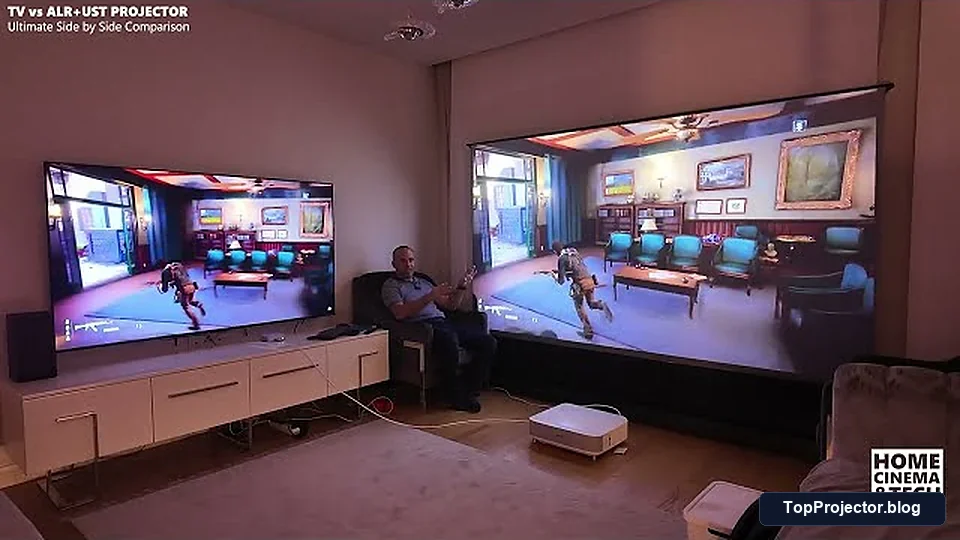
Televisions emit light directly toward the viewer from behind an emissive or transmissive panel. This active emission allows modern displays to punch right through bright daytime room lighting without losing saturation.
Modern ambient light rejecting screens utilize microscopic sawtooth structures. These specialized layers selectively absorb off-axis ceiling light while reflecting ultra-short throw projector beams directly toward seated viewers, preserving 1.2 gain efficiency.
- Projectors require dark or controlled lighting environments.
- Televisions handle windows and daylight effortlessly.
- ALR screens help projectors mitigate ambient washout partially.
- ALR materials actively reject up to 85% of ambient room illumination.
- Standard white walls scatter ambient light, destroying perceived contrast levels.
Pitch-Black Theater vs Living Room Daylight
In a dedicated, blacked-out basement theater with velvet walls, a high-end projector delivers an immersive experience that rivals commercial cinemas. Ambient light is completely neutralized, allowing deep shadow work.
Conversely, placing a standard projector in a white-walled living room during daytime results in washed-out blacks and muted colors. A flat-panel television remains vibrant and punchy under identical lighting.
- Basement theaters maximize projector contrast ratios.
- Daylit living rooms demand high television luminance.
UST Laser vs. Long Throw ALR
Ultra-short throw setups demand specialized lenticular optical filters. For holiday displays outside your main theater room, consult our best christmas laser lights guide to ensure proper outdoor placement.
- Lenticular optical filters block top-down ambient light effectively.
- A 0.4 throw ratio requires precise vertical alignment.
Black Floor Dynamics, Contrast Ratios, and Shadow Detail
Achieving true black levels remains a fundamental optical challenge for projection systems. Because a projector relies on a white screen reflecting ambient room light back, absolute black is limited by room reflectivity.
Advanced laser projectors use dynamic iris controls and dual-laser engines to lower black floors. However, they still cannot compete with the self-emissive pixels of OLED panels or dense local dimming arrays.
Flat panel displays achieve near-infinite native contrast through organic self-emissive pixels. Conversely, projectors struggle with ambient room reflections bouncing off white walls, raising native black floors and compressing critical shadow detail.
- Projectors struggle to show true blacks in bright rooms.
- OLED and Mini-LED TVs achieve infinite or near-zero black floors.
- Contrast perception relies heavily on room surface reflectivity.
- OLED televisions maintain true 0 nits black levels in completely dark environments.
- Projector black floors depend heavily on total room light control.
Dynamic Range and HDR Tone Mapping
HDR metadata handling on projectors requires aggressive tone mapping to distribute limited ANSI lumens effectively across a massive screen area. Specular highlights rarely possess the piercing nits found on TVs.
Televisions process HDR signals with native peak brightness figures exceeding 2000 nits, creating striking specular highlights on metallic reflections, explosions, and bright sunlight without clipping details.
- Projectors tone map HDR across huge surface areas.
- Televisions deliver true high-nit specular punch.
Dynamic Iris and Laser Dimming
High-end home theater projectors utilize dynamic laser dimming or physical iris mechanisms. Units featured in our epson ls11000 review demonstrate how these tools boost contrast ratios toward 500,000:1 performance thresholds.
- Dynamic iris systems reduce brightness during cinematic night sequences.
- Laser power modulation enhances perceived shadow depth significantly.
Peak Brightness, Screen Gain, and Viewing Angles
Measuring brightness requires evaluating how lumens spread over square footage. A 3000 ANSI lumen projector spreading light across a 120-inch diagonal screen delivers vastly less foot-lamberts than a bright television.
Screen gain plays a critical role in projector setups by concentrating reflected light toward the main seating cone. However, high-gain screens often introduce narrow viewing angles and sparkling artifacts.
Premium living room televisions routinely exceed 1,000 nits of peak brightness, easily combating high ambient light. Before buying, use our ansi lumens room calculator to determine exact brightness requirements for your space.
- Projector brightness dilutes across large screen sizes.
- Screen gain trades off viewing angle width for center punch.
- Televisions maintain uniform luminance across wide off-axis seating.
- High-gain screens amplify center-cone brightness while narrowing effective viewing angles.
- ANSI lumens ratings dictate true real-world illumination capabilities.
Off-Axis Drop-Off and Uniformity
When viewers sit off to the side of a high-gain projection screen, perceived brightness drops precipitously. Standard matte white screens offer wider angles but sacrifice peak center punch.
Televisions utilize advanced panel technologies like IPS or wide-view film layers to ensure color accuracy and contrast remain stable even when viewed from extreme side angles.
- High-gain screens suffer from narrow sweet spots.
- TVs offer consistent viewing angles for large groups.
Angular vs. Retro-Reflective Screens
Selecting between angular and retro-reflective screen materials dictates off-axis viewing quality. Angular surfaces bounce light mirror-style, whereas retro-reflective variants return light directly back to the active projection source.
- Retro-reflective materials suit narrow, centered seating arrangements best.
- Wide seating layouts require diffractive angular screen fabrics.
Screen Scaling, Viewing Geometry, and Cinematic Immersion
True cinematic immersion demands a wider field of view that fills your peripheral vision. Projectors effortlessly achieve massive 120-inch to 150-inch diagonals, replicating commercial cinema geometry at home.
Purchasing a television larger than 98 inches introduces prohibitive shipping costs, structural wall reinforcement needs, and extreme pricing curves. Projectors win the scaling battle by a wide margin.
Televisions remain structurally locked to fixed diagonal sizes, typically capping out around 98 inches. Projectors scale effortlessly from 100 inches to 150 inches, delivering authentic commercial cinema geometry right inside your home.
- Projectors deliver true IMAX-scale immersion affordably.
- TV sizes plateau rapidly past 85 inches due to logistics.
- Viewing distance dictates the ideal screen size ratio.
- Standard field-of-view formulas recommend a 40-degree viewing angle for movies.
- Massive projection sizes create genuine physiological immersion unavailable on flat panels.
The Mathematical Sweet Spot for Screen Size
THX and SMPTE guidelines recommend a 30 to 40-degree field of view for home theaters. Achieving this immersive angle requires screen sizes starting at 100 inches, making projectors the practical choice.
Smaller living rooms often lack the wall space required for massive projection screens. In tighter spaces, a 65-inch or 75-inch television provides the optimal viewing geometry without dominating the room.
- Cinematic FOV requires screens over 100 inches.
- Compact rooms benefit from manageable TV footprints.
Aspect Ratio Versatility
Constant height projection setups utilizing anamorphic lenses or motorized masking systems handle widescreen scope content flawlessly. Televisions leave distracting black letterbox bars on ultra-widescreen cinematic movie releases.
- Motorized masking systems eliminate pesky cinematic letterbox bars.
- Anamorphic lenses preserve full panel resolution for scope films.
Colorimetry, Motion Handling, and Console Gaming Latency
Modern home theater projectors frequently cover wide color gamuts like DCI-P3 using advanced phosphor wheels or RGB triple-laser sources. Color accuracy out of the box is exceptionally high on calibrated units.
Console gaming enthusiasts prioritize low input lag and fast refresh rates. While premium gaming projectors now achieve 15ms input lag at 4K/60Hz, televisions routinely offer sub-5ms response with 120Hz support.
Modern OLED televisions deliver blazing sub-millisecond pixel response times and ultra-low input lag under 10 milliseconds at 120Hz. Gaming projectors have improved drastically, now offering competitive latency figures around 16 milliseconds.
- Laser projectors deliver rich wide color gamuts.
- Televisions dominate competitive gaming with HDMI 2.1 features.
- Motion handling on TVs includes advanced black frame insertion.
- Laser light engines achieve massive Rec. 2020 color space coverage.
- Black frame insertion helps projectors combat inherent sample-and-hold motion blur.
Response Times and Competitive Gaming
Fast-paced competitive shooters require instant visual feedback. High-end televisions feature variable refresh rate technologies that eliminate screen tearing while maintaining ultra-low latency.
Projectors are catching up rapidly with dedicated gaming modes, but cable routing, keystone correction processing, and long HDMI runs can occasionally add unwanted latency to fast twitch gameplay.
- VRR support is native on almost all modern gaming TVs.
- Projector gaming requires careful processing mode adjustments.
Color Volume Under High Brightness
Maintaining color saturation at peak laser output challenges many single-chip DLP projectors. Televisions maintain rich, saturated color volume even during high-brightness HDR highlights without relying on aggressive color-wheel filtering.
- RGBRGB color wheels prioritize accurate cinematic color over peak brightness.
- Laser phosphor engines trade purity for massive lumen output.
Installation Complexity, Throw Ratios, and Physical Demands
Installing a front projection system involves complex calculations including throw ratios, lens shift percentages, and precise ceiling mount positioning. Alignment requires patience and technical know-how.
Televisions offer plug-and-play simplicity. Unboxing a flat panel, attaching the tabletop stand, or hanging it on a standard VESA wall mount takes minutes compared to hours of projector calibration.
Wall-mounted televisions require basic stud finding and bracket leveling. Projectors demand meticulous ceiling calculations, lens shift adjustments, and precise throw distance measurements to align images perfectly onto fixed frames.
- Projectors demand precise physical installation and calibration.
- TVs offer straightforward, hassle-free out-of-box setup.
- Ultra-short-throw projectors simplify placement on media consoles.
- Optical lens shift allows flexible ceiling placement without digital keystone degradation.
- Accurate throw ratios determine exact mounting distances for sharp focus.
Ultra-Short-Throw Projector Alternatives
Ultra-short-throw projectors sit inches from the wall, eliminating ceiling mounting hassles and foot-traffic shadow interference. They bridge the gap between traditional projectors and large living room TVs.
Despite easier placement, UST projectors still require specialized ambient light rejecting screens to combat ceiling lights, keeping installation slightly more complex than a standard television.
- UST models sit close to walls for easy placement.
- Specialized screens remain mandatory for optimal performance.
Thermal Management and Acoustic Noise
Powerful projector lamps and laser diodes generate substantial heat, requiring robust cooling fans. To understand how these light sources affect image artifacts, read our guide on laser speckle for deeper technical context.
- High-output laser projectors often exceed 30 decibels of fan noise.
- Dedicated media closets isolate cooling fan noise from theaters.
Definitive Room-by-Room Winner Scenarios
Choosing between these technologies depends entirely on your specific room environment. Dedicated media rooms with controlled lighting favor the cinematic scale and immersive nature of projectors.
Multipurpose family living rooms with large windows and daytime activity strongly favor the high peak brightness, deep black levels, and hassle-free operation of modern flat-panel televisions.
Dedicated media rooms with total light control heavily favor high-end 4K home theater projectors paired with acoustically transparent screens. Bright open-concept living rooms demand high-nit mini-LED televisions for daytime viewing.
- Dedicated dark rooms are ideal for high-end projectors.
- Bright living rooms demand capable flat-panel televisions.
- Budget and space constraints dictate the final hardware choice.
- Basement theaters maximize cinematic immersion with 120-inch projection surfaces.
- Family rooms require bright flat panels to overcome natural daylight.
Making Your Final Purchasing Decision
If your primary goal is watching blockbuster movies in a dark room on a massive 120-inch screen, buy a quality projector for unmatched cinematic scale.
If you watch sports, news, and play video games in a lit room, buy a high-brightness television for superior contrast, vibrant HDR punch, and effortless everyday convenience.
- Prioritize projectors for cinema-scale immersion.
- Prioritize TVs for bright rooms and versatile daily use.
Mixed-Use Family Spaces
Casual daytime TV viewing and bright sports broadcasting favor large flat panels. Dedicated evening movie buffs and console gamers with light-controlled rooms should prioritize high-contrast projection setups for ultimate cinematic scale.
- Sports viewing benefits from high ambient light rejection of TVs.
- Evening movie nights excel on massive projector screens.
Frequently Asked Questions
Can a projector replace my living room television?
A projector can replace a TV only if you control ambient room light or use an ALR screen. Dedicated light control is mandatory for good daytime contrast.
Are laser projectors better than lamp-based models?
Laser light sources offer significantly longer operational lifespans and instant on-off capabilities. Solid-state lasers maintain consistent color accuracy over thousands of viewing hours.
Why do televisions look brighter than projectors?
Televisions emit light directly toward your eyes from self-emissive pixels. Direct panel emission beats passive light reflection in bright rooms every single time.
What throw ratio do I need for a small room?
Small rooms require ultra-short-throw projectors placed inches from the wall. Short throw lenses project massive images without requiring long mounting distances.
Do projectors suffer from noticeable input lag for gaming?
Modern gaming projectors achieve low input lag around fifteen milliseconds. Dedicated gaming modes ensure competitive responsiveness for casual and console gaming sessions.