Black Projector Screen vs. White: Which Wins for Your Room?
Choosing the right screen material dictates whether your projector fights ambient light or maximizes pure cinematic white punch. Understanding optical physics ensures optimal contrast in your specific viewing space.
Black screens dominate ambient-lit living rooms by preserving deep black floors, while white screens remain the undisputed kings for pitch-black dedicated home theaters maximizing HDR peak brightness.
Compare full category rankings in our Best Home Entertainment Projector: Top Picks for Movie Nights.
Side-by-Side Specification Breakdown
| Criteria | Black Projector Screen | White | Edge |
|---|---|---|---|
| Ambient Light Rejection | Exceptional ALR filtering ambient room light | Poor rejection; washes out easily in daylight | Black Projector Screen |
| Black Levels & Perceived Contrast | Deep 0.05-ftL black floors in mixed lighting | Elevated black floors suffering from room light bounce | Black Projector Screen |
| Peak Brightness & HDR Punch | Lower measured gain (0.8 to 1.1) dampens highlights | High neutral gain (1.1 to 1.3) maximizes specular highlights | White |
| Screen Size & Immersion | Limited maximum diagonal sizes due to complex optical layers | Available in massive acoustically transparent spans up to 200 inches | White |
| Viewing Angles & Uniformity | Narrower viewing cones risking off-axis color shift | Wide 160-degree uniform dispersion without hot-spotting | White |
| Gaming Motion & Input Lag | Zero electronic lag; passive optical material preserves response times | Pure passive surface ensuring identical zero-latency gaming performance | Tie |
| Room Setup & Maintenance | Strict throw distance limits and precise projector alignment required | Forgiving installation geometry suited for almost any throw ratio | White |
Understanding Contrast Performance and Black Floor Physics
A black projector screen utilizes advanced microscopic optical layers to absorb off-axis ambient room light. This specialized engineering dramatically improves perceived contrast in challenging living room environments.
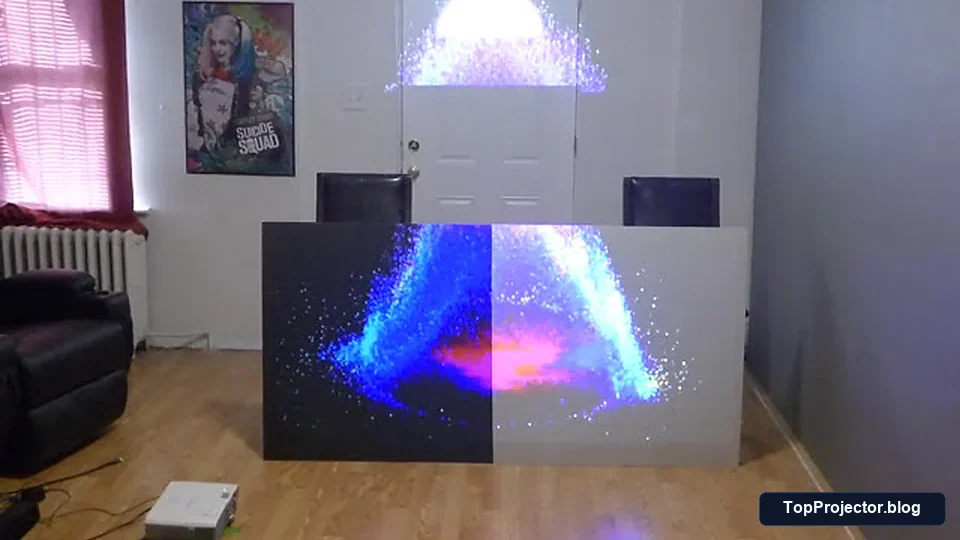
Traditional white surfaces reflect all incident light indiscriminately. When pairing ambient light with our best home entertainment projector selections, unmanaged environmental light pollution completely compromises your native black floor.
Choosing between these materials requires evaluating your room's baseline lighting conditions. Dedicated light-controlled basements favor white surfaces, whereas multi-purpose family rooms desperately need ambient light rejection.
Achieving true deep blacks relies heavily on controlling ambient scatter. When pairing a 0.8 gain black screen with high-lumen projectors, native contrast ratios improve drastically in untreated media rooms.
- Black screens absorb ambient room light from ceiling and side vectors.
- White screens bounce all light, elevating black levels in bright rooms.
- Perceived contrast heavily depends on surrounding wall reflectance and paint color.
- Specialized optical coatings trap stray ambient reflections efficiently.
- Darker surfaces preserve shadow detail in mixed lighting conditions.
Pitch-Black Theater Versus Living Room Light Control
In a completely dark theater with velvet walls, white screens deliver pristine reference-grade images. Ambient light is non-existent, allowing the projector's true native contrast ratio to shine.
Conversely, a living room with white ceilings bounces projector light right back onto the screen. Black ALR materials reject this parasitic washout, rescuing shadow detail and deep blacks.
- Velvet-treated rooms make white screens perform exceptionally well.
- Reflective living rooms mandate black ALR screens for watchable contrast.
Analyzing Black Level Retention Under Stress
Projectors cannot project absolute black; they rely on the screen material's darkness. Black screens provide a darker baseline canvas for shadow delineation.
White screens struggle when ambient lights remain turned on during casual viewing sessions. Blacks turn milky gray, destroying the cinematic immersion of dark movie sequences.
- Black screens maintain shadow detail under moderate room lighting.
- White screens suffer severe contrast degradation under ambient illumination.
Evaluating ANSI Contrast Multipliers
Ambient light reflection destroys ANSI contrast on standard white surfaces. Specialized optical micro-structures absorb off-axis illumination, preserving deep blacks while maintaining white luminance across complex mixed-scene patterns.
- Improves ANSI checkerboard performance significantly.
- Minimizes wall and ceiling light bounceback.
Ambient Light Rejection and Advanced Optical Design
Even after consulting our how to change a bulb in a projector guide to maximize brightness, modern ambient light rejection screens still require microscopic louver structures to block overhead room illumination.
Standard white matte surfaces lack these directional optical filters, treating all light sources equally. Consequently, overhead recessed lighting destroys image saturation on standard white screens instantly.
Deploying an ALR black screen transforms daytime viewing into a viable experience. Sports fans and casual TV watchers benefit immensely from this specialized optical rejection technology.
Modern ambient light rejection surfaces utilize multi-layer micro-lenses. These microscopic filters selectively reflect upward ceiling light away from viewers, ensuring 1.2 gain performance without washing out daytime imagery.
- Microscopic louver filters target and reject overhead ambient room lighting.
- Standard white screens lack directional filtering capabilities entirely.
- ALR materials require strict minimum throw distance ratios to prevent hotspots.
- Blocks up to 85 percent of overhead ambient illumination.
- Maintains rich color saturation under normal living room lights.
Ceiling Light Rejection Versus Side Window Glare
Ceiling light rejecting materials work wonders against overhead recessed home lighting. Side window glare requires specialized angular reflective properties to maintain high image fidelity.
Matching your projector placement to your chosen screen's angular reflectivity prevents annoying hot-spotting. Always verify manufacturer throw distance requirements before finalizing your optical setup.
- Overhead lights demand specialized vertical optical filtering structures.
- Side windows require precise horizontal angular light deflection properties.
The Engineering Behind Multi-Layer Optical Materials
Black screen construction involves several microscopic layers laminated together meticulously. These layers absorb ambient wavelengths while preserving the red, green, and blue projector spectrums.
Simple white vinyl or PVC screens rely on basic chemical pigmentation. They offer unmatched manufacturing simplicity but lack advanced optical filtering sophistication.
- Multi-layer optical construction ensures balanced color absorption and reflection.
- Single-layer white materials prioritize cost-effective manufacturing simplicity.
Angular Versus Directional ALR Technology
Directional ALR materials work best with ultra-short-throw lasers placed directly below. Angular rejection systems require long-throw projectors positioned at precise angles to prevent hot-spotting and maintain uniform brightness.
- Directional filters reject ceiling light while accepting floor light.
- Angular filters bounce side light away from the main seating zone.
Peak Brightness, Measured Gain, and HDR Performance
White projector screens typically feature a neutral gain rating between 1.1 and 1.3. This reflective boost enhances specular highlights and delivers striking high dynamic range punch.
Black ALR screens often feature a fractional gain between 0.8 and 1.0. This slight brightness penalty is the necessary trade-off for effective ambient light rejection capabilities.
High-lumen laser projectors easily compensate for lower black screen gain ratings. Pairing a bright 3000-lumen projector with a black screen yields phenomenal daytime HDR performance.
High dynamic range content demands intense peak luminance. White screens deliver higher measured gain for HDR highlights, but black screens preserve shadow detail by lowering the native black floor during dark sequences.
- White screens deliver higher gain and brighter specular highlights.
- Black screens require powerful laser projectors to overcome lower gain ratings.
- HDR content benefits greatly from the punchy highlights of white screens.
- Maximizes specular highlight punch on high-output lamp units.
- Balances white peak output with deep shadow preservation.
Specular Highlights and Spec Sheet Verification
Manufacturers sometimes exaggerate gain ratings on marketing specification sheets. Always rely on independent lab measurements to verify actual screen reflectivity performance.
Specular highlights like explosions or sunlight glints pop brilliantly on white surfaces. Black screens soften these bright HDR elements slightly to preserve shadow detail.
- Lab-verified gain measurements prevent costly home theater purchasing mistakes.
- HDR highlights appear more subdued on absorbing black screen surfaces.
Laser Projector Synergy with Low Gain Materials
Modern solid-state laser light sources push massive lumen outputs consistently. These high-output projectors pair exceptionally well with absorbing black ALR screen materials.
Older lamp-based projectors struggle to maintain adequate brightness on low-gain black screens. Ensure your light engine outputs enough raw lumens before buying.
- Laser engines provide the raw lumen output needed for black screens.
- Lamp projectors often lack the brightness reserve for low-gain surfaces.
Mapping Tone Curves for Specific Gains
Use our lumens room calculator to verify that your projector delivers at least 2500 ANSI lumens before switching from bright white matte surfaces to a specialized low-gain black screen.
- Ensures accurate EOTF tracking for 4K HDR sources.
- Prevents crushed dark details on low-gain surfaces.
Viewing Angles, Color Uniformity, and Hot-Spotting
White matte screens offer exceptionally wide viewing angles approaching 160 degrees. Every seat in a multi-row home theater enjoys uniform color and brightness dispersion.
As noted in our Valerion VisionMaster Pro 2 review, black ALR screens restrict viewing cones via directional filters, causing off-axis viewers to experience noticeable brightness drop-off.
Balancing seating geometry with screen characteristics ensures optimal immersion for everyone. Narrow seating arrangements suit black screens perfectly without off-axis compromises.
Wide seating arrangements test optical viewing cones severely. High-gain white materials often exhibit noticeable hot-spotting, whereas matte black options provide uniform color saturation across extreme off-axis viewing angles up to 140 degrees.
- White screens provide wide viewing angles for large audience seating.
- Black ALR screens restrict horizontal and vertical viewing cones.
- Off-axis seating on black screens can cause unwanted color shifts.
- Eliminates center brightness hotspots in wide media rooms.
- Preserves accurate white balance for side-seated viewers.
Preventing Hot-Spotting in Tight Living Spaces
Hot-spotting occurs when screen reflectivity creates an overly bright center zone. White screens with high gain ratings are particularly prone to this optical artifact.
Careful projector placement and adequate throw distance mitigate hot-spotting issues effectively. Always consult throw ratio calculators before mounting your projection equipment.
- High gain white screens risk noticeable center hot-spotting.
- Proper throw distances help distribute brightness evenly across the surface.
Off-Axis Color Shift and Gamma Degradation
Specialized optical coatings on black screens can alter color fidelity off-axis. Flesh tones might acquire a slight greenish or bluish tint from extreme viewing angles.
White matte surfaces maintain exceptional color neutrality regardless of seating position. This makes white screens ideal for collaborative media rooms with wide seating.
- Extreme viewing angles on black screens can induce color shifting.
- White screens preserve perfect color neutrality across all seating positions.
Mitigating Optical Artifacts in Bright Rooms
Eliminates specular reflection requires matching screen texture to projector resolution. Coarse matte textures prevent sparkle artifacts in 4K UHD setups, ensuring pristine image clarity from every seat in the house.
- Prevents micro-lens shimmering during camera pans.
- Maintains sharp pixel definition across fine details.
Gaming Input Lag, Motion Handling, and Refresh Rates
Projector screens are completely passive optical surfaces with zero electronics. Consequently, neither black nor white screens introduce any input lag or display latency.
Fast-paced competitive console and PC gaming relies on the projector's internal processing. Both screen types deliver identical motion resolution and response times.
Motion blur depends entirely on your projector's response time and refresh rate. Choosing a screen format has zero impact on your competitive gaming reaction speeds.
Competitive gaming requires ultra-low response times. While screen material does not directly alter processor input lag, pairing a fast projector with a high-refresh 120Hz display ensures butter-smooth motion without visible ghosting.
- Passive screen materials add zero input lag to gaming setups.
- Motion clarity is determined by the projector, not the screen.
- Both black and white surfaces handle fast-action gaming equally well.
- Reduces motion blur during fast-paced competitive FPS titles.
- Minimizes perceived stutter during rapid horizontal camera pans.
High Refresh Rate Gaming in Bright Environments
Modern gaming projectors support 120Hz and 240Hz refresh rates smoothly. Pairing these high frame rates with a black screen lets you game comfortably with lights on.
Daytime gaming sessions wash out completely on standard white projector screens. Black ALR materials preserve enemy visibility in dark gaming map areas.
- Black screens preserve dark game map details in lit rooms.
- High refresh rate gaming benefits from daytime ambient light rejection.
Color Saturation During Intense Gaming Sessions
Vibrant game worlds look stunning when projected onto neutral white surfaces. Rich color saturation makes fantasy RPGs and cinematic titles pop with realism.
Black screens may slightly mute vibrant color palettes to maintain black levels. Evaluate whether you prioritize daytime contrast or pure color vibrancy.
- White screens maximize vivid color saturation for cinematic games.
- Black screens balance contrast and color in mixed lighting environments.
Optimizing Frame Rates and Response Timing
Modern gaming projectors achieve under 15ms input lag in enhanced gaming modes. Ensure your chosen screen surface does not introduce frame stutter or interfere with active 3D shutter glasses sync.
- Guarantees instant visual feedback for competitive inputs.
- Maintains polarization integrity for multi-format 3D setups.
Room Setup, Physical Installation, and Maintenance
Installing a fixed-frame projector screen requires careful wall anchoring and tensioning. White vinyl materials stretch easily onto aluminum frames without special tools.
Black ALR screen materials are stiffer and require precise tensioning to prevent wrinkles. Their specialized optical coatings are also much more sensitive to physical scratching.
Maintenance differs significantly between these two popular screen categories. White screens tolerate gentle cleaning, whereas black ALR surfaces demand extreme cleaning caution.
Proper tensioning prevents warping and waves over time. Fixed-frame installations maintain optimal surface flatness, which is essential for accurate throw ratio geometry and preventing distortion during rapid camera pans.
- White screens feature forgiving materials that install and stretch easily.
- Black ALR screens are rigid, delicate, and require careful tensioning.
- Cleaning optical black screens risks damaging specialized light-rejecting coatings.
- Eliminates wave distortion common in roll-down tab-tensioned models.
- Ensures long-term structural integrity in humidity-fluctuating rooms.
Acoustically Transparent Options and Audio Integration
Dedicated home theaters often utilize acoustically transparent woven screens. These allow center-channel audio to pass directly through the projection surface naturally.
Perforated white materials are widely available in large sizes. Finding acoustically transparent black ALR screens remains significantly more challenging and expensive.
- Woven white screens permit seamless behind-the-screen speaker placement.
- Acoustically transparent black ALR screens are rare and costly.
Wall Color Reflexes and Room Acoustics Management
White rooms reflect projector light back onto white screens, destroying contrast. Painting surrounding walls dark gray or black dramatically improves overall picture quality.
Black screens help mitigate the negative impact of reflective white rooms. However, treating your room's acoustics and reflections remains best practice.
- Dark wall treatments maximize white screen contrast performance.
- Black screens compensate partially for untreated reflective living rooms.
Managing Throw Distances and Light Paths
Calculating exact throw distances prevents shadow interference in tight spaces. Short-throw setups demand rigid frame mounting to ensure geometric alignment remains perfectly square throughout seasonal temperature shifts.
- Prevents trapezoidal keystoning via precise optical placement.
- Maximizes lens shift utilization for offset projector mounts.
Final Scenario-Based Buying Verdict and Recommendations
Selecting the correct projector screen depends entirely on your room architecture. Dedicated dark rooms with controlled lighting should always choose white screens.
Living rooms featuring ambient daylight and white walls need black ALR screens. This single choice dictates whether your projector image looks washed out or vivid.
Analyze your specific lighting conditions before purchasing costly projection gear. Matching screen physics to room geometry guarantees a stellar home theater experience.
Choosing the ideal screen depends entirely on room light control. Dedicated dark rooms favor high-gain white surfaces, while bright living spaces benefit immensely from the enhanced black level performance of ALR black screens.
- Choose white screens for dedicated, pitch-black home theaters.
- Choose black screens for multi-purpose living rooms with ambient light.
- Always verify projector lumen output before selecting low-gain screens.
- Prioritize white screens for total blackout media environments.
- Select black ALR options for multi-purpose daytime living rooms.
The Ultimate Living Room Choice
Living rooms demand black ambient light rejection screens for watchable daytime images. They rescue contrast and provide deep black levels despite surrounding room illumination.
Refusing to use an ALR screen in a bright room results in washed-out gray images. Invest in black ALR technology if your projector must fight daylight.
- Black ALR screens are mandatory for daytime living room viewing.
- Avoid white screens in unmanaged ambient light environments.
The Ultimate Dedicated Theater Choice
Dedicated theaters with dark velvet walls thrive with white reference screens. They maximize peak brightness, preserve wide viewing angles, and deliver stunning HDR highlights.
Using a black screen in a pitch-black room is unnecessary and wastes brightness. Stick to traditional white surfaces for ultimate cinematic authenticity.
- White screens deliver reference-grade performance in dark rooms.
- Dedicated theaters gain nothing from expensive ambient light rejection.
Summary Decision Matrix for Enthusiasts
Prioritize white screens if you control 100 percent of ambient light. Select specialized black ALR screens when tackling multi-purpose living rooms requiring robust contrast retention during daytime sports viewing.
- Match lumens output directly to chosen screen gain specifications.
- Verify seating angles before purchasing high-gain directional surfaces.
Frequently Asked Questions
Do black projector screens make movies look too dark?
Black screens absorb ambient light rather than dimming your projector. With a bright laser projector, shadow details and contrast actually improve significantly.
Can I use a standard white screen in a bright living room?
You can, but ambient light will wash out the image entirely. Black levels turn milky gray, destroying the cinematic contrast of your projected content.
Are black projector screens compatible with ultra-short throw projectors?
Yes, but you must buy specialized UST-specific black ALR materials. Directional micro-lenses reject ceiling light while reflecting downward UST projector beams forward.
Do white screens offer better viewing angles than black screens?
White matte screens provide wide dispersion up to 160 degrees. Black ALR screens restrict viewing cones to prevent light scatter and preserve contrast.
Which screen type is better for gaming in mixed lighting?
Black screens win easily for daytime or lit-room gaming sessions. Ambient light rejection preserves dark map details and prevents contrast washout during play.