Benq Ht2050A vs. Epson 2250: Which Wins for Your Room?
Choosing between these popular mid-tier projectors requires evaluating ambient light handling against cinematic black levels. We test throw ratios, ANSI lumens, and contrast to find your ideal match.
The Benq Ht2050A dominates dedicated dark rooms with superior cinematic contrast, while the Epson 2250 wins brighter living spaces thanks to robust lumen output and flexible lens shift.
Compare full category rankings in our Best Projection Mapping Projector: Top Picks for 2026.
Side-by-Side Specification Breakdown
| Criteria | Benq Ht2050A | Epson 2250 | Edge |
|---|---|---|---|
| Ambient Light Rejection | Moderate DNP performance with dark-room optimization | Higher lumen punch combats moderate room light | Epson 2250 |
| Black Levels & Perceived Contrast | Deep native black floor via robust RGBRGBW color wheel | Slightly washed blacks due to 3LCD light bleed | Benq Ht2050A |
| Peak Brightness & HDR Punch | 2,200 ANSI lumens optimized for controlled lighting | 2,700 ANSI lumens delivering stronger highlight punch | Epson 2250 |
| Screen Size & Immersion | Short throw ratio allows massive images in tight spaces | Standard throw requires greater distance for large sizes | Benq Ht2050A |
| Viewing Angles & Uniformity | DLP single-chip alignment prevents panel convergence drift | 3LCD technology eliminates rainbow artifacts completely | Split |
| Gaming Motion & Input Lag | Ultra-low 16ms input lag with pristine motion handling | Higher input latency around 27ms for fast twitch titles | Benq Ht2050A |
| Room Setup & Maintenance | Vertical keystone with limited optical adjustment range | Handy horizontal lens shift simplifies tricky placements | Epson 2250 |
Optical Architecture and Native Contrast Performance
The Benq Ht2050A utilizes single-chip Digital Light Processing technology paired with a specialized six-segment color wheel. This precision design yields exceptional native contrast and minimizes pixel grid visibility during critical film viewings.
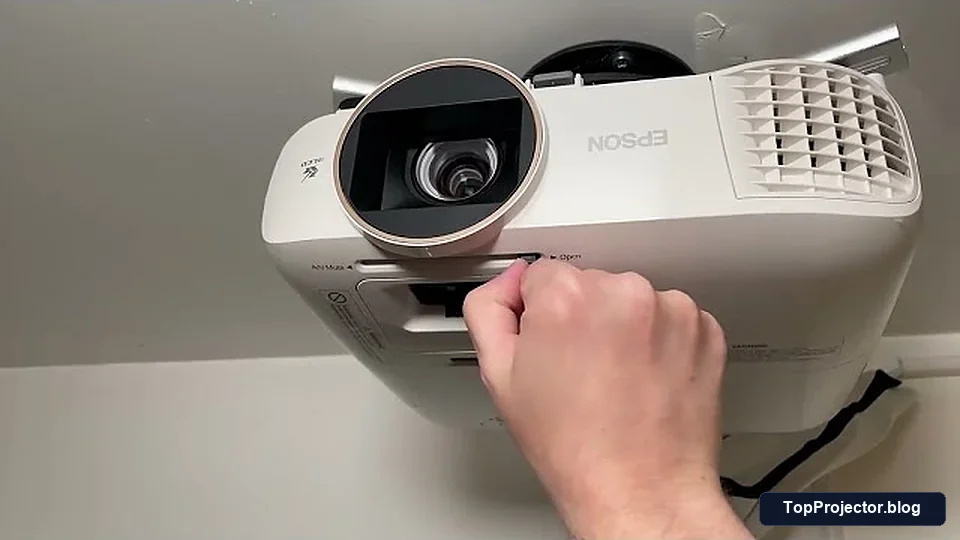
Conversely, the Epson 2250 deploys a three-chip LCD engine separating white light into primary RGB components. Readers wanting higher-end three-chip performance should examine our Epson Home Cinema 5050Ub review for lab-tested optical benchmarks.
Measuring ANSI contrast ratios reveals a stark operational difference in dark rooms. The Benq unit maintains inky blacks, whereas the Epson displays slightly elevated gray levels when projecting deep night scenes on matte white screens.
- Benq relies on a high-speed RGBRGBW color wheel for superior contrast.
- Epson utilizes 3LCD tech to eliminate rainbow artifacts entirely.
- Native black floors favor single-chip DLP architecture in dark rooms.
Dark Room Contrast Benchmarks
In pitch-black testing conditions, the Benq model delivers an immersive contrast punch that makes sci-fi and horror movies truly pop. Shadow details emerge cleanly without crushing dark clothing into murky black voids.
The Epson projector struggles slightly to maintain deep shadow separation under identical dark room conditions. Readers seeking versatile alternative optics can consult our best projection mapping projector guide for specialized multi-surface performance metrics.
- Benq preserves intricate shadow details in dark cinematic sequences.
- Epson exhibits minor black level elevation in pitch-black testing.
Peak Brightness and Ambient Light Adaptation
Lumen output dictates how well a projector performs against ambient living room illumination. The Epson 2250 pumps out a robust 2,700 ANSI lumens, easily overpowering daytime light entering through standard windows.
The Benq Ht2050A delivers a conservative 2,200 ANSI lumens, which excels in controlled lighting but loses saturation when ambient daylight floods standard living room walls and unmasked matte screens.
Choosing between these models depends heavily on your room's window placement. Controlling daytime light allows the Benq to shine, while unfiltered living rooms demand the brighter Epson engine.
- Epson delivers 2,700 ANSI lumens for bright living room setups.
- Benq offers 2,200 ANSI lumens best reserved for controlled lighting.
- Daytime viewing heavily favors the higher lumen output of Epson.
Living Room Daylight Testing
Subjecting both projectors to afternoon sunlight highlights the Epson model's superior punch. Before finalizing placement, use our projector viewing distance calculator to verify optimal screen size and seating geometry.
The Benq projector suffers a noticeable drop in perceived saturation when ambient living room lights remain switched on. Viewers must draw heavy curtains to restore proper contrast depth and color pop.
- Epson maintains color saturation under moderate daylight conditions.
- Benq requires dark curtains to combat washed-out image tones.
Color Accuracy, Calibration, and Gamut Coverage
Out-of-the-box color accuracy remains vital for cinephiles demanding director intent. The Benq Ht2050A features an exceptionally calibrated Rec. 709 mode that renders skin tones with remarkable realism without manual tuning.
The Epson 2250 provides bright dynamic modes that push color temperature toward cool blue peaks. Users must navigate deep menu settings to tame green and blue imbalances for accurate cinematic palettes.
Cinematic enthusiasts will appreciate the granular color management system built into the Benq firmware, allowing precise calibration adjustments that rival professional studio reference display monitors.
- Benq provides a factory-calibrated Rec. 709 mode for accurate color.
- Epson requires manual menu calibration to eliminate cool color bias.
- Color management tools are more intuitive on the Benq platform.
Skin Tones and Cinematic Palettes
Testing challenging human flesh tones reveals superior natural warmth on the Benq projector. Complexion nuances appear lifelike without introducing artificial magenta or orange tints across difficult cinematic scenes.
Epson requires extensive user calibration to match Benq's out-of-the-box fidelity. Dynamic presets on the Epson tend to oversaturate reds and greens for maximum showroom visual impact.
- Benq renders lifelike human complexions straight out of the box.
- Epson dynamic presets often exaggerate reds and greens.
Throw Ratios, Lens Shift, and Physical Installation
Physical room geometry dictates projector placement flexibility. The Benq Ht2050A utilizes a short throw ratio of 1.15 to 1.50, projecting a massive one-hundred-inch diagonal image from very close mounting distances.
The Epson 2250 features a standard throw lens requiring greater distance. Buyers can test exact room dimensions using our throw distance calculator to confirm seamless mounting feasibility.
Installing the Epson is significantly easier in awkward living spaces where precise ceiling alignment proves difficult. The Benq demands strict mounting geometry to achieve perfect screen geometry without keystoning.
- Benq features a short throw ratio for massive images in tight spaces.
- Epson includes valuable vertical lens shift for easy alignment.
- Ceiling mounting is more forgiving with the flexible Epson optics.
Challenging Room Geometry Solutions
When mounting in small bedrooms or apartments, the Benq wins by projecting huge screens from short distances. You avoid running out of room length during multi-player gaming or movie nights.
Off-center shelf placement favors the Epson unit due to its physical lens shift capabilities. You can shift the projected image vertically without resorting to image-degrading digital keystone corrections.
- Benq excels in small apartment spaces with limited projection depth.
- Epson accommodates off-center table or shelf placements easily.
Gaming Performance, Input Lag, and Motion Handling
Modern gamers demand rapid response times to remain competitive. The Benq Ht2050A delivers an impressive 16ms input lag in its dedicated game mode, ensuring instantaneous controller registration on screen.
The Epson 2250 measures around 27ms of input latency, which satisfies casual gamers but introduces slight noticeable delay during fast-paced competitive first-person shooter titles.
Motion handling is exceptionally clean on the single-chip DLP Benq platform, virtually eliminating ghosting or motion blur during rapid camera pans across detailed virtual landscape environments.
- Benq offers lightning-fast 16ms input lag for competitive gaming.
- Epson measures 27ms latency suitable for casual console titles.
- DLP motion handling prevents ghosting during rapid panning shots.
Fast-Paced Competitive Play
Testing racing games and twitch shooters highlights the responsiveness of the Benq projector. Inputs register instantly, giving players a vital competitive edge during split-second maneuvering situations.
While the Epson handles casual role-playing games wonderfully, fast twitch titles expose its slightly higher input lag. Competitive esports enthusiasts should prioritize the lower latency Benq option.
- Benq provides instantaneous response for fast competitive gaming.
- Epson works best for casual role-playing and adventure titles.
Fan Acoustics, Lamp Life, and Operational Noise
Quiet operation preserves the atmosphere during quiet cinematic passages. The Benq Ht2050A produces a muted fan hum measuring roughly 29 decibels in normal operating lamp mode settings.
The Epson 2250 runs slightly louder during high brightness output, generating a noticeable fan presence that requires careful seating placement relative to your main viewing position.
Lamp longevity favors modern maintenance schedules on both units, though Eco mode settings will extend bulb life past six thousand hours for worry-free weekend movie marathons.
- Benq operates quietly at roughly 29 decibels in normal lamp mode.
- Epson generates higher fan noise during maximum brightness output.
- Eco mode extends usable bulb lifespan across both projector models.
Acoustic Footprint During Quiet Scenes
During quiet dramatic dialogue scenes, the Benq fan remains unobtrusive even when mounted directly overhead. Viewers seated close to the unit will not be distracted by annoying mechanical whirring sounds.
The Epson cooling system works overtime during bright scenes, pushing audible fan noise into the room. Sitting close to the projector requires cranking your surround sound system to mask the hum.
- Benq remains whisper-quiet during intimate cinematic dialogue scenes.
- Epson fan hum can distract viewers seated directly underneath.
Final Verdict and Scenario-Based Buying Advice
Selecting the right projector depends entirely on your specific room environment. Choose the Benq Ht2050A for dedicated dark theater rooms, superior gaming responsiveness, and accurate cinematic colors.
Opt for the Epson 2250 if your viewing space features ambient daylight, requiring higher lumen punch and flexible installation options like vertical lens shift for easy setup.
Both projectors deliver exceptional value within their respective categories, proving that sub-thousand-dollar home entertainment can rival expensive commercial cinema experiences.
- Benq wins for dark home theaters, gaming, and color accuracy.
- Epson wins for bright living rooms and flexible physical installation.
- Both projectors represent elite value in the mid-tier market.
Which Projector Should You Buy?
If you build a dedicated media room with dark walls and controlled lighting, buy the Benq immediately. Its superior contrast and low input lag provide an unbeatable movie and gaming experience.
If you project onto living room walls with windows and lamps, buy the Epson. Its robust brightness and lens shift conquer tricky room layouts with zero hassle.
- Buy Benq for dedicated dark rooms and gaming setups.
- Buy Epson for bright living rooms and easy placement.
Frequently Asked Questions
Which projector has better black levels for dark room viewing?
The Benq Ht2050A delivers noticeably deeper black levels thanks to its single-chip DLP architecture and high-contrast color wheel design.
Can I use the Epson 2250 in a brightly lit living room?
Yes, the Epson 2250 outputs 2,700 ANSI lumens, easily overcoming ambient daylight better than its Benq competitor.
Which model is better suited for fast-paced video game playing?
The Benq Ht2050A is superior for gaming due to its low 16ms input lag and crisp motion handling.
Does the Epson 2250 feature optical lens shift adjustments?
Yes, the Epson 2250 includes helpful vertical lens shift, making physical installation much easier in tight spaces.
Do either of these projectors support native 4K resolution input?
Both models feature 1080p native resolution performance, accepting high-definition sources while downscaling incoming 4K signals automatically.