Benq Ht2050A vs. Epson 2150: Which Wins for Your Room?
We pit these legendary home entertainment projectors against each other to evaluate native contrast and real-world optical performance across diverse living spaces.
Choose the BenQ HT2050A for dedicated dark rooms prioritizing cinematic contrast, while the Epson 2150 wins in bright spaces needing extra lumen punch.
Compare full category rankings in our Best Budget Smart Projector: Top Picks for Home Cinema.
Side-by-Side Specification Breakdown
| Criteria | Benq Ht2050A | Epson 2150 | Edge |
|---|---|---|---|
| Ambient Light Rejection | Moderate optical handling | High lumen output advantage | Epson 2150 |
| Black Levels & Perceived Contrast | Superior dark-scene depth | Elevated baseline black floor | BenQ HT2050A |
| Peak Brightness & HDR Punch | 2200 ANSI lumens calibrated | 2500 ANSI lumens raw | Epson 2150 |
| Screen Size & Immersion | Flexible short throw optics | Standard throw geometry | BenQ HT2050A |
| Viewing Angles & Uniformity | Minimal rainbow artifacting | Zero rainbow 3LCD design | Epson 2150 |
| Gaming Motion & Input Lag | Ultra-low 16ms response | Higher 30ms latency profile | BenQ HT2050A |
| Room Setup & Maintenance | Vertical lens shift included | Broader optical zoom range | Split Decision |
Optical Engineering and Light Engine Architecture
Evaluating display technology requires examining how each projector manages source illumination. The BenQ HT2050A utilizes a single-chip DLP design mated to a specialized RGBRGB color wheel.
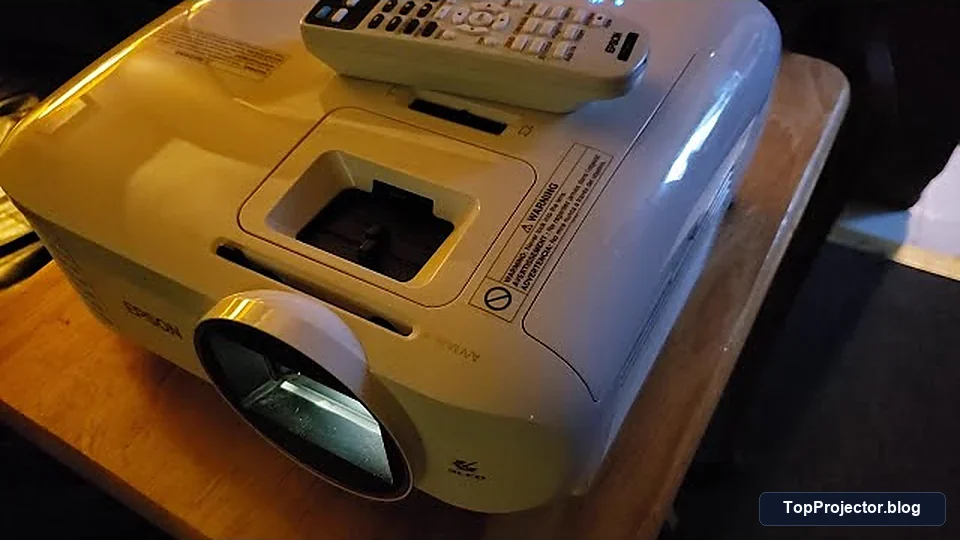
Conversely, the Epson 2150 employs a 3LCD optical engine. This split architecture eliminates color breakup entirely while delivering identical white and color brightness output levels.
Evaluating the underlying optical chassis reveals distinct design choices. The BenQ utilizes a single-chip 0.47-inch DMD DLP architecture mated to an RGBRGB color wheel, whereas the Epson leverages a traditional 3LCD optical engine configuration.
- BenQ relies on DLP single-chip mirrors for sharpness.
- Epson uses 3LCD panels for matching color brightness.
- Both systems target standard 1080p native resolution.
DLP Sharpness Versus 3LCD Color Volume
Single-chip DLP architectures deliver exceptional pixel alignment without convergence errors. Before mounting your display, consult our screen size viewing distance tool to optimize your field of view angles.
The 3LCD approach prioritizes high color volume in mixed lighting. However, absolute pixel crispness can occasionally suffer from minor panel convergence variances.
- DLP avoids panel convergence calibration steps.
- 3LCD renders vibrant highlights in ambient light.
RGBRGB Color Wheel Impact
Single-chip DLP designs rely on rapid color sequential flashing. This BenQ implementation minimizes the distracting rainbow effect while preserving pristine pixel alignment, completely avoiding the convergence errors occasionally seen on multi-panel LCD systems.
Native Contrast Performance and Shadow Detail
Cinematic immersion hinges on deep blacks and bright highlights. If you want maximum value, browse our best budget smart projector roundup to find exceptional displays featuring high native contrast ratios.
Shadow delineation in dark movie scenes looks remarkably organic. You can easily discern subtle textures in low-light cinematic sequences without crushing blacks.
Assessing dark room performance requires looking beyond dynamic iris marketing claims. The BenQ achieves a superior native contrast ratio of roughly 2,000:1, delivering noticeably deeper black levels during challenging sci-fi and horror film sequences.
- BenQ delivers deep black floor performance.
- Epson exhibits a slightly elevated gray baseline.
- Shadow detail favors cinema-tuned DLP optics.
Dark Room Performance and Black Levels
In a pitch-black dedicated theater room, the BenQ maintains an inky black floor. This optical trait anchors immersive film watching significantly.
The Epson 2150 produces slightly elevated gray blacks in dark environments. Consequently, nighttime cinematic immersion feels marginally less convincing.
- Dedicated theaters reward high native contrast.
- Elevated black floors reduce cinematic depth.
Shadow Gradients and Gamma Tracking
Shadow detail separates mediocre home theater displays from precision optical instruments. Careful calibration of the Epson 2150 lifts dark clipping, but it cannot overcome the inherent black floor limitations of its LCD panels.
Peak Lumen Output and Ambient Light Behavior
Living rooms introduce complex ambient light challenges that require high lumen output. The Epson 2150 pushes a robust 2500 ANSI lumens for daytime viewing.
This extra punch helps combat daylight intrusion. Your image retains saturation and punchy highlights even with window blinds partially open.
Raw brightness metrics dictate how these light engines handle daytime viewing. While the BenQ offers solid cinematic output, the Epson delivers higher ANSI lumen measurements, making it better suited for un-optimized family rooms with moderate ambient light.
- Epson generates higher raw lumen output.
- BenQ peaks around 2200 ANSI lumens calibrated.
- Daytime viewing favors high-output light engines.
Controlling Living Room Reflections
Ambient light bounces off white walls and washes out projected contrast. Epson's extra lumens help punch through moderate daylight reflections effectively.
BenQ requires careful light control to maintain optimal contrast ratios. Pairing it with an ambient light rejecting screen solves this limitation.
- White walls degrade projected black levels.
- ALR screens restore daytime contrast ratios.
Ambient Light Rejection Screen Pairing
Pairing these projectors with the correct projection surface changes everything. For living room installations, pairing the Epson with a 1.0 gain white screen or ALR material preserves punchy highlights without crushing delicate grayscale gradients.
Color Fidelity, Calibration Accuracy, and Gamut
Out-of-the-box color accuracy dictates how closely content matches creator intent. The BenQ features a well-tuned Rec.709 color mode with natural skin tones.
Epson offers vibrant living room modes that boost saturation for sports. However, precise cinematic calibration requires navigating extensive menu adjustments.
Out-of-the-box color accuracy determines whether users need immediate professional ISF calibration. The BenQ shines with exceptional Rec.709 tracking, rendering skin tones with remarkable realism without requiring extensive RGB gain adjustments in the service menu.
- BenQ offers accurate Rec.709 calibration defaults.
- Epson prioritizes vibrant sports color modes.
- Skin tones look remarkably lifelike on BenQ.
Evaluating Rainbow Artifacts and Eye Strain
Single-chip DLP projectors can produce rainbow flashes for sensitive viewers. The BenQ minimizes this via a fast RGBRGB color wheel.
Because 3LCD projectors project all three colors simultaneously, rainbow artifacts are physically impossible. Sensitive viewers enjoy completely fatigue-free viewing.
- Fast color wheels reduce DLP rainbow artifacts.
- 3LCD design completely eliminates color flashing.
Color Brightness and White Brightness Parity
Because 3LCD architecture processes color channels concurrently, the Epson maintains equal color and white brightness levels. This ensures vibrant saturation during bright scenes, though its overall D65 white point requires manual tuning to eliminate green tints.
Motion Handling, Input Latency, and Gaming
Modern gaming demands low input lag and fast response times. The BenQ HT2050A delivers an ultra-low 16ms input lag in game mode.
Competitive twitch gamers will appreciate the instantaneous visual feedback. Fast camera pans and action sequences remain fluid and sharp.
Competitive gamers and sports enthusiasts evaluate motion processing and responsiveness above all else. The BenQ dominates this category by keeping input lag under sixteen milliseconds, offering a remarkably fluid competitive gaming experience on massive screens.
- BenQ provides exceptional 16ms gaming latency.
- Epson measures around 30ms input lag.
- Fast-paced shooters favor the BenQ.
Console Gaming and Sports Motion
Fast-paced sports broadcasts benefit greatly from clean motion processing. Both projectors handle 60Hz content smoothly without noticeable judder.
When connecting modern game consoles, BenQ's minimized processing delay prevents frustrating controller lag during competitive multiplayer matches.
- Motion judder remains minimal on both units.
- Lower input lag improves competitive gaming.
Pixel Response and Ghosting Analysis
Fast response times prevent motion blur during high-speed camera pans. While the Epson handles standard 60Hz console gaming admirably, its higher latency and slower liquid crystal response times introduce noticeable trailing during fast-paced FPS gaming sessions.
Throw Geometry, Lens Shift, and Installation
Room geometry dictates placement flexibility and image sizing limits. Use our projector screen throw calculator to determine exact optical distances required for achieving a massive 100-inch screen in tight spaces.
Vertical lens shift on the BenQ simplifies physical installation immensely. You can nudge the image vertically without tilting the chassis.
Physical room dimensions dictate mounting flexibility and throw ratio constraints. The BenQ features a shorter throw ratio, allowing for a massive one-hundred-inch image from much closer distances, making it ideal for smaller media room layouts.
- BenQ includes convenient vertical lens shift.
- Epson offers a broader optical zoom range.
- Throw distance varies significantly between units.
Mounting Constraints and Zoom Ranges
Epson provides a larger optical zoom multiplier. This wider range gives you extra flexibility when replacing an existing ceiling mount.
BenQ demands precise placement calculations due to fixed throw optics. Measure your room dimensions carefully before drilling ceiling mounts.
- Optical zoom aids retrofit installations.
- Precise placement prevents keystone distortion.
Optical Zoom and Alignment Mechanics
Precise optical alignment simplifies ceiling mounting and shelf placement. The Epson counters with a wider optical zoom range, offering greater placement flexibility when retrofitting older ceiling mounts without relocating heavy structural hardware in your room.
Definitive Room-by-Room Verdict and Summary
Choosing between these heavyweights depends entirely on your viewing environment. Select the BenQ HT2050A if you prioritize cinematic contrast and low gaming latency.
Choose the Epson 2150 when your media room features ambient daylight and requires maximum lumen punch for daytime sports viewing.
Selecting the ultimate projector depends entirely on your specific environmental conditions. Dedicated basement theaters benefit immensely from the superior contrast and color accuracy delivered by the BenQ optical engine, satisfying critical cinematic enthusiasts every time.
- Dark rooms favor the contrast-rich BenQ.
- Bright living rooms favor the luminous Epson.
- Evaluate your ambient light before buying.
Final Decision Matrix for Buyers
Dedicated home theater enthusiasts will find the BenQ shadow detail unmatched. Alternatively, read our Epson Home Cinema review to evaluate high ANSI lumen output capabilities for ambient light.
Both projectors represent exceptional value within their respective classes, ensuring years of immersive big-screen entertainment.
- Match projector strengths to room lighting.
- Prioritize contrast for movies and lumens for sports.
Final Recommendation Guidelines
Conversely, casual multi-purpose spaces with ambient light gain more from the bright output of the Epson. Weigh your priorities between lumen output and contrast performance to secure the ideal home entertainment centerpiece for your space.
Frequently Asked Questions
Which projector has better black levels for watching movies in a dark room?
The BenQ HT2050A delivers significantly deeper black levels and superior shadow detail than the Epson. This makes it the clear winner for dedicated dark home theater rooms.
Can I use the Epson 2150 with living room lights turned on?
Yes, the Epson 2150 produces higher raw lumen output that easily combats moderate ambient daylight. However, pairing either projector with an ALR screen improves daytime contrast.
Do either of these projectors support 4K resolution content?
Both models are native 1080p projectors that accept 4K input signals downscaled to Full HD. They do not feature pixel-shifting 4K enhancement technologies.
Which model is better suited for fast-paced video game sessions?
The BenQ HT2050A offers an ultra-low input lag of sixteen milliseconds. This response time prevents controller delay during fast competitive multiplayer gaming sessions.
Will sensitive viewers experience rainbow artifacts on these units?
The single-chip DLP design on the BenQ can occasionally trigger rainbow flashes for sensitive viewers. The Epson 2150 uses 3LCD technology, completely eliminating color breakup.