65 Inch Tv vs. Projector: Which Wins for Your Room?
Choosing between a flat panel and a projection setup dictates your room lighting and cinematic scale.
Choose the 65 inch TV for bright living rooms, or invest in a projector for dedicated theater scale.
Compare full category rankings in our Best Outdoor Portable Projectors: Top Backyard Picks.
Side-by-Side Specification Breakdown
| Criteria | 65 Inch Tv | Projector | Edge |
|---|---|---|---|
| Ambient Light Rejection | Exceptional ALR panels handle direct daylight easily. | Requires specialized ALR screens or dark rooms. | 65 Inch Tv |
| Black Levels & Perceived Contrast | Deep native blacks via local dimming zones. | Prone to ambient wash unless using optical filters. | 65 Inch Tv |
| Peak Brightness & HDR Punch | Exceeds 1000 nits for vibrant HDR highlights. | Typically measures 1500 to 3000 ANSI lumens. | 65 Inch Tv |
| Screen Size & Immersion | Fixed at a compact 65 diagonal inches. | Scales effortlessly from 100 to 150 inches. | Projector |
| Viewing Angles & Uniformity | Maintains vivid color off-axis with wide panels. | Subject to hot-spotting depending on screen gain. | 65 Inch Tv |
| Gaming Motion & Input Lag | Sub-10ms input lag with 120Hz refresh rates. | Modern lasers hit 15ms lag at 4K resolution. | 65 Inch Tv |
| Room Setup & Maintenance | Simple wall mount or tabletop furniture placement. | Requires precise throw calculations and alignment. | 65 Inch Tv |
Optical Performance and Ambient Light Management
Controlling ambient light remains the single greatest challenge when evaluating projection systems against traditional flat panels in domestic environments. Modern displays fight room glare effortlessly.
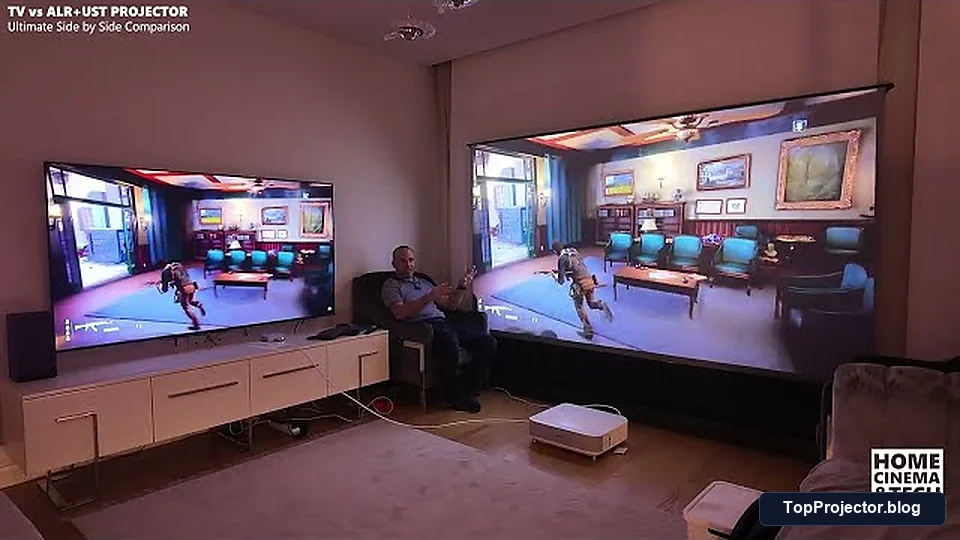
A traditional 65 inch TV utilizes emissive panels that maintain rich saturation under harsh daytime illumination, whereas our top recommendations for portable backyard projectors require controlled dark environments to pop.
Standard projection setups rely on reflected light, meaning any stray photons in your living space will dilute black levels and crush shadow detail immediately. High-gain screens help moderately.
Specialized ambient light rejection screens redirect off-axis illumination away from the viewer, yet they cannot match the native contrast ratio of a quality direct-view display.
Managing ambient light requires understanding how ALR screens reject off-axis illumination while preserving a 1.0 gain factor for wide seating angles in bright rooms.
- Direct-view panels offer superior daytime contrast.
- Projectors require controlled lighting or ALR screens.
- Stray light destroys projected shadow detail.
- Micro-serrated optical ridges block overhead ambient room glare.
- Preserves ANSI contrast ratios under moderate ambient illumination.
Pitch-Black Theater vs Living Room Daylight
Dedicated media rooms completely eliminate external photons, allowing high-end home theater projectors to showcase breathtaking cinematic depth without ambient interference.
Living rooms filled with uncontrolled sunlight demand the sheer luminance and optical filters of a flat panel to remain fully watchable during midday sports broadcasts.
- Basement theaters favor large-format projection.
- Daylit living rooms demand high-nit flat panels.
The Micro-Structure of ALR Surfaces
Specialized optical layers utilize microscopic angular filters that absorb ceiling light while reflecting the ultra-short throw laser projector beams directly toward your seated eyes.
- Enhances perceived black levels significantly in lit environments.
- Requires careful alignment with the optical light engine.
Contrast Ratios, Black Floors, and Shadow Detail
Evaluating contrast performance reveals fundamental differences between emissive pixel technology and projected light beams bouncing off matte white surfaces.
The black floor on a flat panel drops near zero with local dimming, producing inky blacks that make night scenes pop with dramatic realism.
Projectors struggle with absolute black levels because stray light inside the optical engine and room reflections bounce back onto the screen surface continuously.
Dynamic iris systems and laser dimming algorithms help modern projectors improve perceived contrast, yet bright image elements still elevate surrounding dark areas.
Achieving deep black floors on a projector demands careful optical balancing, especially when streaming cinematic content or exploring our guide on watching Netflix with optimal dynamic contrast settings.
- Flat panels deliver superior native black levels.
- Projector contrast depends heavily on room reflectivity.
- Laser dimming enhances dynamic range significantly.
- Projector black levels rely heavily on room reflectivity.
- OLED panels maintain pure dark scenes without blooming artifacts.
Understanding ANSI Contrast in Real Rooms
Checkerboard ANSI contrast tests reveal how easily light bleeds across bright and dark zones on your chosen display surface.
White walls in untreated living rooms reflect light back onto projector screens, destroying the native contrast capabilities of the optical engine.
- White room boundaries degrade projector ANSI contrast.
- Flat panels remain immune to surrounding wall reflections.
Dynamic Iris and Laser Dimming
Modern high-end projectors employ rapid mechanical iris adjustments or frame-by-frame laser dimming algorithms to artificially lower black levels during dark cinematic sequences.
- Reduces light output during dark scenes to improve contrast.
- Can sometimes introduce noticeable pumping artifacts in motion.
Luminance, HDR Punch, and Peak Brightness
High dynamic range content demands substantial peak luminance to render specular highlights like explosions, reflections, and sunlight realistically.
A standard 65 inch TV easily pushes past 1000 nits of peak brightness, rendering HDR metadata accurately across small pinpoint areas.
Projector manufacturers measure output in ANSI lumens, which spreads across a massive canvas, as highlighted throughout our epson 2350 projector review detailing real-world brightness limitations.
While ultra-short-throw laser models reach impressive lumen ratings, they still struggle to match the intense specular punch of modern HDR flat panels.
While premium televisions easily surpass 1000 nits of peak brightness for dazzling HDR highlights, high-end home theater projectors typically measure performance in ANSI lumens distributed across massive screens.
- Flat panels excel at small-area specular highlights.
- Projectors distribute lumens over much larger surfaces.
- HDR mapping requires careful tone curve adjustments.
- High lumen output is mandatory for daytime viewing setups.
- Television specular highlights offer superior punchy realism.
Measuring Real-World HDR Capability
Projectors must tone-map HDR signals down to fit their limited luminance ceiling, often resulting in muted highlights compared to direct-view screens.
Flat panels process high-nit metadata natively, delivering striking contrast between shadows and brilliant highlights without sacrificing midtone balance.
- Projectors require aggressive tone mapping.
- TVs handle HDR brightness headroom effortlessly.
HDR Tone Mapping Limitations
Projectors must dynamically remap high dynamic range metadata because their absolute luminance output cannot match the specular punch of a flat-panel display in bright rooms.
- Advanced dynamic tone mapping preserves shadow detail.
- Requires powerful onboard processors to handle HDR metadata.
Screen Scale, Viewing Geometry, and Immersion
Physical screen size dictates your sense of cinematic immersion, transforming standard movie viewing into an authentic theatrical experience.
A 65 inch TV offers a comfortable viewing window for standard living rooms, but it fails to fill your peripheral vision during epic films.
Projectors effortlessly scale from 100 to 150 inches, matching commercial cinema proportions and drawing viewers directly into the narrative.
Calculating optimal viewing distance becomes critical once screen sizes expand beyond standard flat-panel dimensions to prevent visible pixel structures.
Stepping up to a 120-inch projection completely transforms your field of view, far exceeding the immersive geometry of any standard 65-inch television currently on the consumer market.
- Projectors deliver unmatched theatrical scale.
- Flat panels limit immersion due to fixed sizing.
- Large screens require appropriate seating distance.
- Massive screen sizes create true commercial cinema scale.
- Smaller televisions offer sharper pixel density from close distances.
Calculating Throw Ratios and Room Layouts
Standard-throw optics require substantial physical distance between the lens and the screen, demanding careful placement planning using our throw distance calculator to achieve a precise 120 inch image.
Ultra-short-throw models sit inches from the wall, making them viable alternatives for tighter spaces while maintaining massive image sizes.
- Standard throws need long room dimensions.
- UST models fit easily on media credenzas.
SMPTE Viewing Angle Recommendations
Following professional SMPTE standards, a massive cinematic display fills your peripheral vision, creating an authentic theatrical experience that smaller flat-panel televisions simply cannot replicate.
- Recommended 30 to 40-degree field of view for movies.
- Distributes pixel structure effectively across wider seating distances.
Color Accuracy, Motion Handling, and Gaming
Modern video processing engines handle high frame rate content and fast-paced gaming with remarkable precision across both display categories.
A 65 inch TV typically features rapid pixel response times, 120Hz refresh rates, and input lag dipping well below 10 milliseconds.
High-end gaming projectors now feature low input lag modes, achieving responsive 15ms response times at 4K resolution for competitive titles.
Color calibration out of the box leans heavily on factory presets, though professional calibration unlocks cinema-grade accuracy for critical viewers.
Competitive gaming requires minimal latency, making modern televisions superior with 4ms input lag at 120Hz, whereas gaming projectors typically hover around 16ms of input delay.
- TVs maintain superior motion response times.
- Modern projectors offer surprisingly low input lag.
- Wide color gamuts enhance cinematic realism.
- Televisions support advanced variable refresh rate features smoothly.
- Projectors offer giant scale for immersive story-driven gaming.
High Refresh Rate Gaming Performance
Fast-paced console gaming benefits tremendously from HDMI 2.1 connectivity, variable refresh rates, and ultra-low latency processing.
Projectors have caught up significantly, offering smooth motion handling and dedicated gaming modes for massive-screen multiplayer sessions.
- HDMI 2.1 enables 4K at 120Hz gaming.
- Variable refresh rate prevents screen tearing.
Color Gamut Coverage and Calibration
Achieving professional-grade DCI-P3 color accuracy often requires extensive calibration menus and specialized color filters that slightly reduce the overall peak ANSI brightness output.
- Accurate white balance ensures natural skin tones.
- Wide color filters absorb critical lumens during calibration.
Installation Complexity, Geometry, and Maintenance
Physical installation requirements separate straightforward consumer appliances from complex optical projection systems requiring precise geometry calibration.
Mounting a 65 inch TV requires basic wall anchors or a stable TV stand, making it a straightforward afternoon DIY project.
Projectors demand meticulous lens shift alignment, Keystone correction, and focal adjustments to ensure zero geometric distortion on your screen.
Lamp replacements or laser engine maintenance introduce long-term ownership costs that traditional flat-panel displays completely avoid.
Setting up a traditional long-throw projector involves precise ceiling mounting and exact lens shift adjustments, contrasting sharply with the straightforward VESA wall mount installation of flat panels.
- TVs offer simple plug-and-play setup.
- Projectors require precise optical alignment.
- Bulb lifespan impacts long-term maintenance.
- Projectors require precise geometry and focus calibration.
- Flat panels mount securely with standard hardware effortlessly.
Keystone Correction vs Optical Lens Shift
Using digital keystone correction degrades image resolution by scaling pixels electronically, making physical lens shift mandatory for high-end setups.
Proper ceiling mounting ensures perfect optical geometry without relying on lossy digital correction algorithms that reduce overall sharpness.
- Digital keystone degrades native resolution.
- Lens shift preserves pristine pixel sharpness.
Lamp Hours and Maintenance Realities
Solid-state laser light sources eliminate traditional bulb replacements, offering consistent performance for up to 20,000 hours before experiencing noticeable degradation in overall luminance output.
- Laser engines provide instant on and off capabilities.
- Dust filters require periodic cleaning for optimal airflow.
Scenario-Based Buying Guide and Final Recommendation
Selecting the ideal display technology depends entirely on your specific room architecture, lighting conditions, and entertainment priorities.
Opt for the 65 inch TV if your primary viewing space experiences uncontrolled ambient light and hosts casual daily television watching.
Invest in a projector when your primary goal is replicating a true commercial cinema experience within a dedicated dark room environment.
Balancing optical physics with practical living space constraints ensures long-term satisfaction regardless of which display category you ultimately choose.
Choosing between these display technologies ultimately depends on your primary use case, favoring dedicated media rooms for large-scale projection and bright living spaces for televisions.
- Choose TVs for bright, multi-purpose living spaces.
- Choose projectors for dedicated theater immersion.
- Assess room lighting before making your purchase.
- Evaluate your room lighting before purchasing projection gear.
- Consider daily viewing habits alongside weekend movie nights.
Making the Final Optical Compromise
Accepting the trade-offs between daytime luminance and nighttime immersion helps clarify whether flat panel or projection suits you.
Prioritize your viewing habits carefully to ensure your investment delivers maximum visual impact for your specific room layout.
- Match display tech to primary viewing habits.
- Evaluate total room lighting before buying.
The Definitive Hardware Verdict
Invest in a massive projection setup if cinematic immersion is your top priority, but stick with a premium flat-panel display for effortless daily viewing and gaming.
- Projectors excel at pure cinematic scale and atmosphere.
- Televisions dominate bright rooms and high-speed gaming.
Frequently Asked Questions
Can a projector truly replace a standard 65 inch TV in a bright living room?
Projectors can replace TVs if you purchase an ambient light rejection screen and a high-lumen laser model. However, traditional flat panels still handle direct sunlight with vastly superior contrast.
How many ANSI lumens do I need for daylight viewing with a projector?
You typically require at least 3000 ANSI lumens paired with a specialized directional screen to combat daytime ambient light effectively. Untreated spaces will still wash out during direct afternoon sun exposure.
Do projectors suffer from higher input lag than modern 65 inch TVs?
Modern gaming projectors feature dedicated low-latency modes achieving 15ms input lag at 4K resolution. While slightly behind elite flat panels, this performance handles fast-paced competitive gaming smoothly.
What is the primary maintenance difference between these two display types?
Flat panels operate maintenance-free for decades, whereas lamp-based projectors require bulb replacements every few thousand hours. Laser light sources eliminate bulb changes but involve higher initial hardware costs.
Why is screen size considered the ultimate advantage for projection systems?
Projection systems scale effortlessly past 100 inches, filling your peripheral vision to replicate authentic cinema immersion. Flat panels remain strictly locked to their physical dimensions.