3D Tv vs. 3D Projector: Which Wins for Your Room?
Choosing between a flat-panel 3D display and a dedicated 3D projector requires analyzing your room's ambient light, desired image size, and optical depth requirements.
3D televisions dominate bright living spaces with unmatched native contrast, while 3D projectors deliver ultimate IMAX-scale immersion in controlled, light-controlled home theaters.
Compare full category rankings in our Best Home Video Projector: Top Picks for 2026.
Side-by-Side Specification Breakdown
| Criteria | 3D Tv | 3D Projector | Edge |
|---|---|---|---|
| Ambient Light Rejection | Exceptional self-emissive panel contrast in bright rooms. | Requires specialized ALR screens or total light control. | 3D Tv |
| Black Levels & Perceived Contrast | Infinite black floors on OLED or high local-dimming LCDs. | Dependent on native projector optics and room light bounce. | 3D Tv |
| Peak Brightness & HDR Punch | High nits output for intense specular highlights. | Limited ANSI lumens output when wearing active 3D shutter glasses. | 3D Tv |
| Screen Size & Immersion | Typically capped at 85 to 98 inches for flat panels. | Easily scales from 120 to 150 inches of massive diagonal size. | 3D Projector |
| Viewing Angles & Uniformity | Wide off-axis viewing with zero brightness drop-off. | Subject to hot-spotting and strict cone viewing limits. | 3D Tv |
| Gaming Motion & Input Lag | Sub-10ms response times with ultra-low input lag. | Higher input latency and complex frame interpolation overhead. | 3D Tv |
| Room Setup & Maintenance | Simple wall-mounting or tabletop placement. | Complex throw distance calculations and bulb replacements. | 3D Tv |
Evaluating Ambient Light Handling and Daytime Contrast
Modern ambient light rejection represents a massive hurdle for stereoscopic display technologies. Self-emissive flat panels punch through daytime living room reflections effortlessly.
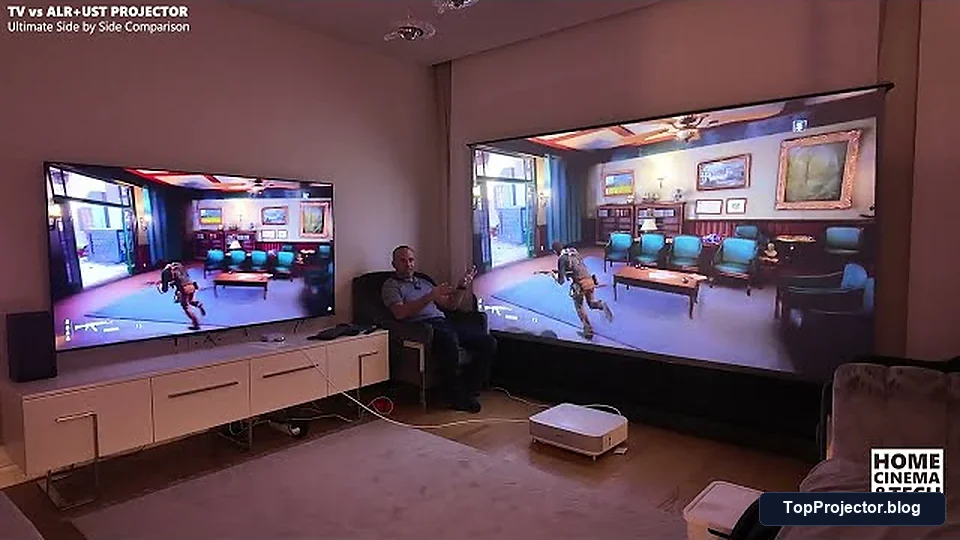
Conversely, projectors rely entirely on reflected light from a projection screen. Any ambient light washes out the dark scenes critical for 3D depth perception.
Modern 3D flat-panel TVs easily maintain 500 nits of peak luminance to fight daylight. Conversely, 3D projectors rely on ambient light rejecting screens to preserve contrast in bright living rooms.
- Flat panels maintain high contrast under severe ambient light conditions.
- Projectors demand bat-cave environments or expensive ALR fabrics to prevent washout.
- Stray light destroys stereoscopic crosstalk separation in projected imagery.
- Micro-layered optical filters reject up to 85% of off-axis ambient light.
- Maintain a minimum 1.2 throw ratio to prevent hot-spotting artifacts.
Pitch-Black Theater Versus Living Room Daylight
In dedicated darkrooms, projectors match flat panels by eliminating stray photon reflections. However, daytime viewing heavily favors self-emissive displays with high peak nits.
Choosing the right display hinges entirely on your ability to control environmental light pollution during critical viewing sessions.
- Controlling ambient light unlocks true projector potential.
- Living rooms require specialized optical rejection screens.
ALR Screen Pairings for High-Gain Control
Pairing a standard throw projector with an angular reflective screen eliminates overhead ceiling reflections. Use our Christie projector lens calculator to map precise throws while boosting perceived black levels.
- Use tensioned tab screens to eliminate annoying surface ripples.
- Choose a 0.8 gain rating to optimize off-axis viewing cones.
Black Floor Depth, Native Contrast, and Shadow Details
Achieving deep black levels is paramount for successful stereoscopic depth separation. Native contrast ratios on premium flat panels regularly exceed thousands to one natively.
Projectors struggle more with black floors due to light scatter inside optical light engines. Room reflections further degrade shadow details during dark movie sequences.
OLED televisions achieve near-infinite contrast with absolute zero black floors. Home theater projectors utilize dynamic iris mechanisms to lower black levels during dark cinematic scenes.
- OLED and high-end LCD panels deliver near-infinite black floor performance.
- Projectors require optimal dark velvet room treatments to control light bounce.
- Shadow detail definition directly impacts perceived 3D layer separation.
- Laser dimming algorithms modulate light output frame-by-frame for deeper blacks.
- Target a calibrated 0.05 foot-lambert black floor for accurate dark-room performance.
The Impact of Room Reflections on Black Levels
Light bouncing off white walls degrades perceived projector contrast severely. Flat panels contain this light locally within their own self-emissive sub-pixels.
Controlling optical scatter requires meticulous matte-black paint choices throughout your dedicated theater perimeter.
- White ceilings destroy ANSI contrast performance on large screens.
- Local dimming algorithms enhance perceived depth on modern televisions.
LCOS Versus DLP Native Contrast Ratios
Premium LCOS projectors routinely deliver 5,000:1 native contrast, outperforming standard single-chip DLP models. This optical advantage preserves vital shadow detail in complex 3D dark sequences.
- DLP chips offer superior pixel alignment but sacrifice native black levels.
- Verify static contrast ratios rather than inflated dynamic marketing metrics.
Peak Brightness, Spectral Crosstalk, and HDR Performance
Wearing active 3D shutter glasses cuts light transmission by up to seventy-five percent. This massive optical penalty requires immense peak brightness from your source display.
Televisions handle this easily with high-output LED backlights. Projectors must fight to maintain legible image brightness through heavy active filter lenses.
Active-shutter 3D glasses inherently absorb substantial light, reducing perceived brightness. As detailed in the EH-LS11000W review, powerful laser light engines generating 3,000 ANSI lumens easily compensate for severe optical attenuation.
- Active 3D glasses introduce severe optical insertion loss.
- Projectors need high ANSI lumen outputs to overcome shutter filtering.
- Crosstalk artifacts emerge when light bleeds into unintended eyes.
- Active glasses require 144Hz refresh rates to eliminate visible flicker artifacts.
- Dual-projector passive setups achieve massive 2,500 lumens per eye output.
Overcoming Shutter Glasses Light Loss
Laser light engines in modern projectors help offset active shutter dimming. High-output laser diodes maintain acceptable luminance levels during intense 3D sequences.
Careful synchronization prevents ghosting artifacts while preserving vital specular punch across complex multi-plane compositions.
- Laser illumination sustains long-term lumen output consistency.
- Precise timing eliminates ghosting and eye strain.
Minimizing Ghosting Through Polarization Control
Spectral crosstalk occurs when left and right eye images bleed together. Advanced polarization filters eliminate ghosting, ensuring pristine 3D separation on silver-backed projection screens.
- Silver screens preserve the polarization vector needed for passive 3D.
- Check for extinction ratios exceeding 100:1 to stop crosstalk.
Display Scale, Throw Ratios, and Cinematic Immersion
Screen size is where projection technology completely dominates home entertainment. Use our throw distance calculator before scaling up to a 150-inch diagonal for genuine commercial cinema presence.
Flat panels remain physically limited and prohibitively heavy once you exceed 98 inches, capping your maximum field of view during epic blockbuster films.
Flat panels cap physical immersion around 85 inches, limiting true theatrical scope. Projectors easily project a 120-inch diagonal image, enveloping your entire field of view naturally.
- Projectors offer unmatched immersion through massive screen real estate.
- Throw ratios determine precise placement requirements within your physical room.
- Large flat panels lack true peripheral vision domination.
- Check your lens shift range to align the image without keystone degradation.
- A 0.21 throw ratio achieves a 100-inch image from minimal distance.
Calculating Throw Distances for Massive Screens
Short-throw and ultra-short-throw projectors redefine large-scale setup flexibility. You can achieve massive diagonal images without running long cables across the ceiling.
Matching throw ratios to your available wall space ensures optimal pixel density and uniform sharpness.
- Ultra-short-throw models eliminate traditional mounting obstacles.
- Proper throw calculations prevent geometric distortion.
Calculating Throw Distances for Ultra-Short-Throw Units
Ultra-short-throw models project massive images from just 12 inches away from the wall. This eliminates foot-traffic shadow interference in tight urban living room environments.
- Verify cabinet offset measurements to ensure proper console placement height.
- Match your screen width calculations against available wall space accurately.
Viewing Geometries, Off-Axis Uniformity, and Polarized 3D
Flat panels provide exceptional off-axis viewing uniformity for multiple seated viewers. You can sit far to the side without experiencing color shifts or brightness loss.
Projector screens rely heavily on directional gain properties. Sitting outside the optimal viewing cone results in severe brightness drop-off and polarization loss.
Television panels maintain uniform color accuracy from extreme off-axis viewing angles. High-gain projection screens often suffer from narrow viewing cones, causing brightness drop-off for edge-seated viewers.
- Televisions maintain accurate color across extreme off-axis angles.
- High-gain projection screens create narrow viewing sweet spots.
- Passive polarization systems demand strict vertical head alignment.
- Keep seating within a 30-degree horizontal cone for optimal 3D depth.
- Curved screens enhance off-axis uniformity by focusing light back toward viewers.
Managing Viewing Angles in Multi-Row Seating
Dedicated theaters with tiered seating require careful screen gain selection. Angular reflectivity must cover both front and back row viewers uniformly.
Flat panels bypass these optical constraints naturally through wide emissive viewing cones.
- Tiered seating exposes limits in directional projection screens.
- Emissive displays guarantee uniform off-axis color fidelity.
Passive Polarization Angles and Seating Positions
Circularly polarized 3D projection systems allow viewers to tilt heads naturally. However, vertical seating offsets can still trigger loss of polarization and sudden crosstalk spikes.
- Maintain eye level with the center vertical axis of the screen.
- Avoid extreme vertical tilt angles to preserve 3D channel separation.
Gaming Responsiveness, Input Lag, and Motion Resolution
Competitive gaming demands minimal input lag and rapid pixel response times. Modern televisions easily deliver sub-15ms latency at high refresh rates.
Projectors often introduce higher processing latency when handling complex frame interpolation and 3D stereoscopic multiplexing algorithms.
Modern televisions offer ultra-low input lag under 15 milliseconds at 120Hz refresh rates. Projectors are catching up, though 3D gaming modes frequently introduce processing latency penalties.
- Televisions feature dedicated game modes for instant controller response.
- Projectors require careful processing bypass to minimize input lag.
- Motion blur handling differs significantly between sample-and-hold panels and flashing projectors.
- Verify HDMI 2.1 bandwidth support for high-framerate 4K gaming feeds.
- Dedicated game modes bypass internal video processing to reduce input lag.
Console Gaming on Giant Projected Displays
Playing stereoscopic games on a massive screen offers incredible immersion. However, twitch-reaction titles suffer if input latency exceeds standard competitive thresholds.
Verify gaming-specific low-lag modes before committing to a projection setup for active gaming.
- Massive scale enhances spatial awareness in open-world titles.
- Input lag verification remains critical for competitive gaming.
Frame Interpolation and Black Frame Insertion
Fast-moving camera pans require robust motion handling to prevent annoying judder. Implementing black frame insertion dramatically improves perceived motion resolution during high-speed gaming sessions.
- Enable MEMC processing carefully to avoid artificial soap-opera effects.
- Test response times thoroughly using specialized latency timing hardware.
Installation Complexity, Throw Distances, and Maintenance Realities
Setting up a television is straightforward and plug-and-play. You mount the display to a wall or place it on a media console within minutes.
Projectors require precise alignment, ceiling mounts, optical focus calibration, and periodic filter or bulb maintenance over their operational lifespan.
Televisions mount securely to standard drywall with minimal hardware complexity and effort. Projectors demand precise ceiling mount alignment and professional cable management across long distances.
- Televisions offer immediate plug-and-play simplicity.
- Projectors demand meticulous physical alignment and geometry calibration.
- Laser light sources eliminate traditional lamp replacement overhead.
- Clean optical air filters every 500 hours to prevent thermal throttling.
- Calculate exact lens throw geometry before drilling permanent ceiling mounts.
Long-Term Maintenance and Optical Upkeep
Dust accumulation on optical lenses can slowly degrade projector sharpness over time. Regular filter cleaning ensures proper thermal management and longevity.
Flat panels require virtually zero ongoing optical maintenance beyond standard surface dusting.
- Dust filters require periodic cleaning on projectors.
- Solid-state lasers provide thousands of hours of maintenance-free operation.
Lamp Life Expectancy and Laser Diode Degradation
Traditional metal halide lamps degrade rapidly after 2,000 hours. Check out our best home video projector guide for models featuring solid-state lasers delivering over 20,000 hours of runtime.
- Monitor internal operating temperatures to extend phosphor wheel longevity.
- Avoid obstructing exhaust vents to prevent premature optical block failure.
Frequently Asked Questions
Which display technology offers better 3D depth perception?
Both technologies handle stereoscopic content effectively, but high contrast OLED televisions deliver superior dark-scene depth separation. Meanwhile, massive projection screens provide unmatched physical immersion due to their sheer field of view dominance.
Can I use a 3D projector in a brightly lit living room?
Standard projectors struggle significantly with ambient light washing out dark scenes. You must utilize a specialized ambient light rejecting screen or maintain strict lighting control to enjoy proper contrast.
Do 3D projectors require expensive lamp replacements?
Traditional bulb-based projectors require lamp changes every few thousand hours. Modern solid-state laser light engines eliminate this upkeep by delivering upwards of 20,000 hours of maintenance-free operation.
Why do 3D glasses make the image look so dark?
Active shutter glasses alternate blocking left and right lenses rapidly, causing heavy optical insertion loss. High lumen laser projectors help combat this dimming effect to preserve crucial HDR specular punch.
Is input lag worse on 3D projectors than televisions?
Yes, projectors generally exhibit higher input lag due to intensive internal video processing. Gamers should look for dedicated low-latency modes to keep controller response times snappy during fast-paced play.