100 Inch Tv vs. Projector: Which Wins for Your Room?
Choosing between a massive 100-inch flat panel and a high-performance home theater projector requires balancing room lighting, throw geometry, and absolute black levels.
Flat panels dominate brightly lit living rooms with unmatched peak brightness, while projectors reign supreme in dedicated dark spaces offering true cinematic immersion.
Compare full category rankings in our Best 4K Home Cinema Projector: Top Picks for 2026.
Side-by-Side Specification Breakdown
| Criteria | 100 Inch Tv | Projector | Edge |
|---|---|---|---|
| Ambient Light Rejection | Exceptional ALR performance against glare | Requires specialized ALR screens in daylight | 100 Inch Tv |
| Black Levels & Perceived Contrast | Deep OLED or local dimming blacks | Elevated black floors in ambient light | 100 Inch Tv |
| Peak Brightness & HDR Punch | High nits deliver vivid specular highlights | Limited ANSI lumens wash out in rooms | 100 Inch Tv |
| Screen Size & Immersion | Fixed rigid boundary at 100 inches | Scalable from 100 to 150+ inches easily | Projector |
| Viewing Angles & Uniformity | Wide off-axis viewing with zero hot-spotting | Directional screens require precise seating angles | 100 Inch Tv |
| Gaming Motion & Input Lag | Sub-10ms lag with 120Hz or 144Hz support | Increasingly competitive but historically laggier | 100 Inch Tv |
| Room Setup & Maintenance | Heavy wall mounting and structural support | Flexible placement with throw ratio math | Projector |
Ambient Light Rejection and Daylight Living Room Dynamics
Controlling ambient daylight is the single biggest factor when choosing your optical setup. Standard living rooms feature uncontrolled windows, overhead recessed lighting, and pale reflective walls.
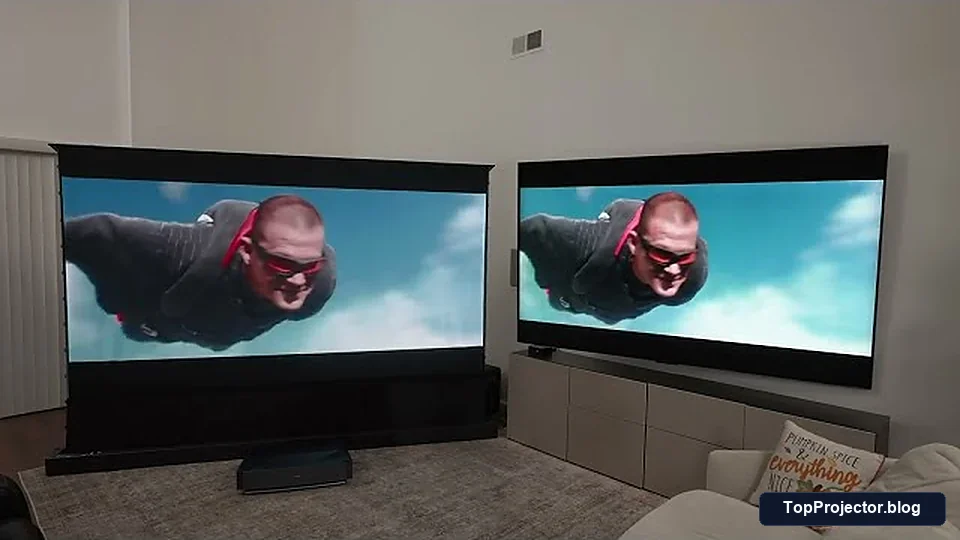
Flat displays generate their own internal illumination, cutting right through daytime glare. Projectors rely on reflected light, making stray photons your absolute worst enemy for contrast.
Managing ambient light is vital for projection setups. Read our guide on projector daytime performance to see how ALR screens salvage contrast in bright rooms.
- Flat panels maintain high contrast in sunlit rooms.
- Standard projectors wash out without blackout curtains.
- ALR screens salvage daytime projection performance.
Living Rooms with Uncontrolled Windows
A 100-inch television shrugs off ambient sunlight thanks to aggressive surface polarizers and extreme native luminance outputs. Your daytime sports viewing remains crisp, saturated, and highly visible.
Traditional long-throw projectors completely suffer under high-lumen room conditions unless paired with expensive ceiling-rejecting material. Even ultra-short throw models need specialized micro-structured screens to combat overhead glare.
- TVs overcome high ambient lux levels easily.
- Projectors require dark-room controls or specialized optics.
Dedicated Dark Rooms and Controlled Basements
Once you control ambient light, the optical equation shifts dramatically toward large-format projection. Dark sanctuaries eliminate light bounce, letting high-end optical engines shine without interference.
Flat panels can actually become fatiguing to watch in pitch-black environments due to excessive localized panel brightness. Projectors deliver a more relaxed, film-like optical presentation.
- Dark rooms level the optical playing field.
- Projectors excel in light-controlled basements.
Black Floors, Native Contrast Ratios, and Shadow Detail
Achieving a true black floor dictates how three-dimensional and realistic your dark-scene movie moments appear. Light leakage from backlights or optical engines ruins moody cinematic atmosphere.
Display technology handles black levels through vastly different physical mechanisms. Panel-level dimming contrasts sharply with lamp or laser light modulation in projection units.
Understanding native contrast prevents disappointment when watching cinematic thrillers in low-light environments with demanding shadow detail requirements.
- OLED and Mini-LED panels deliver infinite or near-zero blacks.
- Projectors struggle with ambient light bouncing in white rooms.
- Dynamic iris systems help laser projectors improve contrast.
OLED and Mini-LED Panel Technology
A 100-inch flat panel utilizing local dimming zones or self-emissive pixels achieves inky, abyssal black levels. Shadow detail remains pristine because dark pixels emit zero photons.
Blooming can occasionally occur around bright objects on local dimming LCDs, but overall contrast punch far exceeds standard projection capabilities in mixed-light rooms.
- Pixel-level control eliminates backlight bleed.
- High native contrast enhances HDR grading.
DLP, 3LCD, and LCoS Projector Black Floors
Projectors cannot make light disappear entirely because their light source stays active. Even with closed shutters or laser dimming, room reflection bounces light back onto the screen.
LCoS technology offers the deepest black floors in projection, while single-chip DLP units rely on fast color wheels. Neither matches a direct-view panel in bright rooms.
- LCoS delivers superior projector black levels.
- Room reflections compromise projected contrast.
Peak Brightness, Spectral Uniformity, and HDR Dynamics
High Dynamic Range content demands immense peak luminance to render specular highlights like exploding suns or flashing neon signs accurately. Nits and lumens measure this power differently.
Flat panels measure brightness in direct nits, often exceeding 1,000 to 2,000 nits on premium models. Projectors measure ANSI lumens, which must spread across a massive surface area.
Scaling an image up dilutes photon concentration significantly across every square inch of your projection screen surface.
- Flat panels excel at high-nit HDR rendering.
- Projectors require high ANSI lumens for large spreads.
- Screen gain alters perceived image brightness.
Specular Highlights on Direct-View Panels
Direct-view screens deliver searing peak brightness directly to your retinas. This high-nit capability makes HDR grading pop with incredible realism even during daytime viewing.
Panel uniformity is strictly controlled during factory manufacturing, ensuring edge-to-edge brightness without hot-spotting or noticeable light falloff.
- High nit counts ensure impactful HDR highlights.
- Factory calibration guarantees uniform illumination.
Projected ANSI Lumens and Screen Gain Physics
A high-output laser projector pushing 3,000 ANSI lumens still yields lower effective nits on a 100-inch screen than a standard TV. Physics dictates that reflected light loses energy.
Proper placement maximizes your optical throw ratio. Use our screen size and viewing distance calculator to map out your exact seating layout.
- Reflected light inherently reduces peak nits.
- Screen gain trades viewing angles for brightness.
Screen Geometry, Viewing Distances, and Cinematic Immersion
True cinematic immersion depends heavily on your visual field coverage. Sitting closer to a massive image triggers peripheral engagement that traditional smaller displays simply miss.
Fixed-size flat panels lock you into a rigid physical dimension once mounted on your wall. Projectors offer incredible sizing flexibility by simply moving the chassis.
Calculate your seating distance carefully to prevent seeing individual pixels while maximizing your immersive cinematic field of view.
- Projectors scale seamlessly beyond 100 inches.
- Flat TVs are permanently locked to their physical diagonal.
- Wider field of view increases emotional engagement.
The 100-Inch Fixed Boundary Limit
A 100-inch television provides a phenomenal viewing window for standard living room layouts. However, upgrading your size later requires buying an entirely new display unit.
Transporting and maneuvering rigid glass panels of this magnitude through doorways requires professional installation crews and careful structural wall reinforcement.
- Rigid size offers no upgrade path.
- Heavy glass requires professional mounting.
Scaling Up to 120, 150 Inches, and Beyond
Projectors let you effortlessly expand your screen size from 100 inches up to 150 inches with a simple zoom adjustment or projector throw repositioning.
Choosing true 4K resolution ensures you get maximum clarity at scale. Explore our best 4k home cinema projector guide to find top-tier models for dedicated rooms.
- Easily scale image size without replacing hardware.
- Replicates true commercial movie theater scale.
Color Fidelity, Wide Gamut Coverage, and Calibration
Accurate color reproduction ensures skin tones look natural and artistic director intents remain intact. Both display types utilize advanced color filtering and laser illumination.
Wide color gamuts like DCI-P3 and Rec.2020 push modern displays to render vivid reds, deep greens, and subtle color gradients with startling precision.
Professional calibration unlocks the true potential of your display hardware, eliminating out-of-the-box color tinting issues.
- Laser light sources produce rich, saturated colors.
- Quantum dot technology enhances flat panel purity.
- Calibration ensures accurate DCI-P3 color tracking.
Laser Phosphor vs. RGB LED vs. Lamp Engines
Modern laser projectors utilize multi-laser or laser-phosphor engines to achieve wide color gamuts without fading over time. Traditional lamp projectors degrade quickly in color accuracy.
Triple-laser UST projectors offer stunning primary color saturation, though some units require careful alignment to prevent laser speckle artifacts on smooth screens.
- Laser engines offer long-lasting color stability.
- Triple-laser units deliver wide color gamuts.
Flat Panel Color Volume at High Brightness
If you want high-refresh gaming performance alongside color accuracy, check out the Benq TK700 review for detailed input lag and lumen metrics.
This high color volume makes HDR content look vibrant and lifelike across all lighting conditions, outperforming standard projection color stretching.
- Quantum dots maintain saturation at high nits.
- Vibrant color volume enhances HDR realism.
Input Lag, Refresh Rates, and Competitive Gaming
Modern gaming demands lightning-fast input response times and high refresh rates to ensure fluid motion handling. Frame tearing or controller lag ruins competitive gaming.
Display technology manufacturers prioritize gaming features like ALLM and VRR heavily in current flat panel lineups. Projectors are rapidly catching up with dedicated low-latency modes.
Evaluating your gaming habits helps determine whether response times or sheer screen size matters more for your play style.
- Flat panels offer ultra-low sub-10ms input lag.
- High refresh rates up to 144Hz support fast twitch games.
- Projectors increasingly feature dedicated gaming modes.
High Refresh Rate Displays and VRR Support
A 100-inch television typically includes HDMI 2.1 ports supporting 4K at 120Hz, variable refresh rates, and instantaneous response times. Fast-paced shooters feel razor-sharp and responsive.
Motion handling on OLED panels is virtually instantaneous, eliminating ghosting and motion blur completely during high-speed camera pans.
- HDMI 2.1 ports enable 4K 120Hz gaming.
- Instantaneous pixel response prevents motion blur.
Ultra-Short Throw and Standard Throw Latency
Gaming on a 150-inch projected image provides an astonishingly immersive scale for role-playing games and racing simulators. Modern laser models achieve respectable input lag under 20 milliseconds.
While slightly behind top-tier OLED panels, modern projector gaming modes deliver more than adequate responsiveness for casual and immersive single-player titles.
- Massive projected scale enhances gaming immersion.
- Sub-20ms lag satisfies casual and story gamers.
Installation Mechanics, Thermal Management, and Room Acoustics
Physical installation requirements differ wildly between rigid heavy panels and versatile projection systems. Wall integrity and cooling fans deserve careful planning.
Heavy direct-view screens require sturdy stud anchoring and multiple people for safe setup. Projectors demand precise throw distance calculations and secure ceiling mounts.
Managing fan noise ensures your quiet movie dialogue remains undisturbed by cooling system hums during intense cinematic scenes.
- Flat panels demand heavy-duty wall structural support.
- Projectors require precise throw distance math.
- Fan noise management protects quiet movie scenes.
Wall Mounting and Structural Load Safety
Mounting a 100-inch television requires anchoring directly into reinforced wall studs with heavy steel brackets. Structural failure carries catastrophic financial and safety consequences.
Once secured, the TV sits flush against the wall with minimal room footprint, integrating cleanly into modern living room interior design aesthetics.
- Heavy brackets require professional stud anchoring.
- Flush wall profile saves valuable floor space.
Throw Ratios, Ceiling Mounts, and Fan Noise
Projector setups require exact throw ratio measurements to fill your screen edge-to-edge. Ceiling mounts or credenza placements must be aligned with optical lens shift controls.
High-output laser projectors feature active cooling fans that emit low-frequency hums. Selecting a quiet unit prevents audio distraction during quiet film passages.
- Precise throw ratios ensure perfect image geometry.
- Low decibel fan ratings protect audio immersion.
Frequently Asked Questions
Can a projector really replace a 100 inch TV in a brightly lit living room?
Projectors can replace TVs if you invest in specialized ambient light rejecting screens. However, a direct-view TV remains much easier to watch during daytime hours.
Which option is better for competitive console gaming and fast-paced action titles?
A 100-inch TV wins easily for competitive gaming due to sub-10ms input lag and 120Hz refresh rates. Modern projectors are improving quickly but still lag slightly behind.
Do projectors require more maintenance and bulb replacements than flat panel TVs?
Modern laser projectors eliminate traditional lamp replacements, lasting upwards of 20,000 hours. Both display types offer exceptional long-term reliability without requiring constant upkeep.
How does the total cost of ownership compare between these two large displays?
While 100-inch TVs have become more affordable, massive flat panels remain expensive to ship and mount. Projectors offer cheaper per-inch scaling once you exceed 120 inches.
Which display type delivers better cinematic immersion for watching movies at night?
Projectors provide unmatched cinematic immersion by replicating true commercial theater scale. Their massive field of view creates an emotional connection flat TVs cannot match.