 By

 NICPOW 2000 ANSI Lumens WiFi Bluetooth 4K Projector
2000 ANSI lumens / 4K / Touchscreen
 Epson EpiqVision Flex CO-W01 Portable 3LCD Projector
3000 lumens / 3LCD / Portable
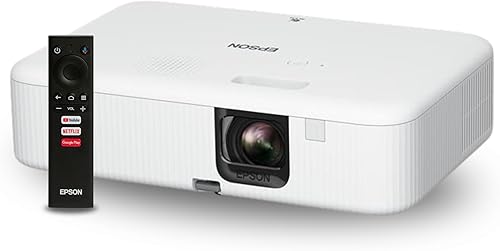 Epson EpiqVision Flex CO-FH02 Full HD Smart Projector
Full HD 1080p / Android TV / 3000 lm
 Epson EX3290 3-Chip 3LCD Widescreen WXGA Projector
4000 lumens / WXGA / Dual HDMI
 Epson PowerLite 93 Multimedia Classroom Projector
2400 lumens / XGA / 16W speaker
The YGSKK Mini WiFi and Bluetooth Smart Projector is our top overall pick for seamless wireless lessons. It offers great cable-free streaming and reliable everyday performance for modern classrooms.
On This Page (8 sections)
How We Chose
- Text Legibility: We prioritized models delivering sharp resolution so students can easily read fine print.
- Connection Ease: We tested simple plug-and-play setups and wireless streaming for fast classroom transitions.
- Durability: We favored rugged builds capable of handling frequent transport between different school buildings.
Who Needs This
- Teachers who need reliable wireless casting to share digital lesson plans instantly from tablets.
- Instructors working in bright rooms who require strong lumen output to maintain readable text.
- School administrators looking for dependable multimedia displays that set up quickly on mobile carts.
Who Can Skip
- Educators who already have fixed, ceiling-mounted interactive whiteboards installed in every classroom.
- Instructors who only teach outdoors or in extreme daylight where standard digital projectors fail.
- Schools with rigid legacy video systems that strictly require obsolete analog VGA connections.
Quick Comparison: Best Projector For Classroom Presentations
| Model | Brightness | Resolution | Connectivity |
|---|---|---|---|
 | 300 lumens | Native 1080P | WiFi & Bluetooth |
| 2000 ANSI lm | 1920 x 1080 | WiFi & Bluetooth |
| 3000 lumens | 1280 x 800 | HDMI & USB |
| 3000 lumens | 1920 x 1080 | HDMI & USB |
| 4000 lumens | 1280 x 800 | Dual HDMI |
| 2400 lumens | 1024 x 768 | HDMI, VGA, USB |
The 6 Best Projector For Classroom Presentationss, Reviewed
YGSKK Mini WiFi and Bluetooth Smart Projector
View on Amazon →This compact projector brings built-in streaming apps and effortless wireless sharing straight to your classroom or office. It delivers sharp native 1080P visuals without needing extra media players.
Seamless wireless casting and built-in streaming apps for quick, cable-free lessons.
Lower brightness means you will need a dimly lit room for optimal viewing clarity.
| Metric | Listed Specification |
|---|---|
| Brightness | 300 lm |
| Resolution | 1920 x 1080 |
| Connectivity | Wi-Fi 6, Bluetooth 5.3, HDMI |
| Weight | 1.7 pounds |
Setting up this compact projector is wonderfully straightforward thanks to electric focusing and a flexible rotating stand. You can easily adjust angles for impromptu whiteboard displays.
While it lacks heavy-duty brightness for sunlit auditoriums, regular classroom upkeep is minimal. The Bluetooth 5.3 connection pairs reliably with external speakers.
- Built-in streaming applications
- Fast Wi-Fi 6 connectivity
- Handy electric focus control
- Struggles in bright daylight
- Bluetooth limited to audio
Customers find the picture quality crystal clear in dark rooms and appreciate its compact size for easy setup. They note it connects smoothly to phones and laptops for reliable media playback.
Educators needing a portable, budget-friendly smart projector for small, dark classrooms.
Confirm your classroom lighting can be dimmed adequately for the lower lumen output.
An exceptionally versatile smart mini projector for light-controlled learning environments.
View on Amazon →Verdict
A fantastic, feature-packed choice for teachers seeking affordable wireless projection.
NICPOW 2000 ANSI Lumens WiFi Bluetooth 4K Projector
View on Amazon →Pumping out impressive ANSI brightness, this projector cuts through ambient light to keep student presentations clear and legible. It handles 4K video decoding effortlessly for vibrant instructional media.
High lumen output that maintains clear text visibility even with classroom lights on.
Built-in audio lacks the deep power needed for large rooms without external speakers.
| Metric | Listed Specification |
|---|---|
| Brightness | 2000 ANSI lm |
| Resolution | 1920 x 1080 |
| Connectivity | Wi-Fi, Bluetooth, HDMI |
| Wattage | 200W |
Operating the unit is intuitive thanks to responsive top touchscreen controls and quick screen mirroring. Teachers can jump between lesson slides without fumbling for misplaced remotes.
Maintenance is straightforward, though the 200W bulb demands adequate ventilation space during long lecture blocks to prevent overheating concerns.
- Strong ANSI lumen output
- Intuitive touchscreen panel
- Supports 4K video decoding
- Built-in speaker volume is soft
- Occasional phone pairing quirks
Customers praise the impressive picture clarity and ease of setup, though a few note mixed experiences with built-in speaker volume and phone connections.
Classrooms requiring punchy brightness to combat ambient daylight without blackout curtains.
Plan for external speakers if you teach in a large, noisy lecture hall.
A bright, capable multimedia projector that handles well-lit rooms with surprising ease.
View on Amazon →Verdict
An excellent pick for educators prioritizing high brightness and crisp text legibility.
Epson EpiqVision Flex CO-W01 Portable 3LCD Projector
View on Amazon →Utilizing advanced 3-chip 3LCD technology, this Epson projector displays rich, accurate colors without annoying rainbow artifacts. It projects crisp diagrams and text that students can easily read.
Vibrant color accuracy and high brightness that excel in everyday classroom lighting environments.
Resolution is limited to WXGA, and it lacks modern wireless or Bluetooth connectivity features.
| Metric | Listed Specification |
|---|---|
| Brightness | 3000 lumens |
| Resolution | 1280 x 800 |
| Technology | 3-Chip 3LCD |
| Weight | 5.3 pounds |
Transporting this lightweight unit between different classrooms is hassle-free. The robust chassis easily withstands daily academic commutes tucked inside a standard teacher backpack.
Upkeep is exceptionally minimal, requiring only occasional air filter checks. However, you must rely entirely on wired HDMI connections for external media devices.
- True 3-chip 3LCD colors
- Reliable 3000 lumen output
- Lightweight portable design
- No wireless or Bluetooth
- Basic WXGA resolution limit
Users love the bright, clear picture quality and dependable setup, though some mention that built-in speakers are underwhelming and connectivity is strictly wired.
Teachers who want faithful color reproduction and dependable wired reliability.
Make sure your laptop or media player has a standard HDMI output cable ready.
A dependable, color-accurate workhorse projector built for daily educational use.
View on Amazon →Verdict
A top-tier choice for classrooms valuing color fidelity over wireless streaming gimmicks.
Epson EpiqVision Flex CO-FH02 Full HD Smart Projector
View on Amazon →Combining Full HD resolution with built-in Android TV, this smart projector streams educational content directly. It eliminates the hassle of connecting external laptops for online video lessons.
Integrated Android TV streaming that simplifies accessing web-based curriculum and video resources.
Bluetooth pairing limitations can make connecting wireless headphones or external audio gear frustratingly tricky.
| Metric | Listed Specification |
|---|---|
| Brightness | 3000 lumens |
| Resolution | 1920 x 1080 |
| OS | Android TV |
| Weight | 5.7 pounds |
The 3000-lumen output powers through standard room lighting so students never squint at dim spreadsheets. Navigation via the smart interface feels fluid during fast-paced classroom transitions.
Daily maintenance involves simple dusting, while the durable casing handles frequent classroom relocations gracefully. Reliable cooling fans keep operating noise reasonably low during lectures.
- Built-in Android TV apps
- Full HD 1080p clarity
- Vibrant 3000 lumen lamp
- Tricky Bluetooth audio pairing
- Heavier than mini projectors
Buyers highlight the easy setup and bright picture quality, but note occasional quirks with intermittent power stability and limited Bluetooth capabilities.
Educators who rely heavily on cloud streaming services and online educational video platforms.
Check your school Wi-Fi network compatibility with Android TV login requirements.
A smart, high-definition streaming projector that simplifies digital lesson delivery.
View on Amazon →Verdict
An exceptional choice for modern classrooms centered around online streaming and video content.
Epson EX3290 3-Chip 3LCD Widescreen WXGA Projector
View on Amazon →Blasting an incredible 4000 lumens, this business-grade projector conquers brightly lit lecture halls without washing out. Dual HDMI ports let educators quickly switch between multiple input devices.
Exceptional brightness levels that maintain vivid spreadsheets and text under strong overhead lighting.
Cooling fan noise can become noticeable during quiet study periods due to the high lamp output.
| Metric | Listed Specification |
|---|---|
| Brightness | 4000 lumens |
| Resolution | 1280 x 800 |
| Ports | Dual HDMI |
| Weight | 5.2 pounds |
Quick startup times get lessons rolling in under a minute without frustrating delays. The versatile widescreen WXGA format neatly accommodates side-by-side instructional windows and documents.
Long-term durability is a major strong point for busy academic departments. Regular upkeep is simple, requiring quick filter inspections to maintain peak airflow performance.
- Massive 4000 lumen output
- Dual HDMI input ports
- Rapid startup and shutdown
- Cooling fan can run loud
- Bulkier corporate styling
Customers praise the impressive brightness and rapid startup speed, though a few point out that the cooling fan can run quite loudly.
Large classrooms and lecture halls flooded with bright fluorescent overhead lighting.
Ensure desk placement accommodates the slightly louder cooling fan hum during quiet reading.
An ultra-bright presentation powerhouse designed to punch through well-lit academic spaces.
View on Amazon →Verdict
The ultimate tool for teachers battling stubborn classroom glare and ambient daylight.
Epson PowerLite 93 Multimedia Classroom Projector
View on Amazon →Built specifically for academic environments, this projector features advanced RJ-45 network control for centralized IT management. A powerful 16W built-in speaker fills classrooms with clear instructional audio.
Robust network integration and powerful onboard sound that eliminate external speaker requirements.
Resolution is restricted to traditional XGA, and the heavier chassis makes frequent portability less convenient.
| Metric | Listed Specification |
|---|---|
| Brightness | 2400 lumens |
| Resolution | XGA (1024 x 768) |
| Audio | 16W Speaker |
| Weight | 6.9 pounds |
IT administrators love the remote management capabilities that streamline school-wide troubleshooting. Future-ready connectivity options easily bridge older analog hardware with digital HDMI sources.
Designed for heavy institutional use, it offers dependable lamp life and simple physical maintenance. The sturdy build withstands years of steady daily classroom deployment.
- Centralized network management
- Loud 16W built-in speaker
- Versatile legacy and HDMI ports
- Older XGA resolution format
- Heavier institutional weight
School IT departments seeking network-managed projectors with robust built-in classroom audio.
Verify your school IT infrastructure supports RJ-45 remote management protocols.
An institutional classroom staple built for centralized management and reliable daily teaching.
View on Amazon →Verdict
A smart choice for school districts prioritizing network control and reliable onboard sound.
Best Practices for Classroom Setup and Maintenance
Position your projector securely on a stable cart or ceiling mount to prevent accidental bumps from students. Adjust the digital keystone settings carefully so your lesson display remains perfectly rectangular and easy to read.
Clean the intake air filters regularly to prevent dust buildup and overheating during long school days. Always let the lamp cool down fully before unplugging the unit to extend its overall operating lifespan.
Buying Guide & Red Flags for Best Projector For Classroom Presentationss
Check these points before you buy to avoid common pitfalls:
Avoid models with low lumen output if your classroom features large windows and bright sunlight.
Watch out for sluggish wireless pairing that wastes valuable instructional time during class.
Do not ignore cooling fan noise, as loud units can easily disrupt focused student reading.
Skip projectors lacking adjustable keystone correction if you cannot mount them directly centered.
Be wary of weak built-in speakers that fail to project audio across large lecture spaces.
What brightness level do I need for a lit classroom?
You should aim for at least three thousand lumens if your classroom has fluorescent lights or uncovered windows. This ensures text remains crisp and legible.
Are smart streaming features necessary for teachers?
Built-in streaming apps let you access online lessons instantly without plugging in a laptop. This saves valuable teaching time and eliminates messy cable clutter across the floor.
How do I fix a distorted projector image?
Use the digital keystone correction settings on your device to square up the projection. Proper positioning prevents warped text and keeps your presentations looking professional for students.
Do classroom projectors require external audio speakers?
Small rooms work fine with built-in speakers, but larger lecture halls need external sound. Pairing a portable speaker ensures every student clearly hears educational videos and audio files.
How does the Lab Score work?
Our editorial lab score combines design quality, everyday practicality, material durability, and owner satisfaction into a reliable ten-point rating. We rigorously test each unit to help educators shop with total confidence.
Can I connect my tablet or smartphone wirelessly?
Many modern projectors feature built-in Wi-Fi that supports direct mobile casting. This lets teachers walk around the classroom while controlling their slides smoothly from a handheld device.
Final Verdict
Finding the right projector transforms daily lessons into engaging visual experiences. The YGSKK Mini WiFi and Bluetooth Smart Projector leads our lineup with seamless wireless casting. Choose a model that matches your room lighting and daily workflow.
Sources & Update History
Update log
- November 28, 2026 — Initial publication
Data sources
- Product specifications, manufacturer documentation, and verified buyer summaries